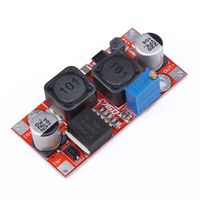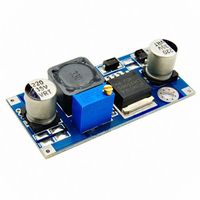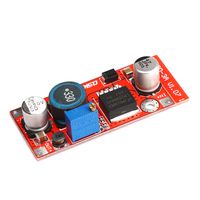
Description
Product Features
Parameters:
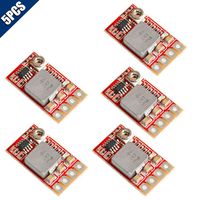
Input Voltage: DC 4-38V, error ±0.1V
Output Voltage: DC 1.25V to 35V
Output Current: 5A(MAX) It is recommended to use under 4.5A (NOTE: When using high power, add a heat sink to the power supply chip)
Size: 6.6x3.9x1.8CM
Weight: 22g
Fuction:
Built in over-temperature protection function
Built in current limit function
Built in output short-circuit protection function
How to use
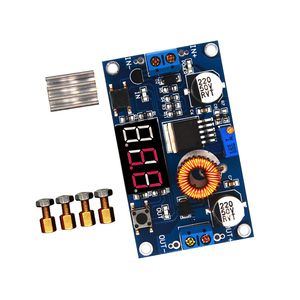
1.Press the left button so that "in" LED lighted, the voltmeter shows the value of input voltage
2.Press the right button so that "out" LED lighted, the voltmeter shows the value of output voltage
3.Rotate the top screw of potentiometer clockwise to boost the value of the output voltage, anti clockwise to reduce it.
How to adjust accuracy of input/output voltage
(for the person who need a highly accurate value of number)
1.When the voltmeter shows output voltage, long press the right button for 2 seconds, then release, voltmeter and "out" LED flash in synchronization entering into the output voltage calibration mode.
2.Press the right button, the voltage value rises a unit; Press the left button, minus a unit ( Due to a unit is less than 0.1V, so you have to continuously press 1 to 5 times to see the voltmeter change 0.1V)
3.Press the right button for more than 2 seconds and then release to exit the output voltage calibration mode. All parameters will be saved automatically.
Parameters:
Input Voltage: DC 4-38V, error ±0.1V
Output Voltage: DC 1.25V to 35V
Output Current: 5A(MAX) It is recommended to use under 4.5A (NOTE: When using high power, add a heat sink to the power supply chip)
Size: 6.6x3.9x1.8CM
Weight: 22g
Fuction:
Built in over-temperature protection function
Built in current limit function
Built in output short-circuit protection function
How to use
1.Press the left button so that "in" LED lighted, the voltmeter shows the value of input voltage
2.Press the right button so that "out" LED lighted, the voltmeter shows the value of output voltage
3.Rotate the top screw of potentiometer clockwise to boost the value of the output voltage, anti clockwise to reduce it.
How to adjust accuracy of input/output voltage
(for the person who need a highly accurate value of number)
1.When the voltmeter shows output voltage, long press the right button for 2 seconds, then release, voltmeter and "out" LED flash in synchronization entering into the output voltage calibration mode.
2.Press the right button, the voltage value rises a unit; Press the left button, minus a unit ( Due to a unit is less than 0.1V, so you have to continuously press 1 to 5 times to see the voltmeter change 0.1V)
3.Press the right button for more than 2 seconds and then release to exit the output voltage calibration mode. All parameters will be saved automatically.
Buck Converter DC to DC 5A 75W Input 4-38V Output 1.25-36V Step-Down Regulator Power Module 36V 24V 12V to 5V 2A Voltage ([1-Pack] Buck with Led)
Current Price
$9.99
Average
$7.61
Min Price
$5.99
Max Price
$9.99
Price dynamics
24%
Description
Product Features
Parameters:
Input Voltage: DC 4-38V, error ±0.1V
Output Voltage: DC 1.25V to 35V
Output Current: 5A(MAX) It is recommended to use under 4.5A (NOTE: When using high power, add a heat sink to the power supply chip)
Size: 6.6x3.9x1.8CM
Weight: 22g
Fuction:
Built in over-temperature protection function
Built in current limit function
Built in output short-circuit protection function
How to use
1.Press the left button so that "in" LED lighted, the voltmeter shows the value of input voltage
2.Press the right button so that "out" LED lighted, the voltmeter shows the value of output voltage
3.Rotate the top screw of potentiometer clockwise to boost the value of the output voltage, anti clockwise to reduce it.
How to adjust accuracy of input/output voltage
(for the person who need a highly accurate value of number)
1.When the voltmeter shows output voltage, long press the right button for 2 seconds, then release, voltmeter and "out" LED flash in synchronization entering into the output voltage calibration mode.
2.Press the right button, the voltage value rises a unit; Press the left button, minus a unit ( Due to a unit is less than 0.1V, so you have to continuously press 1 to 5 times to see the voltmeter change 0.1V)
3.Press the right button for more than 2 seconds and then release to exit the output voltage calibration mode. All parameters will be saved automatically.
Parameters:
Input Voltage: DC 4-38V, error ±0.1V
Output Voltage: DC 1.25V to 35V
Output Current: 5A(MAX) It is recommended to use under 4.5A (NOTE: When using high power, add a heat sink to the power supply chip)
Size: 6.6x3.9x1.8CM
Weight: 22g
Fuction:
Built in over-temperature protection function
Built in current limit function
Built in output short-circuit protection function
How to use
1.Press the left button so that "in" LED lighted, the voltmeter shows the value of input voltage
2.Press the right button so that "out" LED lighted, the voltmeter shows the value of output voltage
3.Rotate the top screw of potentiometer clockwise to boost the value of the output voltage, anti clockwise to reduce it.
How to adjust accuracy of input/output voltage
(for the person who need a highly accurate value of number)
1.When the voltmeter shows output voltage, long press the right button for 2 seconds, then release, voltmeter and "out" LED flash in synchronization entering into the output voltage calibration mode.
2.Press the right button, the voltage value rises a unit; Press the left button, minus a unit ( Due to a unit is less than 0.1V, so you have to continuously press 1 to 5 times to see the voltmeter change 0.1V)
3.Press the right button for more than 2 seconds and then release to exit the output voltage calibration mode. All parameters will be saved automatically.
Price will be lower
in next 2 weeks
in next 2 weeks
According to the data, price will be lower in next two weeks, so not waste your money and track better price!