- HomeIndustrial & ScientificIndustrial ElectricalSemiconductor ProductsInterfacesPrototyping Boards & Accessories
Description
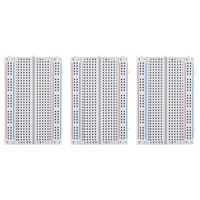
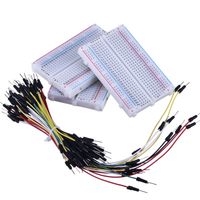
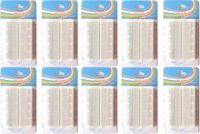
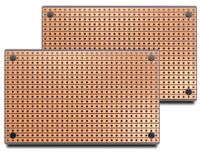
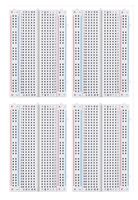
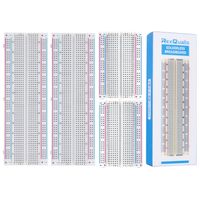
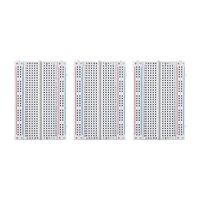
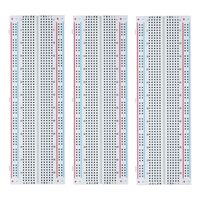
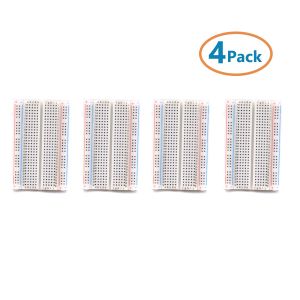
400 point breadboard 8.5CM × 5.5CM can be combined and stitched.
Voltage: 300V
Current:3-5A
Accepts wire diameters of 20-29AWG
Good kits for Arduino breadboard kit proto shield and DIY projects
With tight plug-in contacts, the components will sit well after assembly and nothing will wobble. The jumper wires are easy to insert into the breadboard.
400 tie point Solderless Breadboard
Size: 82mm X 55mm X 8.5mm
Accepts wire diameters of 20-29AWG
Voltage/Current: 300V/3-5A
How to use:
1. It is easy to use for soldering and manual routing, inserting components into holes to test circuits and components.
2. The conductive metal strip on the back of the breadboard is connected to a plurality of metal sockets, and the metal socket corresponds to the small hole in the front, so be careful when using the breadboard. When inserting the component feet into the hole, the component feet must be inserted into the bottom (you need to use tweezers. Especially when inserting the integrated block into the breadboard, it is easy to loosen. In this case, the pins will loosen. The two rows integrate these blocks. Can be close to each other. Press down to firmly insert into the hole.
3. In addition, the test points and ground terminals in the circuit are preferably taken out for measurement. Otherwise, the instrument's probe is directly connected to the component pins, which may cause the component pins to become loose.
Voltage: 300V
Current:3-5A
Accepts wire diameters of 20-29AWG
Good kits for Arduino breadboard kit proto shield and DIY projects
With tight plug-in contacts, the components will sit well after assembly and nothing will wobble. The jumper wires are easy to insert into the breadboard.
400 tie point Solderless Breadboard
Size: 82mm X 55mm X 8.5mm
Accepts wire diameters of 20-29AWG
Voltage/Current: 300V/3-5A
How to use:
1. It is easy to use for soldering and manual routing, inserting components into holes to test circuits and components.
2. The conductive metal strip on the back of the breadboard is connected to a plurality of metal sockets, and the metal socket corresponds to the small hole in the front, so be careful when using the breadboard. When inserting the component feet into the hole, the component feet must be inserted into the bottom (you need to use tweezers. Especially when inserting the integrated block into the breadboard, it is easy to loosen. In this case, the pins will loosen. The two rows integrate these blocks. Can be close to each other. Press down to firmly insert into the hole.
3. In addition, the test points and ground terminals in the circuit are preferably taken out for measurement. Otherwise, the instrument's probe is directly connected to the component pins, which may cause the component pins to become loose.
CenryKay 400 tie Point Experiment Mini Breadboard ,4 Power Rails Compatible for Arduino Jumper Wire(4pcs)
Current Price
$8.99
Average
$8.99
Min Price
$8.98
Max Price
$8.99
Price dynamics
0%
Description
400 point breadboard 8.5CM × 5.5CM can be combined and stitched.
Voltage: 300V
Current:3-5A
Accepts wire diameters of 20-29AWG
Good kits for Arduino breadboard kit proto shield and DIY projects
With tight plug-in contacts, the components will sit well after assembly and nothing will wobble. The jumper wires are easy to insert into the breadboard.
400 tie point Solderless Breadboard
Size: 82mm X 55mm X 8.5mm
Accepts wire diameters of 20-29AWG
Voltage/Current: 300V/3-5A
How to use:
1. It is easy to use for soldering and manual routing, inserting components into holes to test circuits and components.
2. The conductive metal strip on the back of the breadboard is connected to a plurality of metal sockets, and the metal socket corresponds to the small hole in the front, so be careful when using the breadboard. When inserting the component feet into the hole, the component feet must be inserted into the bottom (you need to use tweezers. Especially when inserting the integrated block into the breadboard, it is easy to loosen. In this case, the pins will loosen. The two rows integrate these blocks. Can be close to each other. Press down to firmly insert into the hole.
3. In addition, the test points and ground terminals in the circuit are preferably taken out for measurement. Otherwise, the instrument's probe is directly connected to the component pins, which may cause the component pins to become loose.
Voltage: 300V
Current:3-5A
Accepts wire diameters of 20-29AWG
Good kits for Arduino breadboard kit proto shield and DIY projects
With tight plug-in contacts, the components will sit well after assembly and nothing will wobble. The jumper wires are easy to insert into the breadboard.
400 tie point Solderless Breadboard
Size: 82mm X 55mm X 8.5mm
Accepts wire diameters of 20-29AWG
Voltage/Current: 300V/3-5A
How to use:
1. It is easy to use for soldering and manual routing, inserting components into holes to test circuits and components.
2. The conductive metal strip on the back of the breadboard is connected to a plurality of metal sockets, and the metal socket corresponds to the small hole in the front, so be careful when using the breadboard. When inserting the component feet into the hole, the component feet must be inserted into the bottom (you need to use tweezers. Especially when inserting the integrated block into the breadboard, it is easy to loosen. In this case, the pins will loosen. The two rows integrate these blocks. Can be close to each other. Press down to firmly insert into the hole.
3. In addition, the test points and ground terminals in the circuit are preferably taken out for measurement. Otherwise, the instrument's probe is directly connected to the component pins, which may cause the component pins to become loose.
Price will be lower
in next 2 weeks
in next 2 weeks
According to the data, price will be lower in next two weeks, so not waste your money and track better price!
Similar products