Description
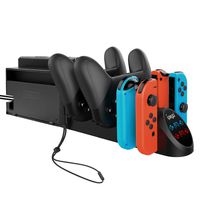
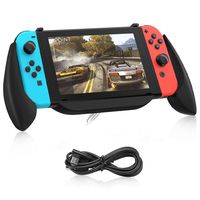
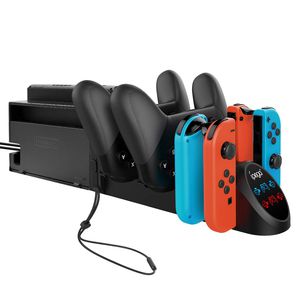
Product Features: 1.This charger is matched with the original Nintendo Switch Dock, used for charging the Joy-con & Pro controller. 2.It is available to charge 4 Joy-con and 2 pro controller at the same time. 3.With USB 2.0 male plug, support power input from original Nintendo switch dock. 4.Extended USB 2. 0 socket support communication function; Extended Joy con wrist strap socket make it easy to store. 5.With ingenious and compact designed, colorful indicator icons indicate current charging status, easy to operate. Characteristic Parameter: 1. Input Voltage/Current DC5V/2.0A 2.Charging time for Joy con: Approximately 3 hours 3. Charging time for Pro Approximately 4.5 hours Usage Instruction: 1 Connect the charge to the original Nintendo switch Dock to get power input. 2 After power on, the logo icon is always on in white, the gamepad indicator icons are blue. 3 Plug in the Joycon or Pro controller for charging. The corresponding indicator icon turn red, and they will turn blue after fully charged. 4 Extend two USB 2.0 port, support communication, Extend two joy-con wrist strap socket, make it easy to store. Package Contents: Charging dock x1 User Manual x1
Charger Dock for Nintendo Switch Joy-con and Pro Controller, Charging Station Replacement Accessories for Nintendo Switch Controller
Price is below average
Current Price
$17.99
Average
$20.56
Min Price
$17.99
Max Price
$21.99
Price dynamics
12%
Description
Product Features: 1.This charger is matched with the original Nintendo Switch Dock, used for charging the Joy-con & Pro controller. 2.It is available to charge 4 Joy-con and 2 pro controller at the same time. 3.With USB 2.0 male plug, support power input from original Nintendo switch dock. 4.Extended USB 2. 0 socket support communication function; Extended Joy con wrist strap socket make it easy to store. 5.With ingenious and compact designed, colorful indicator icons indicate current charging status, easy to operate. Characteristic Parameter: 1. Input Voltage/Current DC5V/2.0A 2.Charging time for Joy con: Approximately 3 hours 3. Charging time for Pro Approximately 4.5 hours Usage Instruction: 1 Connect the charge to the original Nintendo switch Dock to get power input. 2 After power on, the logo icon is always on in white, the gamepad indicator icons are blue. 3 Plug in the Joycon or Pro controller for charging. The corresponding indicator icon turn red, and they will turn blue after fully charged. 4 Extend two USB 2.0 port, support communication, Extend two joy-con wrist strap socket, make it easy to store. Package Contents: Charging dock x1 User Manual x1
Price will be lower
in next 2 weeks
in next 2 weeks
According to the data, price will be lower in next two weeks, so not waste your money and track better price!
Similar products