Description
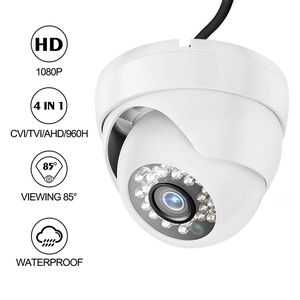
This Dericam 1080P 4-in-1 dome camera is designed for your home and business security needs of indoor or outdoor. It is easy DIY installation and can be plug and play for the NTSC mode security DVR system. This standalone camera does not come with the DVR, Power Supply and Coaxial Video Cables are required and sold separately.
Operation Mode(HDCVI is default):
The sticker on the cable will show you how to switch among different video mode.
Mounting:
-Locate the position in the place you desire to place the camera and apply the included mounting sticker to the surface.
-Using a drill bit of same diameter or slightly smaller than the included drywall mounting sleeves (Included together in the bag of screws). Drill out the smaller circles on the sticker and insert the sleeves.
-Hold the camera unscrew the camera base plate by turning it counterclockwise until it separates from the camera.
-Leave the cable to the unit still threaded through the baseplate match the holes in the baseplate to the holes in the drywall mounting sleeves and seat the included screws.
-Pull the excess cabling through the cable routing channel and seat the camera back on the baseplate by turning it clockwise. And you can direct the cameras framing to your liking. Compress the camera "eye" to the baseplate will help secure the camera while keeping the desired field of view.
Features:
-Image Sensor: 1/2.7" 2MP CMOS Sensor, high resolution 1080P 4-in-1 HDCVI/HDTVI/AHD/960H.
-Signal System: NTSC.
-Lens: 3.6mm/Viewing Angle: 85°/Night Vision: 24 LEDs up to 82ft distance.
-IP Rating: IP66.
-Transmission distance: Reach more than 984ft/300m based on 75-3 coaxial cable.
- Power Supply: DC 12V.
-Working Temperature: 14℉~140℉/-10℃~60℃.
-Humidity: ≤90%rh (non-condensing).
Package Includes:
-1x 1080P Dome Camera.
-1x Specification.
-1x Installation Screw Package.
Operation Mode(HDCVI is default):
The sticker on the cable will show you how to switch among different video mode.
Mounting:
-Locate the position in the place you desire to place the camera and apply the included mounting sticker to the surface.
-Using a drill bit of same diameter or slightly smaller than the included drywall mounting sleeves (Included together in the bag of screws). Drill out the smaller circles on the sticker and insert the sleeves.
-Hold the camera unscrew the camera base plate by turning it counterclockwise until it separates from the camera.
-Leave the cable to the unit still threaded through the baseplate match the holes in the baseplate to the holes in the drywall mounting sleeves and seat the included screws.
-Pull the excess cabling through the cable routing channel and seat the camera back on the baseplate by turning it clockwise. And you can direct the cameras framing to your liking. Compress the camera "eye" to the baseplate will help secure the camera while keeping the desired field of view.
Features:
-Image Sensor: 1/2.7" 2MP CMOS Sensor, high resolution 1080P 4-in-1 HDCVI/HDTVI/AHD/960H.
-Signal System: NTSC.
-Lens: 3.6mm/Viewing Angle: 85°/Night Vision: 24 LEDs up to 82ft distance.
-IP Rating: IP66.
-Transmission distance: Reach more than 984ft/300m based on 75-3 coaxial cable.
- Power Supply: DC 12V.
-Working Temperature: 14℉~140℉/-10℃~60℃.
-Humidity: ≤90%rh (non-condensing).
Package Includes:
-1x 1080P Dome Camera.
-1x Specification.
-1x Installation Screw Package.
Dericam 1080P@30fps 1920TVL Full HD Dome Security Camera, HDCVI/HDTVI/AHD/960H 4-in-1 Surveillance Camera, IP66 Metal Housing, 24 LEDs/82ft Night Vision, 85°Viewing Angle, AC2MD2, White
Price is below average
Current Price
$21.99
Average
$22.52
Min Price
$19.99
Max Price
$24.99
Price dynamics
2%
Description
This Dericam 1080P 4-in-1 dome camera is designed for your home and business security needs of indoor or outdoor. It is easy DIY installation and can be plug and play for the NTSC mode security DVR system. This standalone camera does not come with the DVR, Power Supply and Coaxial Video Cables are required and sold separately.
Operation Mode(HDCVI is default):
The sticker on the cable will show you how to switch among different video mode.
Mounting:
-Locate the position in the place you desire to place the camera and apply the included mounting sticker to the surface.
-Using a drill bit of same diameter or slightly smaller than the included drywall mounting sleeves (Included together in the bag of screws). Drill out the smaller circles on the sticker and insert the sleeves.
-Hold the camera unscrew the camera base plate by turning it counterclockwise until it separates from the camera.
-Leave the cable to the unit still threaded through the baseplate match the holes in the baseplate to the holes in the drywall mounting sleeves and seat the included screws.
-Pull the excess cabling through the cable routing channel and seat the camera back on the baseplate by turning it clockwise. And you can direct the cameras framing to your liking. Compress the camera "eye" to the baseplate will help secure the camera while keeping the desired field of view.
Features:
-Image Sensor: 1/2.7" 2MP CMOS Sensor, high resolution 1080P 4-in-1 HDCVI/HDTVI/AHD/960H.
-Signal System: NTSC.
-Lens: 3.6mm/Viewing Angle: 85°/Night Vision: 24 LEDs up to 82ft distance.
-IP Rating: IP66.
-Transmission distance: Reach more than 984ft/300m based on 75-3 coaxial cable.
- Power Supply: DC 12V.
-Working Temperature: 14℉~140℉/-10℃~60℃.
-Humidity: ≤90%rh (non-condensing).
Package Includes:
-1x 1080P Dome Camera.
-1x Specification.
-1x Installation Screw Package.
Operation Mode(HDCVI is default):
The sticker on the cable will show you how to switch among different video mode.
Mounting:
-Locate the position in the place you desire to place the camera and apply the included mounting sticker to the surface.
-Using a drill bit of same diameter or slightly smaller than the included drywall mounting sleeves (Included together in the bag of screws). Drill out the smaller circles on the sticker and insert the sleeves.
-Hold the camera unscrew the camera base plate by turning it counterclockwise until it separates from the camera.
-Leave the cable to the unit still threaded through the baseplate match the holes in the baseplate to the holes in the drywall mounting sleeves and seat the included screws.
-Pull the excess cabling through the cable routing channel and seat the camera back on the baseplate by turning it clockwise. And you can direct the cameras framing to your liking. Compress the camera "eye" to the baseplate will help secure the camera while keeping the desired field of view.
Features:
-Image Sensor: 1/2.7" 2MP CMOS Sensor, high resolution 1080P 4-in-1 HDCVI/HDTVI/AHD/960H.
-Signal System: NTSC.
-Lens: 3.6mm/Viewing Angle: 85°/Night Vision: 24 LEDs up to 82ft distance.
-IP Rating: IP66.
-Transmission distance: Reach more than 984ft/300m based on 75-3 coaxial cable.
- Power Supply: DC 12V.
-Working Temperature: 14℉~140℉/-10℃~60℃.
-Humidity: ≤90%rh (non-condensing).
Package Includes:
-1x 1080P Dome Camera.
-1x Specification.
-1x Installation Screw Package.
Price will be lower
in next 2 weeks
in next 2 weeks
According to the data, price will be lower in next two weeks, so not waste your money and track better price!
Product review & video
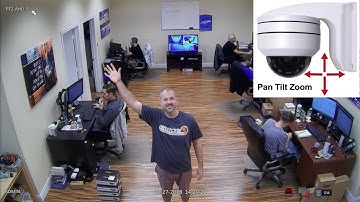
The PTZ-AHD-5 is a high definition pan tilt
zoom security camera. This PTZ camera can be ceiling or wall mounted
using the optional arm bracket. For this demo, the AHD-5 is connected to an
iDVR-PRO surveillance DVR. This is the live view on the DVR. The PTZ camera is connected to channel six. It is recording video at 1080p resolution. I switch to a the single camera view on the
DVR, then activate the PTZ control screen. On the PTZ screen, you can see that I have
10 PTZ presets configured. The first 8 presets are locations that the
camera can focus on. The last 2 presets are special cases and will
be covered later. I call each of the preset locations by clicking
on the arrow icon next to it. I am doing this via the USB mouse connected
to the DVR. You can see that each of the pre-set locations
use the camera’s mechanical pan, tilt, and zoom function. This room where the camera is installe


Similar products







































