Description
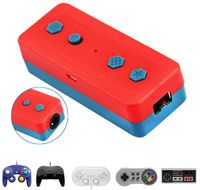
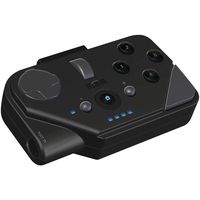
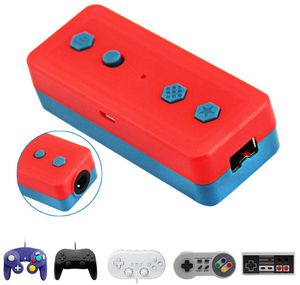
Connect any wired GameCube or classic edition controller to this adapter and you can wirelessly pair it to Nintendo Switch. Works up to 6-8 meters (18 to 22 feet)
Play your Switch with your original wired controllers like Gamecube, NES, SNES, SFC Classic Edition and Wii Classic.
Support multiple controllers with no lag: Has a built in toggle that allows you to connect to either your Nintendo Switch, or also X-input capable software on Windows 7, 8, or 10.
Turbo function (only compatible with Windows PC):
HOME button/screen function (only for Switch Console use)
Screen capture function: Press ☆ button to complete the screen capture, and do a long press to record video (only for Switch use)
Instructions:
Wireless Switch bluetooth connection mode:
Set the device to the "S" position, press HOME button for 1 second. The "start" light will flash slowly. Press the SYNC button for 2 seconds, the LED will flash, indicating paring status. Go to consoles controller settings - Change Grip/ Order Page, and wait for connection. After the connection is complete, the indicator LED is will remain on.
Wireless PC Windows Bluetooth mode:
Set the device to the"X" position. Press the HOME button for 1 second, the "start" light will flash slowly. Press the SYNC button for 2 seconds, the LED will flash, indicating paring status. Go to the bluetooth setting page and wait for the connection. After the connection is complete, the indicator LED will remain on. The default detection is x-input.
Wired Connection:
Use a microUSB data cable to connect the adapter to your Windows PC. The LED light will remain always on after connection complete. The default detection is x-input.
Please note: this adapter supports rumble, but only for the Gamecube controller. Classic controllers have no rumble. 2x AA batteries are required but NOT included.
Play your Switch with your original wired controllers like Gamecube, NES, SNES, SFC Classic Edition and Wii Classic.
Support multiple controllers with no lag: Has a built in toggle that allows you to connect to either your Nintendo Switch, or also X-input capable software on Windows 7, 8, or 10.
Turbo function (only compatible with Windows PC):
HOME button/screen function (only for Switch Console use)
Screen capture function: Press ☆ button to complete the screen capture, and do a long press to record video (only for Switch use)
Instructions:
Wireless Switch bluetooth connection mode:
Set the device to the "S" position, press HOME button for 1 second. The "start" light will flash slowly. Press the SYNC button for 2 seconds, the LED will flash, indicating paring status. Go to consoles controller settings - Change Grip/ Order Page, and wait for connection. After the connection is complete, the indicator LED is will remain on.
Wireless PC Windows Bluetooth mode:
Set the device to the"X" position. Press the HOME button for 1 second, the "start" light will flash slowly. Press the SYNC button for 2 seconds, the LED will flash, indicating paring status. Go to the bluetooth setting page and wait for the connection. After the connection is complete, the indicator LED will remain on. The default detection is x-input.
Wired Connection:
Use a microUSB data cable to connect the adapter to your Windows PC. The LED light will remain always on after connection complete. The default detection is x-input.
Please note: this adapter supports rumble, but only for the Gamecube controller. Classic controllers have no rumble. 2x AA batteries are required but NOT included.
Detroit Packing Co. Wireless Bluetooth Controller Adapter for Nintendo Switch & Windows PC, Works with Wired NGC Gamecube, NES SNES Wii Classic Controllers- Wired To Bluetooth Adapter
Price is below average
Current Price
$9.25
Average
$9.81
Min Price
$8.65
Max Price
$11.95
Price dynamics
6%
Description
Connect any wired GameCube or classic edition controller to this adapter and you can wirelessly pair it to Nintendo Switch. Works up to 6-8 meters (18 to 22 feet)
Play your Switch with your original wired controllers like Gamecube, NES, SNES, SFC Classic Edition and Wii Classic.
Support multiple controllers with no lag: Has a built in toggle that allows you to connect to either your Nintendo Switch, or also X-input capable software on Windows 7, 8, or 10.
Turbo function (only compatible with Windows PC):
HOME button/screen function (only for Switch Console use)
Screen capture function: Press ☆ button to complete the screen capture, and do a long press to record video (only for Switch use)
Instructions:
Wireless Switch bluetooth connection mode:
Set the device to the "S" position, press HOME button for 1 second. The "start" light will flash slowly. Press the SYNC button for 2 seconds, the LED will flash, indicating paring status. Go to consoles controller settings - Change Grip/ Order Page, and wait for connection. After the connection is complete, the indicator LED is will remain on.
Wireless PC Windows Bluetooth mode:
Set the device to the"X" position. Press the HOME button for 1 second, the "start" light will flash slowly. Press the SYNC button for 2 seconds, the LED will flash, indicating paring status. Go to the bluetooth setting page and wait for the connection. After the connection is complete, the indicator LED will remain on. The default detection is x-input.
Wired Connection:
Use a microUSB data cable to connect the adapter to your Windows PC. The LED light will remain always on after connection complete. The default detection is x-input.
Please note: this adapter supports rumble, but only for the Gamecube controller. Classic controllers have no rumble. 2x AA batteries are required but NOT included.
Play your Switch with your original wired controllers like Gamecube, NES, SNES, SFC Classic Edition and Wii Classic.
Support multiple controllers with no lag: Has a built in toggle that allows you to connect to either your Nintendo Switch, or also X-input capable software on Windows 7, 8, or 10.
Turbo function (only compatible with Windows PC):
HOME button/screen function (only for Switch Console use)
Screen capture function: Press ☆ button to complete the screen capture, and do a long press to record video (only for Switch use)
Instructions:
Wireless Switch bluetooth connection mode:
Set the device to the "S" position, press HOME button for 1 second. The "start" light will flash slowly. Press the SYNC button for 2 seconds, the LED will flash, indicating paring status. Go to consoles controller settings - Change Grip/ Order Page, and wait for connection. After the connection is complete, the indicator LED is will remain on.
Wireless PC Windows Bluetooth mode:
Set the device to the"X" position. Press the HOME button for 1 second, the "start" light will flash slowly. Press the SYNC button for 2 seconds, the LED will flash, indicating paring status. Go to the bluetooth setting page and wait for the connection. After the connection is complete, the indicator LED will remain on. The default detection is x-input.
Wired Connection:
Use a microUSB data cable to connect the adapter to your Windows PC. The LED light will remain always on after connection complete. The default detection is x-input.
Please note: this adapter supports rumble, but only for the Gamecube controller. Classic controllers have no rumble. 2x AA batteries are required but NOT included.
Price will be lower
in next 2 weeks
in next 2 weeks
According to the data, price will be lower in next two weeks, so not waste your money and track better price!
Similar products