Description
If you are not satisfied with our products or have quality problems, please contact us and we will friendly response within 24 hours - [amazon@eeekit.com].
Package Includes:
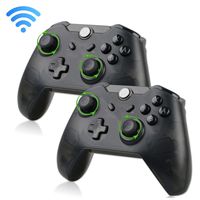
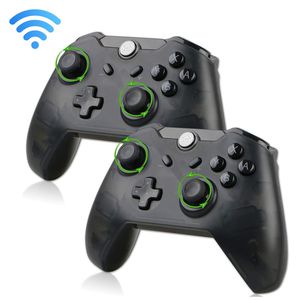
2 x Wireless Pro Gaming Controller
2 x USB Type C Charging cable
2 x User guide
Exclusive EEEKit Unconditional 12-month Money-back
Connecting to Switch Console via Bluetooth:
A. Connecting to a Switch console for the first time:
Power on a Switch console, on the main interface of the console, use your finger to click "Controllers" → "Change Grip/order" to come to this interface "Press L + R on the controller", ignore "L + R"; press "Y" plus "HOME" combinatorial keys and hold for 5s to power a controller on, four LEDs in the controller start blinking quickly and circularly, when one of the four LEDs is solid bright, it means that the controller is paired with the console successfully, then press "B" key to operate.
B.Connecting to a paired Switch console:
If a controller was paired with a Switch console ever before, just press "HOME" key and hold for 2s to power the controller on, the controller will be connected to the console automatically again, then press "A" key to operate.
C.Controller awakened up:
If a controller is in sleeping mode, short press "HOME" key to awaken it up, it will be connected to the console again automatically, then press "A" key to operate.
Kindly Note: If the controller connection failed, it may be caused by your switch have recorded too many controllers before. In this situation, you should go to "System Setting--Controllers and Sensors--Disconnect Controllers" to purge data.
Specification:
Operating voltage :DC 3.7V-4.2V
Operating current :20-30mA
Battery capacity :380mA Battery power-on time :Around 5h(fully charged)
Charging time :2-3h
Package Includes:
2 x Wireless Pro Gaming Controller
2 x USB Type C Charging cable
2 x User guide
Exclusive EEEKit Unconditional 12-month Money-back
Connecting to Switch Console via Bluetooth:
A. Connecting to a Switch console for the first time:
Power on a Switch console, on the main interface of the console, use your finger to click "Controllers" → "Change Grip/order" to come to this interface "Press L + R on the controller", ignore "L + R"; press "Y" plus "HOME" combinatorial keys and hold for 5s to power a controller on, four LEDs in the controller start blinking quickly and circularly, when one of the four LEDs is solid bright, it means that the controller is paired with the console successfully, then press "B" key to operate.
B.Connecting to a paired Switch console:
If a controller was paired with a Switch console ever before, just press "HOME" key and hold for 2s to power the controller on, the controller will be connected to the console automatically again, then press "A" key to operate.
C.Controller awakened up:
If a controller is in sleeping mode, short press "HOME" key to awaken it up, it will be connected to the console again automatically, then press "A" key to operate.
Kindly Note: If the controller connection failed, it may be caused by your switch have recorded too many controllers before. In this situation, you should go to "System Setting--Controllers and Sensors--Disconnect Controllers" to purge data.
Specification:
Operating voltage :DC 3.7V-4.2V
Operating current :20-30mA
Battery capacity :380mA Battery power-on time :Around 5h(fully charged)
Charging time :2-3h
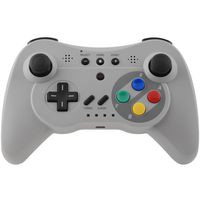
EEEKit 2-Pack Wireless Pro Gaming Controller Gamepad Joypad Remote for Nintendo Switch Console
Price is below average
Current Price
$40
Average
$48.46
Min Price
$39.97
Max Price
$63.97
Price dynamics
17%
Description
If you are not satisfied with our products or have quality problems, please contact us and we will friendly response within 24 hours - [amazon@eeekit.com].
Package Includes:
2 x Wireless Pro Gaming Controller
2 x USB Type C Charging cable
2 x User guide
Exclusive EEEKit Unconditional 12-month Money-back
Connecting to Switch Console via Bluetooth:
A. Connecting to a Switch console for the first time:
Power on a Switch console, on the main interface of the console, use your finger to click "Controllers" → "Change Grip/order" to come to this interface "Press L + R on the controller", ignore "L + R"; press "Y" plus "HOME" combinatorial keys and hold for 5s to power a controller on, four LEDs in the controller start blinking quickly and circularly, when one of the four LEDs is solid bright, it means that the controller is paired with the console successfully, then press "B" key to operate.
B.Connecting to a paired Switch console:
If a controller was paired with a Switch console ever before, just press "HOME" key and hold for 2s to power the controller on, the controller will be connected to the console automatically again, then press "A" key to operate.
C.Controller awakened up:
If a controller is in sleeping mode, short press "HOME" key to awaken it up, it will be connected to the console again automatically, then press "A" key to operate.
Kindly Note: If the controller connection failed, it may be caused by your switch have recorded too many controllers before. In this situation, you should go to "System Setting--Controllers and Sensors--Disconnect Controllers" to purge data.
Specification:
Operating voltage :DC 3.7V-4.2V
Operating current :20-30mA
Battery capacity :380mA Battery power-on time :Around 5h(fully charged)
Charging time :2-3h
Package Includes:
2 x Wireless Pro Gaming Controller
2 x USB Type C Charging cable
2 x User guide
Exclusive EEEKit Unconditional 12-month Money-back
Connecting to Switch Console via Bluetooth:
A. Connecting to a Switch console for the first time:
Power on a Switch console, on the main interface of the console, use your finger to click "Controllers" → "Change Grip/order" to come to this interface "Press L + R on the controller", ignore "L + R"; press "Y" plus "HOME" combinatorial keys and hold for 5s to power a controller on, four LEDs in the controller start blinking quickly and circularly, when one of the four LEDs is solid bright, it means that the controller is paired with the console successfully, then press "B" key to operate.
B.Connecting to a paired Switch console:
If a controller was paired with a Switch console ever before, just press "HOME" key and hold for 2s to power the controller on, the controller will be connected to the console automatically again, then press "A" key to operate.
C.Controller awakened up:
If a controller is in sleeping mode, short press "HOME" key to awaken it up, it will be connected to the console again automatically, then press "A" key to operate.
Kindly Note: If the controller connection failed, it may be caused by your switch have recorded too many controllers before. In this situation, you should go to "System Setting--Controllers and Sensors--Disconnect Controllers" to purge data.
Specification:
Operating voltage :DC 3.7V-4.2V
Operating current :20-30mA
Battery capacity :380mA Battery power-on time :Around 5h(fully charged)
Charging time :2-3h
Price will be lower
in next 2 weeks
in next 2 weeks
According to the data, price will be lower in next two weeks, so not waste your money and track better price!
Similar products