- HomeElectronicsComputers & AccessoriesComputer Accessories & PeripheralsAudio & Video AccessoriesWebcams
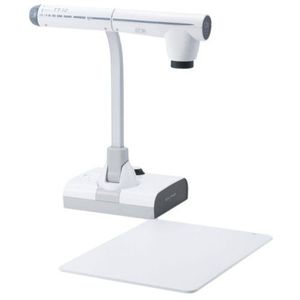
Description
Elmo 1331 Model TT-12 Document Camera, 300° Swivel, Adjustable Free-Angle Camera Head & Arm, Powerful 96x Zoom (12x Optical zoom x 8x Digital zoom), 3.4-Megapixel CMOS Image Sensor
The ELMO TT-12 is an all-inclusive document camera designed for teachers looking to incorporate 21st century classroom technology to create dynamic lessons that enhance learning, interaction, creativity and academic performance of students.
Key Features- 300° Swivel
- Adjustable Free-Angle Camera Head & Arm
- Powerful 96x Zoom (12x Optical zoom x 8x Digital zoom)
- 3.4-Megapixel CMOS Image Sensor
- Smooth Moving Images at 30 fps
- Slip-proof rubber feet
- Wireless remote control
- Zoom Dial & AF Button
- Selectable Output Resolution
- Audio Input & Output
- Save Classroom Presentations on External Memory
- Image pick-up device: 1/2.8" CMOS 3,400,000 pixels
- Total pixels: 2,144 (H) x 1,588 (V)
- Effective pixels: 1,920 (H) x 1,536 (V)
- Frame rate: 30 fps
- Resolution Analog RGB: 800 (H) x 800 (V) TV lines or more, Video output: 500 (H) TV lines or more
- Lens: F3.2-3.6, f=4.0 mm- 48.0 mm
- Focus: Auto/Manual/Zoom Sync
- White balance: Auto/One-Push /Manual
- Image mode: Text1/Text2/Text3/Graphics1/Graphics2
- Digital zoom: 8X
- Image save: SD memory card/SDHC memory card/USB flash drive
- State presetting: Up to 3 user settings
- Brightness control: Auto (with level adjustment)/Manual
- Power source: 12V DC (AC adapter AC 100-240V)
- Power consumption: 17.5 W (AC adapter included)
- Dimensions (WxDxH): 14" x 14 11/16" x 16 13/16" setup,7 11/16" x 11 9/16" x 18 7/16" folded
- Weight: Approx. 7.1 lbs (main unit only)
Elmo 1331 Model TT-12 Document Camera, 300° Swivel, Adjustable Free-Angle Camera Head & Arm, Powerful 96x Zoom (12x Optical zoom x 8x Digital zoom), 3.4-Megapixel CMOS Image Sensor
Current Price
$700
Average
$643.7
Min Price
$19.31
Max Price
$850
Price dynamics
8%
Description
Elmo 1331 Model TT-12 Document Camera, 300° Swivel, Adjustable Free-Angle Camera Head & Arm, Powerful 96x Zoom (12x Optical zoom x 8x Digital zoom), 3.4-Megapixel CMOS Image Sensor
The ELMO TT-12 is an all-inclusive document camera designed for teachers looking to incorporate 21st century classroom technology to create dynamic lessons that enhance learning, interaction, creativity and academic performance of students.
Key Features- 300° Swivel
- Adjustable Free-Angle Camera Head & Arm
- Powerful 96x Zoom (12x Optical zoom x 8x Digital zoom)
- 3.4-Megapixel CMOS Image Sensor
- Smooth Moving Images at 30 fps
- Slip-proof rubber feet
- Wireless remote control
- Zoom Dial & AF Button
- Selectable Output Resolution
- Audio Input & Output
- Save Classroom Presentations on External Memory
- Image pick-up device: 1/2.8" CMOS 3,400,000 pixels
- Total pixels: 2,144 (H) x 1,588 (V)
- Effective pixels: 1,920 (H) x 1,536 (V)
- Frame rate: 30 fps
- Resolution Analog RGB: 800 (H) x 800 (V) TV lines or more, Video output: 500 (H) TV lines or more
- Lens: F3.2-3.6, f=4.0 mm- 48.0 mm
- Focus: Auto/Manual/Zoom Sync
- White balance: Auto/One-Push /Manual
- Image mode: Text1/Text2/Text3/Graphics1/Graphics2
- Digital zoom: 8X
- Image save: SD memory card/SDHC memory card/USB flash drive
- State presetting: Up to 3 user settings
- Brightness control: Auto (with level adjustment)/Manual
- Power source: 12V DC (AC adapter AC 100-240V)
- Power consumption: 17.5 W (AC adapter included)
- Dimensions (WxDxH): 14" x 14 11/16" x 16 13/16" setup,7 11/16" x 11 9/16" x 18 7/16" folded
- Weight: Approx. 7.1 lbs (main unit only)
Price will be lower
in next 2 weeks
in next 2 weeks
According to the data, price will be lower in next two weeks, so not waste your money and track better price!
Product review & video
today we're going to show you how to use the document cameras as webcams so this model document camera the ELMO Teke 12 is available in a lot of classrooms so we're gonna show you how to use it as a webcam first it has to be connected to the computer via USB and this USB plug is right here you can see on the bottom it says USB so using a cable you can connect that to either the Mac Mini inside the podium and have a qualified AV services person do that for you or you can temporarily connect it to a laptop or whatever else in this case we've already installed it so what do we do first first thing is I'm actually going to be looking at the touch panel preview just to demonstrate the menu settings in the document camera just in case they're not set correctly so again this is one of those things that you can just check just to be sure now on the document camera we're gonna use the menu and t