Description
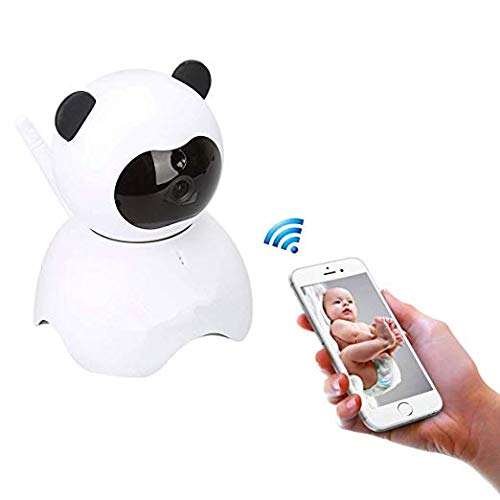
With a 2 MP lens, this 1080p HD camera can record excellent footage and have it sent straight to your device in real time.
Compatible with Samsung (Android) or iPhone (iOS), it features both HD (720p) and FHD (1080p) .
This wireless nanny cam is easy to set up and easy to use. All you need is wifi and the app for immediate viewing.
The infrared feature allows for night vision.
All images, recordings, audio feedback, zoom-in and angle-manipulation can be controlled from your device .
*It allows the user to speak through the camera to either their child, dog or intruder . It can alert the user via notifications on their phone if suspicious activity is detected.
*Steps To Set up Your Security Cam :
1. Download the Hapsee app from the Google Play Store or the Apple App Store
2. Create a new account
3. Power on your cam, wait for a musical chime.
4. Connect your cam using the Ethernet cable provided to a port on the back of your WiFi router.
5. Press the + symbol next to 'WiFi Camera'.
6. Press 'Manual Add/Add by CID'.
7. Locate CID number + password under camera.
8. Enter CID number + password to add.
9. Press the Settings cog.
10. Press Network Settings.
11. Select your Wi-Fi.
12. Enter Wi-Fi password.
13. Wait for camera to sync, change default camera password to finish.
Package Include:
1x camera
1x ethernet cable RJ45
1x power adaptor
1x user manual
1x guick guide
1x mount screw set
1x bracket for mount
Compatible with Samsung (Android) or iPhone (iOS), it features both HD (720p) and FHD (1080p) .
This wireless nanny cam is easy to set up and easy to use. All you need is wifi and the app for immediate viewing.
The infrared feature allows for night vision.
All images, recordings, audio feedback, zoom-in and angle-manipulation can be controlled from your device .
*It allows the user to speak through the camera to either their child, dog or intruder . It can alert the user via notifications on their phone if suspicious activity is detected.
*Steps To Set up Your Security Cam :
1. Download the Hapsee app from the Google Play Store or the Apple App Store
2. Create a new account
3. Power on your cam, wait for a musical chime.
4. Connect your cam using the Ethernet cable provided to a port on the back of your WiFi router.
5. Press the + symbol next to 'WiFi Camera'.
6. Press 'Manual Add/Add by CID'.
7. Locate CID number + password under camera.
8. Enter CID number + password to add.
9. Press the Settings cog.
10. Press Network Settings.
11. Select your Wi-Fi.
12. Enter Wi-Fi password.
13. Wait for camera to sync, change default camera password to finish.
Package Include:
1x camera
1x ethernet cable RJ45
1x power adaptor
1x user manual
1x guick guide
1x mount screw set
1x bracket for mount
EsiCam Baby Monitor WiFi Camera Nanny Camera for Smart Phone, Toy Panda for Kids Pet Care HD Pan Tilt Motion Detection Alarm Recording Two-Way Audio Night Vision SD Card P2P Cloud Account (1080p)
Current Price
$49
Average
$49
Min Price
$49
Max Price
$49
Description
With a 2 MP lens, this 1080p HD camera can record excellent footage and have it sent straight to your device in real time.
Compatible with Samsung (Android) or iPhone (iOS), it features both HD (720p) and FHD (1080p) .
This wireless nanny cam is easy to set up and easy to use. All you need is wifi and the app for immediate viewing.
The infrared feature allows for night vision.
All images, recordings, audio feedback, zoom-in and angle-manipulation can be controlled from your device .
*It allows the user to speak through the camera to either their child, dog or intruder . It can alert the user via notifications on their phone if suspicious activity is detected.
*Steps To Set up Your Security Cam :
1. Download the Hapsee app from the Google Play Store or the Apple App Store
2. Create a new account
3. Power on your cam, wait for a musical chime.
4. Connect your cam using the Ethernet cable provided to a port on the back of your WiFi router.
5. Press the + symbol next to 'WiFi Camera'.
6. Press 'Manual Add/Add by CID'.
7. Locate CID number + password under camera.
8. Enter CID number + password to add.
9. Press the Settings cog.
10. Press Network Settings.
11. Select your Wi-Fi.
12. Enter Wi-Fi password.
13. Wait for camera to sync, change default camera password to finish.
Package Include:
1x camera
1x ethernet cable RJ45
1x power adaptor
1x user manual
1x guick guide
1x mount screw set
1x bracket for mount
Compatible with Samsung (Android) or iPhone (iOS), it features both HD (720p) and FHD (1080p) .
This wireless nanny cam is easy to set up and easy to use. All you need is wifi and the app for immediate viewing.
The infrared feature allows for night vision.
All images, recordings, audio feedback, zoom-in and angle-manipulation can be controlled from your device .
*It allows the user to speak through the camera to either their child, dog or intruder . It can alert the user via notifications on their phone if suspicious activity is detected.
*Steps To Set up Your Security Cam :
1. Download the Hapsee app from the Google Play Store or the Apple App Store
2. Create a new account
3. Power on your cam, wait for a musical chime.
4. Connect your cam using the Ethernet cable provided to a port on the back of your WiFi router.
5. Press the + symbol next to 'WiFi Camera'.
6. Press 'Manual Add/Add by CID'.
7. Locate CID number + password under camera.
8. Enter CID number + password to add.
9. Press the Settings cog.
10. Press Network Settings.
11. Select your Wi-Fi.
12. Enter Wi-Fi password.
13. Wait for camera to sync, change default camera password to finish.
Package Include:
1x camera
1x ethernet cable RJ45
1x power adaptor
1x user manual
1x guick guide
1x mount screw set
1x bracket for mount
Price will be lower
in next 2 weeks
in next 2 weeks
According to the data, price will be lower in next two weeks, so not waste your money and track better price!
Product review & video
hi guys uh we have one new product it's called mini wireless camera you can use as a spy or hidden camera so so let's see what we have inside in envelope first of all we have a user manual then we have one usb charging camera with micro usb port and we have a camera and it's a stand for the camera okay so let's see what we have in this camera first of all over here we have a on off button we have power light indicator we have mic over here and this is more button you can reset the camera password over here we have sd card slot over here we have charging port you can just click plug micro usb cable over here and charge it from with the help of your usb on back side we have a camera unique id mentioned with the qr code and below that we have a magnetic um small magnetic install in the camera so with the help of this tab with the help of this magnet you can just put your camera on stand li


Similar products