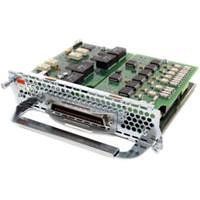
Description
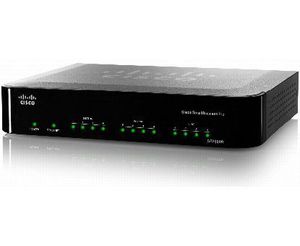
Shipping Depth: 11.4 Shipping Height: 3.3 Shipping Width: 12.5 Master Pack Qty: 10 General Information Manufacturer: Cisco Systems, Inc Manufacturer Part Number: SPA8800 Brand Name: Cisco Product Model: SPA8800 Product Name: SPA8800 VoIP Gateway Marketing Information: Developed for small businesses, the Cisco SPA8800 IP Telephony Gateway adapts to the needs of businesses that maintain their own on-premise IP private branch exchange (PBX) or that want to add voice over IP (VoIP) to their legacy time-division multiplexing (TDM) PBX or key system. The SPA8800 can be configured to be a FXO gateway for an Asterisk open source PBX, providing a versatile solution when conditions favor an external device. Product Type: VoIP Gateway Technical Information Voice Codec: G.711 Voice Codec: G.729a Voice Codec: G.723.1 Voice Codec: G.711a Voice Codec: G.711u Voice Codec: G.726 Interfaces/Ports Interfaces/Ports: 4 x RJ-11 FXO Interfaces/Ports: 4 x RJ-11 FXS Interfaces/Ports: 1 x RJ-45 10/100Base-TX Auxiliary Management Interfaces/Ports: 1 x RJ-21 Interfaces/Ports: 1 x RJ-45 10/100Base-TX WAN Media Performance Connectivity Media: Twisted Pair 10/100Base-TX Data Transfer Rate: 100 Mbps Fast Ethernet Data Transfer Rate: 10 Mbps Ethernet Physical Characteristics Height: 1.5 Width: 6.7 Depth: 8.7 Weight (Approximate): 2.87 lb Miscellaneous Package Contents: SPA8800 VoIP Gateway 12V Power Adapter 1 x RJ-45 Ethernet cable 4 x RJ-11 Telephone cable Quick Start Guide Warranty Standard Warranty: 1 Year Limited
Cisco SPA8800 VoIP Gateway
Current Price
$695.78
Average
$531.65
Min Price
$254.29
Max Price
$1 159
Price dynamics
24%
Description
Shipping Depth: 11.4 Shipping Height: 3.3 Shipping Width: 12.5 Master Pack Qty: 10 General Information Manufacturer: Cisco Systems, Inc Manufacturer Part Number: SPA8800 Brand Name: Cisco Product Model: SPA8800 Product Name: SPA8800 VoIP Gateway Marketing Information: Developed for small businesses, the Cisco SPA8800 IP Telephony Gateway adapts to the needs of businesses that maintain their own on-premise IP private branch exchange (PBX) or that want to add voice over IP (VoIP) to their legacy time-division multiplexing (TDM) PBX or key system. The SPA8800 can be configured to be a FXO gateway for an Asterisk open source PBX, providing a versatile solution when conditions favor an external device. Product Type: VoIP Gateway Technical Information Voice Codec: G.711 Voice Codec: G.729a Voice Codec: G.723.1 Voice Codec: G.711a Voice Codec: G.711u Voice Codec: G.726 Interfaces/Ports Interfaces/Ports: 4 x RJ-11 FXO Interfaces/Ports: 4 x RJ-11 FXS Interfaces/Ports: 1 x RJ-45 10/100Base-TX Auxiliary Management Interfaces/Ports: 1 x RJ-21 Interfaces/Ports: 1 x RJ-45 10/100Base-TX WAN Media Performance Connectivity Media: Twisted Pair 10/100Base-TX Data Transfer Rate: 100 Mbps Fast Ethernet Data Transfer Rate: 10 Mbps Ethernet Physical Characteristics Height: 1.5 Width: 6.7 Depth: 8.7 Weight (Approximate): 2.87 lb Miscellaneous Package Contents: SPA8800 VoIP Gateway 12V Power Adapter 1 x RJ-45 Ethernet cable 4 x RJ-11 Telephone cable Quick Start Guide Warranty Standard Warranty: 1 Year Limited
Price will be lower
in next 2 weeks
in next 2 weeks
According to the data, price will be lower in next two weeks, so not waste your money and track better price!
Product review & video
today we have a new nugget and there's not good we gonna connect the Cisco gateway SVA 8800 with the last X Server which will be our PBX so what we have right now we have the PBX 192.168 7200 and we have the Cisco gateway 192 168 70 205 both of them locally in the same network right now I'm gonna start with this Cisco SP a so I'm gonna connect yeah okay so let's let's have a little bit about this device and this device which is SP a800 we have four F X s sports and we have four F X all fours as well so we will be focusing on the part of F X L which will be connected to your PSTN provider so those port will be responsible for configuration of the SIP trunk but gonna handle the incoming and the outgoing calls so first of all I will connect to the Cisco make sure in advanced mode and in admin login as well then I go to voice as we see right now we have fun1 from 2 4 3 4 4 as I mentioned in



Similar products