Description
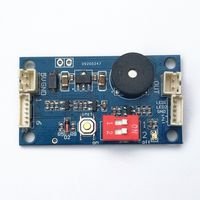
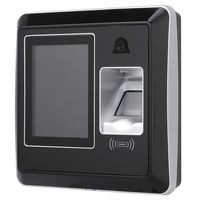
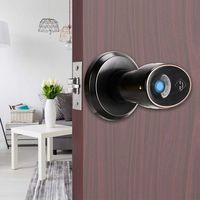
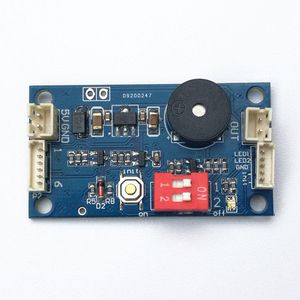
GROW K200 New Design Multi-function PCB Fingerprint Control board
Technical parameters:
Fingerprint capacity: 120
Power supply: 4*AA battery or DC5V
Stand-by mode current: less than 7 uA
Output:DC5--6V,500mA
Instructions for control board:
1.Press SET button shortly,system in administrator register status and blue indicator light flash fast, press two times for each fingerprint, fingerprint register successfully when hearing music.Fingerprint can be registered continuously,and it can register 20 pieces administrator fingerprint. If no need for adding fingerprint, waiting for 6seconds or press the SET button to exit.
2.When back to factory default, press SET button until hear "Di-Di-Di" beep and release the button,means initialization operation successful.
3.Register User Fingerprint: Press the administrator fingerprint until hear the music and blue indicator light flash fast, means can add user fingerprint.Press two times for each user fingerprint, fingerprint register successful when hearing music. Fingerprint can be registered continuously, it can register 100 pieces user fingerprint.
4.Delete User Fingerprint:Press the administrator fingerprint when hear the music and blue indicator light flash fast, move the finger until hear "DiDiDi" long deep, than all user fingerprints are deleted.
5.Mode selection,setby the toggle switch:
a) 1:ON, 2:ON Output DC5V and keep 0.5 second; stop 5 seconds,then minusvoltage outputted and keep 0.5 seconds.
b) 1:ON, 2:OFF Output DC5V and keep 1 second
c) 1:OFF, 2:ON Output DC5V and keep 10 seconds
d) 1:OFF, 2:OFF Keeping output DC5V until removing the finger
Here is the video on Youtube: https://youtu.be/-wpyx4S41bo
Technical parameters:
Fingerprint capacity: 120
Power supply: 4*AA battery or DC5V
Stand-by mode current: less than 7 uA
Output:DC5--6V,500mA
Instructions for control board:
1.Press SET button shortly,system in administrator register status and blue indicator light flash fast, press two times for each fingerprint, fingerprint register successfully when hearing music.Fingerprint can be registered continuously,and it can register 20 pieces administrator fingerprint. If no need for adding fingerprint, waiting for 6seconds or press the SET button to exit.
2.When back to factory default, press SET button until hear "Di-Di-Di" beep and release the button,means initialization operation successful.
3.Register User Fingerprint: Press the administrator fingerprint until hear the music and blue indicator light flash fast, means can add user fingerprint.Press two times for each user fingerprint, fingerprint register successful when hearing music. Fingerprint can be registered continuously, it can register 100 pieces user fingerprint.
4.Delete User Fingerprint:Press the administrator fingerprint when hear the music and blue indicator light flash fast, move the finger until hear "DiDiDi" long deep, than all user fingerprints are deleted.
5.Mode selection,setby the toggle switch:
a) 1:ON, 2:ON Output DC5V and keep 0.5 second; stop 5 seconds,then minusvoltage outputted and keep 0.5 seconds.
b) 1:ON, 2:OFF Output DC5V and keep 1 second
c) 1:OFF, 2:ON Output DC5V and keep 10 seconds
d) 1:OFF, 2:OFF Keeping output DC5V until removing the finger
Here is the video on Youtube: https://youtu.be/-wpyx4S41bo
GROW K200 Multi-Function PCB Fingerprint Control Board
Current Price
$8.89
Average
$8.89
Min Price
$8.89
Max Price
$8.89
Description
GROW K200 New Design Multi-function PCB Fingerprint Control board
Technical parameters:
Fingerprint capacity: 120
Power supply: 4*AA battery or DC5V
Stand-by mode current: less than 7 uA
Output:DC5--6V,500mA
Instructions for control board:
1.Press SET button shortly,system in administrator register status and blue indicator light flash fast, press two times for each fingerprint, fingerprint register successfully when hearing music.Fingerprint can be registered continuously,and it can register 20 pieces administrator fingerprint. If no need for adding fingerprint, waiting for 6seconds or press the SET button to exit.
2.When back to factory default, press SET button until hear "Di-Di-Di" beep and release the button,means initialization operation successful.
3.Register User Fingerprint: Press the administrator fingerprint until hear the music and blue indicator light flash fast, means can add user fingerprint.Press two times for each user fingerprint, fingerprint register successful when hearing music. Fingerprint can be registered continuously, it can register 100 pieces user fingerprint.
4.Delete User Fingerprint:Press the administrator fingerprint when hear the music and blue indicator light flash fast, move the finger until hear "DiDiDi" long deep, than all user fingerprints are deleted.
5.Mode selection,setby the toggle switch:
a) 1:ON, 2:ON Output DC5V and keep 0.5 second; stop 5 seconds,then minusvoltage outputted and keep 0.5 seconds.
b) 1:ON, 2:OFF Output DC5V and keep 1 second
c) 1:OFF, 2:ON Output DC5V and keep 10 seconds
d) 1:OFF, 2:OFF Keeping output DC5V until removing the finger
Here is the video on Youtube: https://youtu.be/-wpyx4S41bo
Technical parameters:
Fingerprint capacity: 120
Power supply: 4*AA battery or DC5V
Stand-by mode current: less than 7 uA
Output:DC5--6V,500mA
Instructions for control board:
1.Press SET button shortly,system in administrator register status and blue indicator light flash fast, press two times for each fingerprint, fingerprint register successfully when hearing music.Fingerprint can be registered continuously,and it can register 20 pieces administrator fingerprint. If no need for adding fingerprint, waiting for 6seconds or press the SET button to exit.
2.When back to factory default, press SET button until hear "Di-Di-Di" beep and release the button,means initialization operation successful.
3.Register User Fingerprint: Press the administrator fingerprint until hear the music and blue indicator light flash fast, means can add user fingerprint.Press two times for each user fingerprint, fingerprint register successful when hearing music. Fingerprint can be registered continuously, it can register 100 pieces user fingerprint.
4.Delete User Fingerprint:Press the administrator fingerprint when hear the music and blue indicator light flash fast, move the finger until hear "DiDiDi" long deep, than all user fingerprints are deleted.
5.Mode selection,setby the toggle switch:
a) 1:ON, 2:ON Output DC5V and keep 0.5 second; stop 5 seconds,then minusvoltage outputted and keep 0.5 seconds.
b) 1:ON, 2:OFF Output DC5V and keep 1 second
c) 1:OFF, 2:ON Output DC5V and keep 10 seconds
d) 1:OFF, 2:OFF Keeping output DC5V until removing the finger
Here is the video on Youtube: https://youtu.be/-wpyx4S41bo
Price will be lower
in next 2 weeks
in next 2 weeks
According to the data, price will be lower in next two weeks, so not waste your money and track better price!