- HomeElectronicsCar & Vehicle ElectronicsVehicle Electronics AccessoriesAudio & Video AccessoriesBluetooth Car Kits
Description
Instruction Video:
https://youtu.be/67NkgjdRM8M
https://youtu.be/4I1JV9Oo6Iw
1 in 2 out function operation on TX Mode:
1. Connect any one of your BT device first, then turn off the "X3", press and hold for 4 seconds to enter the pairing mode. At this time, make the second device enter the pairing mode. After the pairing is successful, the two devices will simultaneously receive the transmitted audio (the sound gradually increases).
2. Connect one of your BT device first, then turn it off, then connect the second device. After the second connection is successful, immediately open the first device. The sound of the two devices gradually increased and the connection was successful.
TWS function operation on RX Mode:
1. Turn on the two "X3". After booting, press and hold the auxiliary button for 2 seconds to enter the TWS pairing mode (green flashing). Then turn off any "X3" and press and hold for 4 seconds to enter the pairing mode and connect with the Bluetooth devices such as mobile phone etc. after connection succeeded, Both "X3" can hear audio from mobile phones.
2. "X3" has been connected to a Bluetooth device such as a mobile phone. Press and hold for about 3 seconds to open another "X3". Then press and hold the auxiliary button for two seconds (the green light flashes quickly). At this time, press and hold the connected "X3" auxiliary button for 2 seconds to enter the TWS pairing mode. After the pairing is successful, both of them will receive the audio transmitted by the mobile phone through Bluetooth.
Under TWS, both "X3" button controls are active (play/pause)
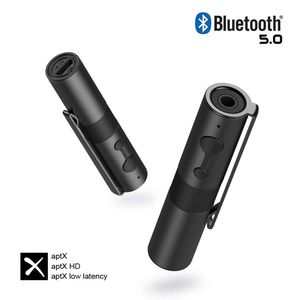
Bluetooth Version: v5.0
Frequency Range: 2.4GHz
Bluetooth Range: Up to 33 feet
Battery: 100mAh
Battery Life: 8 Hours(TX Mode) / 4 Hours(RX Mode)
Bluetooth chip: CSR8675
Package
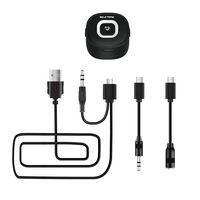
1 x Hagibis "X3"
1 x 3.5mm Audio Cable
1 x Micro USB Cable
1 x User Manual
1 x Warranty Card
https://youtu.be/67NkgjdRM8M
https://youtu.be/4I1JV9Oo6Iw
1 in 2 out function operation on TX Mode:
1. Connect any one of your BT device first, then turn off the "X3", press and hold for 4 seconds to enter the pairing mode. At this time, make the second device enter the pairing mode. After the pairing is successful, the two devices will simultaneously receive the transmitted audio (the sound gradually increases).
2. Connect one of your BT device first, then turn it off, then connect the second device. After the second connection is successful, immediately open the first device. The sound of the two devices gradually increased and the connection was successful.
TWS function operation on RX Mode:
1. Turn on the two "X3". After booting, press and hold the auxiliary button for 2 seconds to enter the TWS pairing mode (green flashing). Then turn off any "X3" and press and hold for 4 seconds to enter the pairing mode and connect with the Bluetooth devices such as mobile phone etc. after connection succeeded, Both "X3" can hear audio from mobile phones.
2. "X3" has been connected to a Bluetooth device such as a mobile phone. Press and hold for about 3 seconds to open another "X3". Then press and hold the auxiliary button for two seconds (the green light flashes quickly). At this time, press and hold the connected "X3" auxiliary button for 2 seconds to enter the TWS pairing mode. After the pairing is successful, both of them will receive the audio transmitted by the mobile phone through Bluetooth.
Under TWS, both "X3" button controls are active (play/pause)
Bluetooth Version: v5.0
Frequency Range: 2.4GHz
Bluetooth Range: Up to 33 feet
Battery: 100mAh
Battery Life: 8 Hours(TX Mode) / 4 Hours(RX Mode)
Bluetooth chip: CSR8675
Package
1 x Hagibis "X3"
1 x 3.5mm Audio Cable
1 x Micro USB Cable
1 x User Manual
1 x Warranty Card
Hagibis Bluetooth 5.0 Transmitter Receiver for TV/Car/Nintendo Switch/PS4/Speaker/Headphone/PC/MP3, 2-in-1 Wireless 3.5mm Adapter aptX Low Latency, TWS 2 Devices Simultaneously with Clip
Current Price
$36.99
Average
$36.99
Min Price
$36.99
Max Price
$36.99
Description
Instruction Video:
https://youtu.be/67NkgjdRM8M
https://youtu.be/4I1JV9Oo6Iw
1 in 2 out function operation on TX Mode:
1. Connect any one of your BT device first, then turn off the "X3", press and hold for 4 seconds to enter the pairing mode. At this time, make the second device enter the pairing mode. After the pairing is successful, the two devices will simultaneously receive the transmitted audio (the sound gradually increases).
2. Connect one of your BT device first, then turn it off, then connect the second device. After the second connection is successful, immediately open the first device. The sound of the two devices gradually increased and the connection was successful.
TWS function operation on RX Mode:
1. Turn on the two "X3". After booting, press and hold the auxiliary button for 2 seconds to enter the TWS pairing mode (green flashing). Then turn off any "X3" and press and hold for 4 seconds to enter the pairing mode and connect with the Bluetooth devices such as mobile phone etc. after connection succeeded, Both "X3" can hear audio from mobile phones.
2. "X3" has been connected to a Bluetooth device such as a mobile phone. Press and hold for about 3 seconds to open another "X3". Then press and hold the auxiliary button for two seconds (the green light flashes quickly). At this time, press and hold the connected "X3" auxiliary button for 2 seconds to enter the TWS pairing mode. After the pairing is successful, both of them will receive the audio transmitted by the mobile phone through Bluetooth.
Under TWS, both "X3" button controls are active (play/pause)
Bluetooth Version: v5.0
Frequency Range: 2.4GHz
Bluetooth Range: Up to 33 feet
Battery: 100mAh
Battery Life: 8 Hours(TX Mode) / 4 Hours(RX Mode)
Bluetooth chip: CSR8675
Package
1 x Hagibis "X3"
1 x 3.5mm Audio Cable
1 x Micro USB Cable
1 x User Manual
1 x Warranty Card
https://youtu.be/67NkgjdRM8M
https://youtu.be/4I1JV9Oo6Iw
1 in 2 out function operation on TX Mode:
1. Connect any one of your BT device first, then turn off the "X3", press and hold for 4 seconds to enter the pairing mode. At this time, make the second device enter the pairing mode. After the pairing is successful, the two devices will simultaneously receive the transmitted audio (the sound gradually increases).
2. Connect one of your BT device first, then turn it off, then connect the second device. After the second connection is successful, immediately open the first device. The sound of the two devices gradually increased and the connection was successful.
TWS function operation on RX Mode:
1. Turn on the two "X3". After booting, press and hold the auxiliary button for 2 seconds to enter the TWS pairing mode (green flashing). Then turn off any "X3" and press and hold for 4 seconds to enter the pairing mode and connect with the Bluetooth devices such as mobile phone etc. after connection succeeded, Both "X3" can hear audio from mobile phones.
2. "X3" has been connected to a Bluetooth device such as a mobile phone. Press and hold for about 3 seconds to open another "X3". Then press and hold the auxiliary button for two seconds (the green light flashes quickly). At this time, press and hold the connected "X3" auxiliary button for 2 seconds to enter the TWS pairing mode. After the pairing is successful, both of them will receive the audio transmitted by the mobile phone through Bluetooth.
Under TWS, both "X3" button controls are active (play/pause)
Bluetooth Version: v5.0
Frequency Range: 2.4GHz
Bluetooth Range: Up to 33 feet
Battery: 100mAh
Battery Life: 8 Hours(TX Mode) / 4 Hours(RX Mode)
Bluetooth chip: CSR8675
Package
1 x Hagibis "X3"
1 x 3.5mm Audio Cable
1 x Micro USB Cable
1 x User Manual
1 x Warranty Card
Price will be lower
in next 2 weeks
in next 2 weeks
According to the data, price will be lower in next two weeks, so not waste your money and track better price!
Product review & video
you green Bluetooth audio transmitter enables your TV or PC that without Lotus function to send the audio to your Bluetooth speaker or headphone when you play the game not only enjoy the big screen but capture the delicate sound details to get a better gaming experience at night you can also watch the football game with your friends without disturbing the rest of your family just enjoy the wonderful wireless audio experience next we will introduce you how to use the product connection pair for the first time step 1 connect the 3.5 millimeter plug to your computer step 2 use the provided micro USB cable to power this unit and it will turn on automatically and ready to be paired step 3 turn on your Bluetooth headphone and wait a few seconds this unit will automatically pair with your device this unit can connect to bluetooth devices at the same time step 1 pair this unit with the first de


Similar products