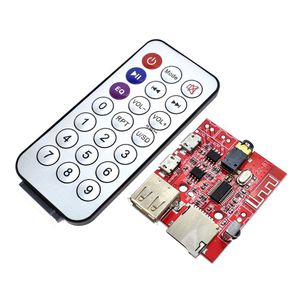
Description
Power Supply: 3.7-5V
1. Mode Control
Bluetooth mode is default, powered on when there is no U disk or TF card installed on board; And music mode is defult, powered on when U disk or TF card is installed on
board. Switching mode using adkey or IR remote.
2. Music mode
Playing the audio files stored in the U disk and TF card, when plug into U disk and TF card.
3. Bluetooth mode
When switching mode and playing "The bluetooth device is ready to pair", it goes into Bluetooth mode and is ready to pair. The device named "XY_BT" Cell phone searched is
the decoding board device. Connecting the "XY_BT" device with cell phone, the decoding board plays "The Bluetooth device is connected successfully", the decoding
board has connected with the cell phone successfully, and you can playing music through the Bluetooth device.
4. USB Audio
Connecting the decoding board with PC by USB data wire. Switching mode and playing "USB mode", it's in USB Audio mode. Playing music by PC player , and the decoding
board will play the music in the PC player list. If pluging into TF card, can download music into the TF card from PC.
NOTE:
1.When working in the USB Audio mode, U disk mustn't be pluged into board.
2.In the U disk playing mode, suggesting that use 5V power to supply(don't use 3.7V power to supply), because earlier U disk can't support 3.7V power supply.
3.When using mobile power and PC USB port to supply, must use Power port on the board(mustn't use USB Audio port on board), or can't playing audio files stored in U disk.
4.This decoding board only support FAT16/FAT32 file system format, both U disk and TF card, don't support NTFS file system format.
Package Included:
1 x Bluetooth Decoding Boar
1 x Remote Control
1. Mode Control
Bluetooth mode is default, powered on when there is no U disk or TF card installed on board; And music mode is defult, powered on when U disk or TF card is installed on
board. Switching mode using adkey or IR remote.
2. Music mode
Playing the audio files stored in the U disk and TF card, when plug into U disk and TF card.
3. Bluetooth mode
When switching mode and playing "The bluetooth device is ready to pair", it goes into Bluetooth mode and is ready to pair. The device named "XY_BT" Cell phone searched is
the decoding board device. Connecting the "XY_BT" device with cell phone, the decoding board plays "The Bluetooth device is connected successfully", the decoding
board has connected with the cell phone successfully, and you can playing music through the Bluetooth device.
4. USB Audio
Connecting the decoding board with PC by USB data wire. Switching mode and playing "USB mode", it's in USB Audio mode. Playing music by PC player , and the decoding
board will play the music in the PC player list. If pluging into TF card, can download music into the TF card from PC.
NOTE:
1.When working in the USB Audio mode, U disk mustn't be pluged into board.
2.In the U disk playing mode, suggesting that use 5V power to supply(don't use 3.7V power to supply), because earlier U disk can't support 3.7V power supply.
3.When using mobile power and PC USB port to supply, must use Power port on the board(mustn't use USB Audio port on board), or can't playing audio files stored in U disk.
4.This decoding board only support FAT16/FAT32 file system format, both U disk and TF card, don't support NTFS file system format.
Package Included:
1 x Bluetooth Decoding Boar
1 x Remote Control
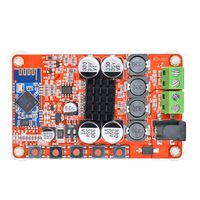
HiLetgo 3W Car Bluetooth 4.1 MP3 WAV Decoding Board Speaker Amplifier Audio Receiver Module Support USB/TF/U-Disk/IR with Remote Control
Current Price
$8.49
Average
$8.49
Min Price
$8.49
Max Price
$8.49
Description
Power Supply: 3.7-5V
1. Mode Control
Bluetooth mode is default, powered on when there is no U disk or TF card installed on board; And music mode is defult, powered on when U disk or TF card is installed on
board. Switching mode using adkey or IR remote.
2. Music mode
Playing the audio files stored in the U disk and TF card, when plug into U disk and TF card.
3. Bluetooth mode
When switching mode and playing "The bluetooth device is ready to pair", it goes into Bluetooth mode and is ready to pair. The device named "XY_BT" Cell phone searched is
the decoding board device. Connecting the "XY_BT" device with cell phone, the decoding board plays "The Bluetooth device is connected successfully", the decoding
board has connected with the cell phone successfully, and you can playing music through the Bluetooth device.
4. USB Audio
Connecting the decoding board with PC by USB data wire. Switching mode and playing "USB mode", it's in USB Audio mode. Playing music by PC player , and the decoding
board will play the music in the PC player list. If pluging into TF card, can download music into the TF card from PC.
NOTE:
1.When working in the USB Audio mode, U disk mustn't be pluged into board.
2.In the U disk playing mode, suggesting that use 5V power to supply(don't use 3.7V power to supply), because earlier U disk can't support 3.7V power supply.
3.When using mobile power and PC USB port to supply, must use Power port on the board(mustn't use USB Audio port on board), or can't playing audio files stored in U disk.
4.This decoding board only support FAT16/FAT32 file system format, both U disk and TF card, don't support NTFS file system format.
Package Included:
1 x Bluetooth Decoding Boar
1 x Remote Control
1. Mode Control
Bluetooth mode is default, powered on when there is no U disk or TF card installed on board; And music mode is defult, powered on when U disk or TF card is installed on
board. Switching mode using adkey or IR remote.
2. Music mode
Playing the audio files stored in the U disk and TF card, when plug into U disk and TF card.
3. Bluetooth mode
When switching mode and playing "The bluetooth device is ready to pair", it goes into Bluetooth mode and is ready to pair. The device named "XY_BT" Cell phone searched is
the decoding board device. Connecting the "XY_BT" device with cell phone, the decoding board plays "The Bluetooth device is connected successfully", the decoding
board has connected with the cell phone successfully, and you can playing music through the Bluetooth device.
4. USB Audio
Connecting the decoding board with PC by USB data wire. Switching mode and playing "USB mode", it's in USB Audio mode. Playing music by PC player , and the decoding
board will play the music in the PC player list. If pluging into TF card, can download music into the TF card from PC.
NOTE:
1.When working in the USB Audio mode, U disk mustn't be pluged into board.
2.In the U disk playing mode, suggesting that use 5V power to supply(don't use 3.7V power to supply), because earlier U disk can't support 3.7V power supply.
3.When using mobile power and PC USB port to supply, must use Power port on the board(mustn't use USB Audio port on board), or can't playing audio files stored in U disk.
4.This decoding board only support FAT16/FAT32 file system format, both U disk and TF card, don't support NTFS file system format.
Package Included:
1 x Bluetooth Decoding Boar
1 x Remote Control
Price will be lower
in next 2 weeks
in next 2 weeks
According to the data, price will be lower in next two weeks, so not waste your money and track better price!