Description
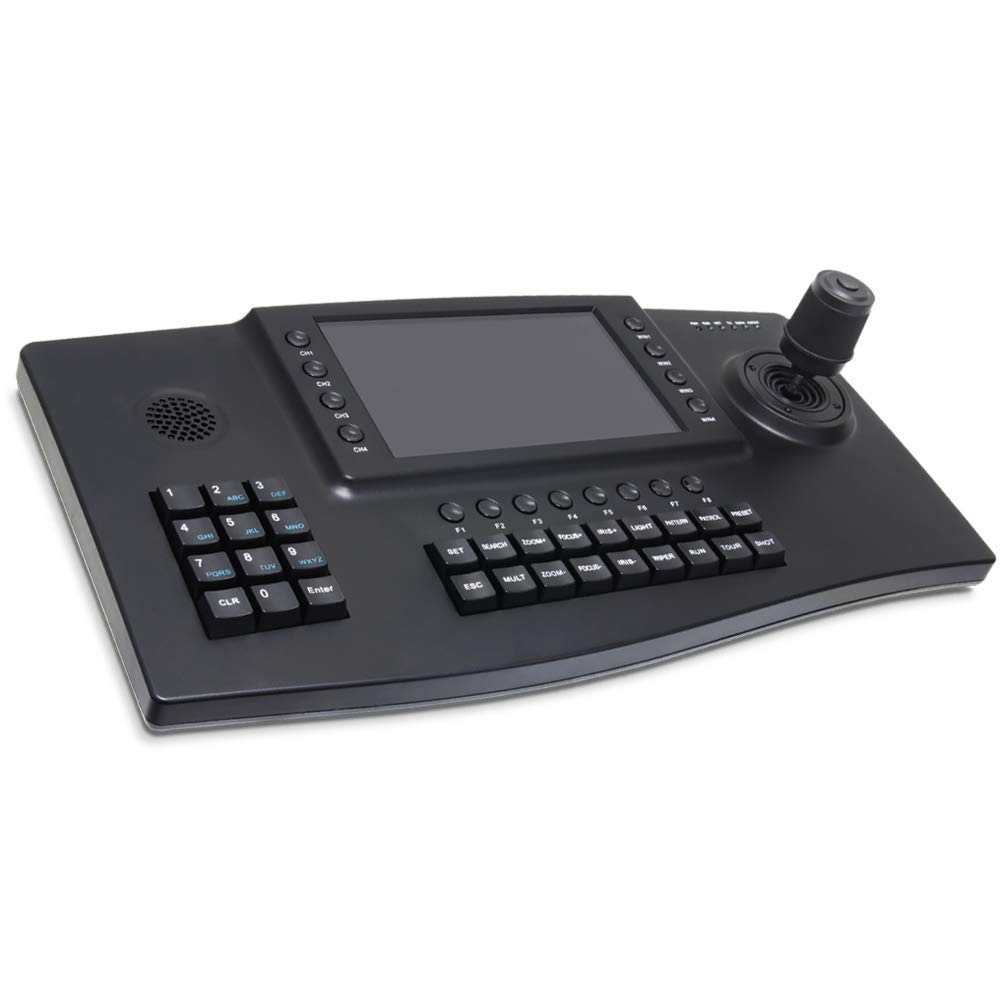
The C400-I IP PTZ Control Keyboard equips with 7 inch Color LCD Screen to display 4 PTZ camera video. It adopts Onif Protocol to communicate, connect and control, works with alll Onvif PTZ cameras, can control up to 253 camera IP addresses. The 4D Joystick is used to pan,tilt,zoom control the speed domes and PTZ,get the mouse away. The keyboard can be applied to various security fields such as school,hospital,residential area,factory,workshop, etc.
Product Features
7 inch TFT LCD Display, 800 x 600 resolution
4D Joystick
Support controlling PTZ, Preset,Patrol,Scan Configuration, Independent Wipers, Light Shortcut Keys
Support Onvif, Support many famous brand IP PTZ coding.
Support outer-connected display equipment (HDMI connector)
Support USB mouse operation
Techinical Specification
Protocol: Onvif
Control IP address: Max 253 cameras
Ethernet: One Ethernet Port,IEEE 802.11b/g/n
Joystick Function: 4D (Control: UP,Down,Left,Right) Confirm Button on Joystick and Zoom Function
Connection: Wiring
Display: Color LCD
Power Supply: DC12V 2A
Working Temperature: 0°C-55°C
Package Size:49*26.5*17cm
Weight: 2KG
Product Features
7 inch TFT LCD Display, 800 x 600 resolution
4D Joystick
Support controlling PTZ, Preset,Patrol,Scan Configuration, Independent Wipers, Light Shortcut Keys
Support Onvif, Support many famous brand IP PTZ coding.
Support outer-connected display equipment (HDMI connector)
Support USB mouse operation
Techinical Specification
Protocol: Onvif
Control IP address: Max 253 cameras
Ethernet: One Ethernet Port,IEEE 802.11b/g/n
Joystick Function: 4D (Control: UP,Down,Left,Right) Confirm Button on Joystick and Zoom Function
Connection: Wiring
Display: Color LCD
Power Supply: DC12V 2A
Working Temperature: 0°C-55°C
Package Size:49*26.5*17cm
Weight: 2KG
IP PTZ Controller,LEFTEK Onvif Network Keyboard 4D Joystick with 7" Colour LCD Display for High Speed PTZ Dome IP Cameras
Current Price
$319.99
Average
$319.99
Min Price
$319.99
Max Price
$319.99
Price dynamics
0%
Description
The C400-I IP PTZ Control Keyboard equips with 7 inch Color LCD Screen to display 4 PTZ camera video. It adopts Onif Protocol to communicate, connect and control, works with alll Onvif PTZ cameras, can control up to 253 camera IP addresses. The 4D Joystick is used to pan,tilt,zoom control the speed domes and PTZ,get the mouse away. The keyboard can be applied to various security fields such as school,hospital,residential area,factory,workshop, etc.
Product Features
7 inch TFT LCD Display, 800 x 600 resolution
4D Joystick
Support controlling PTZ, Preset,Patrol,Scan Configuration, Independent Wipers, Light Shortcut Keys
Support Onvif, Support many famous brand IP PTZ coding.
Support outer-connected display equipment (HDMI connector)
Support USB mouse operation
Techinical Specification
Protocol: Onvif
Control IP address: Max 253 cameras
Ethernet: One Ethernet Port,IEEE 802.11b/g/n
Joystick Function: 4D (Control: UP,Down,Left,Right) Confirm Button on Joystick and Zoom Function
Connection: Wiring
Display: Color LCD
Power Supply: DC12V 2A
Working Temperature: 0°C-55°C
Package Size:49*26.5*17cm
Weight: 2KG
Product Features
7 inch TFT LCD Display, 800 x 600 resolution
4D Joystick
Support controlling PTZ, Preset,Patrol,Scan Configuration, Independent Wipers, Light Shortcut Keys
Support Onvif, Support many famous brand IP PTZ coding.
Support outer-connected display equipment (HDMI connector)
Support USB mouse operation
Techinical Specification
Protocol: Onvif
Control IP address: Max 253 cameras
Ethernet: One Ethernet Port,IEEE 802.11b/g/n
Joystick Function: 4D (Control: UP,Down,Left,Right) Confirm Button on Joystick and Zoom Function
Connection: Wiring
Display: Color LCD
Power Supply: DC12V 2A
Working Temperature: 0°C-55°C
Package Size:49*26.5*17cm
Weight: 2KG
Price will be lower
in next 2 weeks
in next 2 weeks
According to the data, price will be lower in next two weeks, so not waste your money and track better price!
Product review & video
when you first receive your third-generation IP joystick from PTZ optics the first do is read your included manual once you've read through the manual you can connect your IP joystick to your network if your network switch provides p OE power over ethernet you should not use the included power supply only use this power supply if your network switch is not capable of p OE power please note DHCP is required for the initial configuration of your joystick the joystick controller is unable to span subnets so the IP camera and the joystick controller must be in the same subnet of your local area network for example 192.168.1.1 2 3 and 192.168.1.1 2 4 belong in the same subnet but 192.168.1.1 2 3 and 192.168.0.1 2 5 do not once your joystick boot up process is complete the LCD screen will display the controller's current IP address please take note of this IP address if you would like to chan



Similar products