Description
The Nintendo Switch comes with two Joy-Con controllers. This guide will show you how to replace the joystick of the Joy-Con.
Operation Instruction
Step 1: Remove 4 screws
Step 2: Use a pry bar to open the case
Step 3: Pry out the battery (Note: pay attention to the wires)
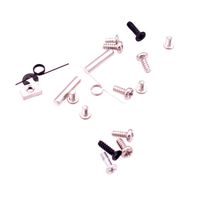
Step 4: Use a Phillips screwdriver to remove 5 screws (two types of screws)
Step 5: Slowly remove the middle compartment, open the cable valve, and remove the cable with tweezers
Step 6: Open the two cable valves next to the joystick, then remove the cable and remove the two screws
Step 7: Replace the new joystick, and then unscrew the two screws on the joystick, insert the cable with tweezers, and close the cable valve.
Step 8: Connect the compartment cables with tweezers, close the cable valve, cover the middle compartment, and tighten the screws.
Step 9: Close the back cover and tighten the screws.
Operation Instruction
Step 1: Remove 4 screws
Step 2: Use a pry bar to open the case
Step 3: Pry out the battery (Note: pay attention to the wires)
Step 4: Use a Phillips screwdriver to remove 5 screws (two types of screws)
Step 5: Slowly remove the middle compartment, open the cable valve, and remove the cable with tweezers
Step 6: Open the two cable valves next to the joystick, then remove the cable and remove the two screws
Step 7: Replace the new joystick, and then unscrew the two screws on the joystick, insert the cable with tweezers, and close the cable valve.
Step 8: Connect the compartment cables with tweezers, close the cable valve, cover the middle compartment, and tighten the screws.
Step 9: Close the back cover and tighten the screws.
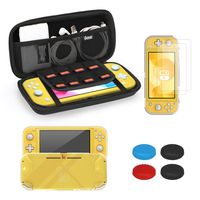
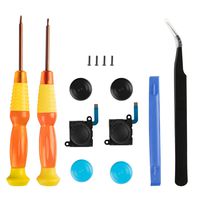
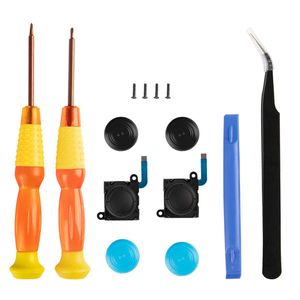
Joy con Repair Kit, YCCTEAM Switch Joystick Replacement Analog Thumb Stick for Nintendo Switch Joycon Controller- include 2 New Joysticks,Tri-Wing & Cross Screwdriver Tool + 4 Thumbstick Caps
Price is below average
Current Price
$13.99
Average
$14.99
Min Price
$13.99
Max Price
$15.99
Price dynamics
7%
Description
The Nintendo Switch comes with two Joy-Con controllers. This guide will show you how to replace the joystick of the Joy-Con.
Operation Instruction
Step 1: Remove 4 screws
Step 2: Use a pry bar to open the case
Step 3: Pry out the battery (Note: pay attention to the wires)
Step 4: Use a Phillips screwdriver to remove 5 screws (two types of screws)
Step 5: Slowly remove the middle compartment, open the cable valve, and remove the cable with tweezers
Step 6: Open the two cable valves next to the joystick, then remove the cable and remove the two screws
Step 7: Replace the new joystick, and then unscrew the two screws on the joystick, insert the cable with tweezers, and close the cable valve.
Step 8: Connect the compartment cables with tweezers, close the cable valve, cover the middle compartment, and tighten the screws.
Step 9: Close the back cover and tighten the screws.
Operation Instruction
Step 1: Remove 4 screws
Step 2: Use a pry bar to open the case
Step 3: Pry out the battery (Note: pay attention to the wires)
Step 4: Use a Phillips screwdriver to remove 5 screws (two types of screws)
Step 5: Slowly remove the middle compartment, open the cable valve, and remove the cable with tweezers
Step 6: Open the two cable valves next to the joystick, then remove the cable and remove the two screws
Step 7: Replace the new joystick, and then unscrew the two screws on the joystick, insert the cable with tweezers, and close the cable valve.
Step 8: Connect the compartment cables with tweezers, close the cable valve, cover the middle compartment, and tighten the screws.
Step 9: Close the back cover and tighten the screws.
Price will be lower
in next 2 weeks
in next 2 weeks
According to the data, price will be lower in next two weeks, so not waste your money and track better price!
Similar products