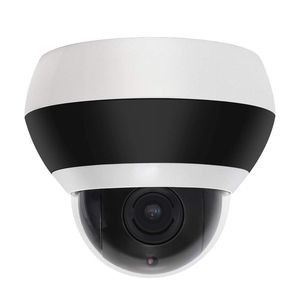
Description
LEFTEK YCD-PS series PTZ Camera is newly developed security surveillance camera with New appearance. Solved the reflective ring issue and foggy problem. And It achieves great improvement in IR night vision. Keep colorful and clear picture in low light for Star light feature.
Main Features
Day/Night Mode Auto Switch 24 Hours Surveillance
4X Optical Zoom with Auto Focus
65ft IR LED Working Distance
Improved IR Night Vision : No more aperture, see further and see more details
Support Colorful Mode in Low light
355°Horizontal Continuous Rotation at 80°/s, 90°Vertical Tilt at 80°/s
IP66 protection grade
Support lightning protection, surge protection, anti-surge function
Support park action, presets/pattern/patrol/pan scan can invoke automatically after a defined time of inactivity;
The standard 48V-52V (IEEE 802.3af standard )and POE power supply which only needs one network cable to supply power to the device, thereby reducing wiring costs and reducing interference to the transmission line.
Troubleshooting:
If there is no image,or image is unstable on your PC. It may be the IP conflict.
The default IP of camera is 192.168.0.200,password: admin. when accessing this ip camera on the web client on IE or NVR. It need to set the camera ip address to the same network IP segment of the connected devices. And it can use our search tool to change the camera ip address on the laptop.For example, if your computer ip address is 192.168.1.20 , then you need to change the camera ip address to 192.168.1. xx (xx rang from 0 to 225).Please note that we do not change the default ip address of camera as the computer is in same LAN (192.168.0.xx)
Wall mount sold separately
Package included:
1x Camera
1x User manual
1x Base Plat
Main Features
Day/Night Mode Auto Switch 24 Hours Surveillance
4X Optical Zoom with Auto Focus
65ft IR LED Working Distance
Improved IR Night Vision : No more aperture, see further and see more details
Support Colorful Mode in Low light
355°Horizontal Continuous Rotation at 80°/s, 90°Vertical Tilt at 80°/s
IP66 protection grade
Support lightning protection, surge protection, anti-surge function
Support park action, presets/pattern/patrol/pan scan can invoke automatically after a defined time of inactivity;
The standard 48V-52V (IEEE 802.3af standard )and POE power supply which only needs one network cable to supply power to the device, thereby reducing wiring costs and reducing interference to the transmission line.
Troubleshooting:
If there is no image,or image is unstable on your PC. It may be the IP conflict.
The default IP of camera is 192.168.0.200,password: admin. when accessing this ip camera on the web client on IE or NVR. It need to set the camera ip address to the same network IP segment of the connected devices. And it can use our search tool to change the camera ip address on the laptop.For example, if your computer ip address is 192.168.1.20 , then you need to change the camera ip address to 192.168.1. xx (xx rang from 0 to 225).Please note that we do not change the default ip address of camera as the computer is in same LAN (192.168.0.xx)
Wall mount sold separately
Package included:
1x Camera
1x User manual
1x Base Plat
LEFTEK Dome Camera PTZ Star Light Security Camera POE 1080P 4X Zoom 65ft IR CCTV Camera IP66 Weatherpoof (2.0MP)
Current Price
$109.99
Average
$109.99
Min Price
$109.99
Max Price
$109.99
Description
LEFTEK YCD-PS series PTZ Camera is newly developed security surveillance camera with New appearance. Solved the reflective ring issue and foggy problem. And It achieves great improvement in IR night vision. Keep colorful and clear picture in low light for Star light feature.
Main Features
Day/Night Mode Auto Switch 24 Hours Surveillance
4X Optical Zoom with Auto Focus
65ft IR LED Working Distance
Improved IR Night Vision : No more aperture, see further and see more details
Support Colorful Mode in Low light
355°Horizontal Continuous Rotation at 80°/s, 90°Vertical Tilt at 80°/s
IP66 protection grade
Support lightning protection, surge protection, anti-surge function
Support park action, presets/pattern/patrol/pan scan can invoke automatically after a defined time of inactivity;
The standard 48V-52V (IEEE 802.3af standard )and POE power supply which only needs one network cable to supply power to the device, thereby reducing wiring costs and reducing interference to the transmission line.
Troubleshooting:
If there is no image,or image is unstable on your PC. It may be the IP conflict.
The default IP of camera is 192.168.0.200,password: admin. when accessing this ip camera on the web client on IE or NVR. It need to set the camera ip address to the same network IP segment of the connected devices. And it can use our search tool to change the camera ip address on the laptop.For example, if your computer ip address is 192.168.1.20 , then you need to change the camera ip address to 192.168.1. xx (xx rang from 0 to 225).Please note that we do not change the default ip address of camera as the computer is in same LAN (192.168.0.xx)
Wall mount sold separately
Package included:
1x Camera
1x User manual
1x Base Plat
Main Features
Day/Night Mode Auto Switch 24 Hours Surveillance
4X Optical Zoom with Auto Focus
65ft IR LED Working Distance
Improved IR Night Vision : No more aperture, see further and see more details
Support Colorful Mode in Low light
355°Horizontal Continuous Rotation at 80°/s, 90°Vertical Tilt at 80°/s
IP66 protection grade
Support lightning protection, surge protection, anti-surge function
Support park action, presets/pattern/patrol/pan scan can invoke automatically after a defined time of inactivity;
The standard 48V-52V (IEEE 802.3af standard )and POE power supply which only needs one network cable to supply power to the device, thereby reducing wiring costs and reducing interference to the transmission line.
Troubleshooting:
If there is no image,or image is unstable on your PC. It may be the IP conflict.
The default IP of camera is 192.168.0.200,password: admin. when accessing this ip camera on the web client on IE or NVR. It need to set the camera ip address to the same network IP segment of the connected devices. And it can use our search tool to change the camera ip address on the laptop.For example, if your computer ip address is 192.168.1.20 , then you need to change the camera ip address to 192.168.1. xx (xx rang from 0 to 225).Please note that we do not change the default ip address of camera as the computer is in same LAN (192.168.0.xx)
Wall mount sold separately
Package included:
1x Camera
1x User manual
1x Base Plat
Price will be lower
in next 2 weeks
in next 2 weeks
According to the data, price will be lower in next two weeks, so not waste your money and track better price!
Product review & video
[Music] okay so today we're going to unbox this camera system it's a poor camera wireless system where you going to unbox and install today [Music] this one does not come with a partner which you can have later on so here's our little user right now okay sorry now we're going to go ahead and just set it up upstairs we'll probably relocate it later on here is your little box right here the handles are two antennas on the back has HDMI ports has a VGA or network port and USB port and a power and it's pretty lightly now there's no hard drive minute both let's go ahead and unscrew it later and then we'll see help we can add a hard drive if you have some spare part res nots we tell the hard drive is compatible with the system in this box right here network cable little mouse [Music] our user closely template cables to go ahead and plug and the camera see so see how far we did place a camera



Similar products







































