Description
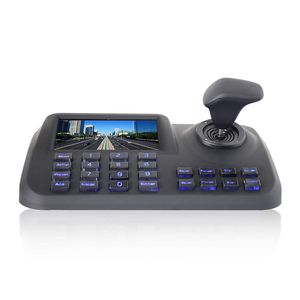
This network control keyboard is a powerful three-dimensional with multi-function, easy to operate, no need to make any setting,plug and play; powerful hardware decoding capabilities, the first to achieve industry IP dome unlimited access for large safe City projects, support 5.0 "LED LCD HD real-time display; Support HDMI output to achieve the main console screen and control equipment screen salvo (comes matrix switching function), reducing installation costs! Support 5MP Camera. Support ONVIF2.4, back-end PTZ not restricted by manufacturer , wide compatibility, with PTZ tour, A-B scan, 360°, pattern and so on functions.
Features
1. ONVIF2.4 compatible
2. 5'' colorful LED display
3. Plug and Play , automatically add and distribute IP address
4. 3D jostick
5. Support USB and HDMI output
Specification
Product Name: Network keyboard controller
Control Mode: Network
Controllable Device: Network High Speed Dome
Screen display: 5.0" HD LED Display
Interface: 1xRJ45 , 2xRS485 (reserved) , 1xDC12V power , 1xHDMI , 1xUSB
Ambient Temp.: -20℃~+55℃
Power Supply: DC12V/2000MA
Operating Humidity ≤90% Non Condensing
ONVIF: ONVIF2.4
Joystick: Vector variable speed joystick
Baud Rate :9600bps
Communication Distance: depend on network cable
Display screen : 5'' LED
Language: English
Access Device No.: No upper limit (display by single picture)
Image Switch Mode: Serial number or mouse
Packing Lists
1 * IP Keyboard controller
1 * Power Adaptor
1 * CD
1 * User Manual
Any question, please contact with support@inesun.cn
We can send you the video of how to use this keyboard
Features
1. ONVIF2.4 compatible
2. 5'' colorful LED display
3. Plug and Play , automatically add and distribute IP address
4. 3D jostick
5. Support USB and HDMI output
Specification
Product Name: Network keyboard controller
Control Mode: Network
Controllable Device: Network High Speed Dome
Screen display: 5.0" HD LED Display
Interface: 1xRJ45 , 2xRS485 (reserved) , 1xDC12V power , 1xHDMI , 1xUSB
Ambient Temp.: -20℃~+55℃
Power Supply: DC12V/2000MA
Operating Humidity ≤90% Non Condensing
ONVIF: ONVIF2.4
Joystick: Vector variable speed joystick
Baud Rate :9600bps
Communication Distance: depend on network cable
Display screen : 5'' LED
Language: English
Access Device No.: No upper limit (display by single picture)
Image Switch Mode: Serial number or mouse
Packing Lists
1 * IP Keyboard controller
1 * Power Adaptor
1 * CD
1 * User Manual
Any question, please contact with support@inesun.cn
We can send you the video of how to use this keyboard
Inesun IP PTZ Controller Joystick LCD for Security (Pan Tilt Zoom) Speed Dome Camera 5 inch 3D HD LCD Display Keyboard Controller, Black
Current Price
$199.99
Average
$199.98
Min Price
$199.97
Max Price
$199.99
Price dynamics
0%
Description
This network control keyboard is a powerful three-dimensional with multi-function, easy to operate, no need to make any setting,plug and play; powerful hardware decoding capabilities, the first to achieve industry IP dome unlimited access for large safe City projects, support 5.0 "LED LCD HD real-time display; Support HDMI output to achieve the main console screen and control equipment screen salvo (comes matrix switching function), reducing installation costs! Support 5MP Camera. Support ONVIF2.4, back-end PTZ not restricted by manufacturer , wide compatibility, with PTZ tour, A-B scan, 360°, pattern and so on functions.
Features
1. ONVIF2.4 compatible
2. 5'' colorful LED display
3. Plug and Play , automatically add and distribute IP address
4. 3D jostick
5. Support USB and HDMI output
Specification
Product Name: Network keyboard controller
Control Mode: Network
Controllable Device: Network High Speed Dome
Screen display: 5.0" HD LED Display
Interface: 1xRJ45 , 2xRS485 (reserved) , 1xDC12V power , 1xHDMI , 1xUSB
Ambient Temp.: -20℃~+55℃
Power Supply: DC12V/2000MA
Operating Humidity ≤90% Non Condensing
ONVIF: ONVIF2.4
Joystick: Vector variable speed joystick
Baud Rate :9600bps
Communication Distance: depend on network cable
Display screen : 5'' LED
Language: English
Access Device No.: No upper limit (display by single picture)
Image Switch Mode: Serial number or mouse
Packing Lists
1 * IP Keyboard controller
1 * Power Adaptor
1 * CD
1 * User Manual
Any question, please contact with support@inesun.cn
We can send you the video of how to use this keyboard
Features
1. ONVIF2.4 compatible
2. 5'' colorful LED display
3. Plug and Play , automatically add and distribute IP address
4. 3D jostick
5. Support USB and HDMI output
Specification
Product Name: Network keyboard controller
Control Mode: Network
Controllable Device: Network High Speed Dome
Screen display: 5.0" HD LED Display
Interface: 1xRJ45 , 2xRS485 (reserved) , 1xDC12V power , 1xHDMI , 1xUSB
Ambient Temp.: -20℃~+55℃
Power Supply: DC12V/2000MA
Operating Humidity ≤90% Non Condensing
ONVIF: ONVIF2.4
Joystick: Vector variable speed joystick
Baud Rate :9600bps
Communication Distance: depend on network cable
Display screen : 5'' LED
Language: English
Access Device No.: No upper limit (display by single picture)
Image Switch Mode: Serial number or mouse
Packing Lists
1 * IP Keyboard controller
1 * Power Adaptor
1 * CD
1 * User Manual
Any question, please contact with support@inesun.cn
We can send you the video of how to use this keyboard
Price will be lower
in next 2 weeks
in next 2 weeks
According to the data, price will be lower in next two weeks, so not waste your money and track better price!
Product review & video
[Music] in this video we're going to show you how to connect a pan tilt zoom camera to a pdz joystick controller we have the setup wired with a cable from the pan tilt zoom camera and it's rs-485 outputs connected to the controller the setup applies to any pdz camera and joystick controller combination here we've chosen to use DC terminals to make the job easier with a DC male pigtail connected to the rs-485 outputs from the PTZ cable connecting to a female DC pigtail that's in turn connected to the rs-485 outputs from the pan tilt zoom joystick controller when setting up your PTZ to a joystick controller you have to remember there are mainly two types of connections that come into play to make sure this is done properly one is the hard wired connection and the other is the software settings inside your joystick controller first you want to identify the positive and negative leads for t



Similar products







































