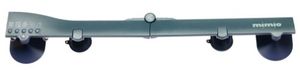
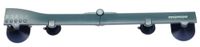
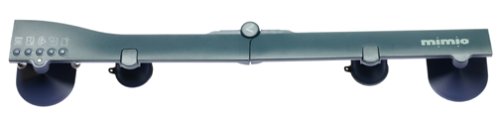
Whether you're brainstorming with your team, presenting complex ideas, or instructing a class through distance learning, the Mimio Digital Meeting Assistant whiteboard scanner is a valuable timesaving tool that adds clarity to all your presentations while saving your work as you go. Electronic whiteboards free meeting participants of the distracting and time-consuming task of note taking by combining a touch-sensitive writing surface with a scanner and a thermal printer. With the Mimio Digital Meeting Assistant, anything written or drawn on the board surface can be scanned and printed, allowing the participants to remain focused on and engage in the topic at hand.Mount the Mimio Digital Meeting Assistant capture bar on any whiteboard up to 4 by 8 feet to record the notes and thinking processes of lessons and meetings on to your computer. Used with your PC, the easy-to-use software displays the basic commands on the screen. All your work is recorded sequentially, so you can save information, then wipe the board clean to proceed to your next thoughts. Easily fastened with either lever-action suction cups or permanent mounting brackets, the bar attaches vertically to a wide board or horizontally on a portrait-size whiteboard. The capture bar has five command buttons, making quick work of tasks like starting a new board, tagging a board for later reference, printing, maximizing a board, or activating the Mimio control panel. Once the information is preserved on the computer, the images can be printed, faxed, or e-mailed.
Used with standard Windows applications, the Mimio Digital Meeting Assistant works in real time in color with one-touch printing, e-mail, fax, or HTML capability, all controlled from the front of the room. When used with an LCD projector, your whiteboard becomes a Windows desktop. Plus, you can use a Mimio stylus as a mouse to click, double-click, and drag and drop in any Windows application. --Barbara Price