Description
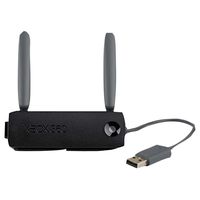
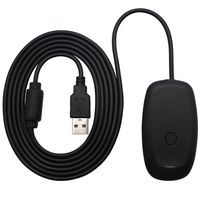
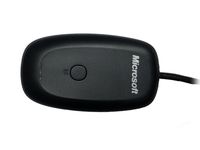
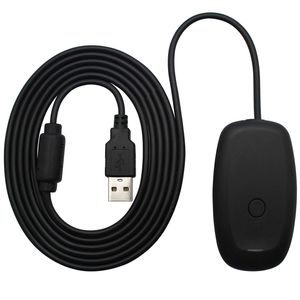
*The Xbox 360 Wireless Gaming Receiver for Windows lets you take your quality, wireless gaming experiences that you enjoy on your console and experience them on your Windows gaming platform
*Use integrated 2.4 gigahertz(GHz) high-performance wireless technology that lets you operate a wireless device from up to 30 feet away
*Let you use up to four wireless controllers and four wireless headsets together with one wireless gaming receiver
*Easily integrates with PC gaming scenarios and utilizes the same binding technology as Xbox 360.
*Plugs into a PC USB port and has a 6 feet cable
How to use:
*Before you connect the PC Gaming Receiver to the computer, insert the installation disc in the disc drive on the computer
*Follow the steps in the wizard to install the software
*Remove the green label from the USB connector on the PC Wireless Gaming Receiver
*Insert the USB connector into an available powered USB 2.0 port on tne computer
*When your USB connector inserted a dialog Pop up with the 'Welcome to Found New Hardware Wizard' ,Then need select option 'Install from a list or specific location(Advanced)',click on button 'Next'
*Make sure the 'Search for best driver in these locations' is selected and unselect 'Search removable media', Also select 'Include this location in the search', Browse to 'USB Driver' in CD folder, click on button 'Next'
*The 'Completing the Found New Hardware Wizard' screen will appear and click on button 'Finish'
Note:
*The Wireless Gaming Receiver requires a powered USB port to operate. If you're using the Wireless Gaming Receiver with a USB hub, the USB hub must have an external power source.
Package Includes: 1 x Wireless gaming receiver
1 x Driver CD
Compatible with: Microsoft widows XP-based computers and the Xbox 360 video game and entertainment system.
*Use integrated 2.4 gigahertz(GHz) high-performance wireless technology that lets you operate a wireless device from up to 30 feet away
*Let you use up to four wireless controllers and four wireless headsets together with one wireless gaming receiver
*Easily integrates with PC gaming scenarios and utilizes the same binding technology as Xbox 360.
*Plugs into a PC USB port and has a 6 feet cable
How to use:
*Before you connect the PC Gaming Receiver to the computer, insert the installation disc in the disc drive on the computer
*Follow the steps in the wizard to install the software
*Remove the green label from the USB connector on the PC Wireless Gaming Receiver
*Insert the USB connector into an available powered USB 2.0 port on tne computer
*When your USB connector inserted a dialog Pop up with the 'Welcome to Found New Hardware Wizard' ,Then need select option 'Install from a list or specific location(Advanced)',click on button 'Next'
*Make sure the 'Search for best driver in these locations' is selected and unselect 'Search removable media', Also select 'Include this location in the search', Browse to 'USB Driver' in CD folder, click on button 'Next'
*The 'Completing the Found New Hardware Wizard' screen will appear and click on button 'Finish'
Note:
*The Wireless Gaming Receiver requires a powered USB port to operate. If you're using the Wireless Gaming Receiver with a USB hub, the USB hub must have an external power source.
Package Includes: 1 x Wireless gaming receiver
1 x Driver CD
Compatible with: Microsoft widows XP-based computers and the Xbox 360 video game and entertainment system.
OSTENT USB Wireless Controller PC Laptop Receiver Compatible for Microsoft Xbox 360 Slim Game Color Black
Current Price
$15.49
Average
$15.1
Min Price
$12
Max Price
$18.99
Price dynamics
3%
Description
*The Xbox 360 Wireless Gaming Receiver for Windows lets you take your quality, wireless gaming experiences that you enjoy on your console and experience them on your Windows gaming platform
*Use integrated 2.4 gigahertz(GHz) high-performance wireless technology that lets you operate a wireless device from up to 30 feet away
*Let you use up to four wireless controllers and four wireless headsets together with one wireless gaming receiver
*Easily integrates with PC gaming scenarios and utilizes the same binding technology as Xbox 360.
*Plugs into a PC USB port and has a 6 feet cable
How to use:
*Before you connect the PC Gaming Receiver to the computer, insert the installation disc in the disc drive on the computer
*Follow the steps in the wizard to install the software
*Remove the green label from the USB connector on the PC Wireless Gaming Receiver
*Insert the USB connector into an available powered USB 2.0 port on tne computer
*When your USB connector inserted a dialog Pop up with the 'Welcome to Found New Hardware Wizard' ,Then need select option 'Install from a list or specific location(Advanced)',click on button 'Next'
*Make sure the 'Search for best driver in these locations' is selected and unselect 'Search removable media', Also select 'Include this location in the search', Browse to 'USB Driver' in CD folder, click on button 'Next'
*The 'Completing the Found New Hardware Wizard' screen will appear and click on button 'Finish'
Note:
*The Wireless Gaming Receiver requires a powered USB port to operate. If you're using the Wireless Gaming Receiver with a USB hub, the USB hub must have an external power source.
Package Includes: 1 x Wireless gaming receiver
1 x Driver CD
Compatible with: Microsoft widows XP-based computers and the Xbox 360 video game and entertainment system.
*Use integrated 2.4 gigahertz(GHz) high-performance wireless technology that lets you operate a wireless device from up to 30 feet away
*Let you use up to four wireless controllers and four wireless headsets together with one wireless gaming receiver
*Easily integrates with PC gaming scenarios and utilizes the same binding technology as Xbox 360.
*Plugs into a PC USB port and has a 6 feet cable
How to use:
*Before you connect the PC Gaming Receiver to the computer, insert the installation disc in the disc drive on the computer
*Follow the steps in the wizard to install the software
*Remove the green label from the USB connector on the PC Wireless Gaming Receiver
*Insert the USB connector into an available powered USB 2.0 port on tne computer
*When your USB connector inserted a dialog Pop up with the 'Welcome to Found New Hardware Wizard' ,Then need select option 'Install from a list or specific location(Advanced)',click on button 'Next'
*Make sure the 'Search for best driver in these locations' is selected and unselect 'Search removable media', Also select 'Include this location in the search', Browse to 'USB Driver' in CD folder, click on button 'Next'
*The 'Completing the Found New Hardware Wizard' screen will appear and click on button 'Finish'
Note:
*The Wireless Gaming Receiver requires a powered USB port to operate. If you're using the Wireless Gaming Receiver with a USB hub, the USB hub must have an external power source.
Package Includes: 1 x Wireless gaming receiver
1 x Driver CD
Compatible with: Microsoft widows XP-based computers and the Xbox 360 video game and entertainment system.
Price will be lower
in next 2 weeks
in next 2 weeks
According to the data, price will be lower in next two weeks, so not waste your money and track better price!
Similar products