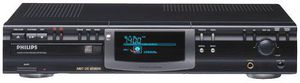
The CDR770BK offers CD-R (write-once) and CD-RW (rewritable) compatibility and streamlined recording for single-track or whole-disc recordings. This CD recorder also offers CD Text (for reading text-encoded artist and track information) and text-entry ability, so you can enter titles and artist names for discs as well as individual tracks. In our view, this feature is extremely cool, especially for people who make a lot of compilations, where keeping track of who and what you're listening to after the fact is often tricky.
Multiple inputs (analog as well as coaxial and optical digital) and internal sample-rate conversion (to allow recording from DSS or DAT) expand your recording-source options, while a balance control lets you adjust the left/right input levels independently--even when making a digital recording (though you can't adjust the overall recording level when making a digital copy).
As with all CD recorders, discs must be finalized before you can play them on standard nonrecording CD players. The finalization process takes roughly four minutes. CD-RWs can be unfinalized and rerecorded (either by erasing the last track on the disc or the whole disc), while CD-Rs are permanent once they're finalized--you can't add any more material. More importantly, perhaps, you can never erase anything from a CD-R; once it's been recorded, it's permanent, whether you finalize the disc or not. If you're new to recording on CDs, it's a good practice to do a trial run on a CD-RW before you record your first CD-R. Another pointer: heed the manual's advice about level setting when making an analog copy of anything--setting the recording level too high can result in distorted, unlistenable
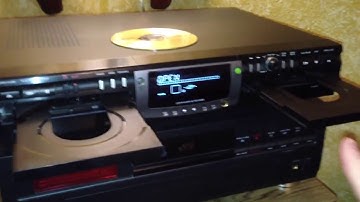
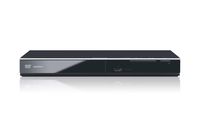
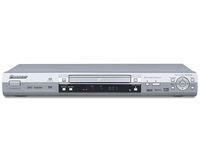
Philips CDR770BK CD Recorder
The CDR770BK offers CD-R (write-once) and CD-RW (rewritable) compatibility and streamlined recording for single-track or whole-disc recordings. This CD recorder also offers CD Text (for reading text-encoded artist and track information) and text-entry ability, so you can enter titles and artist names for discs as well as individual tracks. In our view, this feature is extremely cool, especially for people who make a lot of compilations, where keeping track of who and what you're listening to after the fact is often tricky.
Multiple inputs (analog as well as coaxial and optical digital) and internal sample-rate conversion (to allow recording from DSS or DAT) expand your recording-source options, while a balance control lets you adjust the left/right input levels independently--even when making a digital recording (though you can't adjust the overall recording level when making a digital copy).
As with all CD recorders, discs must be finalized before you can play them on standard nonrecording CD players. The finalization process takes roughly four minutes. CD-RWs can be unfinalized and rerecorded (either by erasing the last track on the disc or the whole disc), while CD-Rs are permanent once they're finalized--you can't add any more material. More importantly, perhaps, you can never erase anything from a CD-R; once it's been recorded, it's permanent, whether you finalize the disc or not. If you're new to recording on CDs, it's a good practice to do a trial run on a CD-RW before you record your first CD-R. Another pointer: heed the manual's advice about level setting when making an analog copy of anything--setting the recording level too high can result in distorted, unlistenable
in next 2 weeks