Description
Description
Safe: Keeps your hands clear of dangerous machinery
Multifunctional: Program it as a key shortcut, key combination, mouse action, type a string, multimedia control, or game control
Easy and Convenient: Simply install the software to customize the action based on the instructions below, and the multifunction control button can assist you in automating your tasks
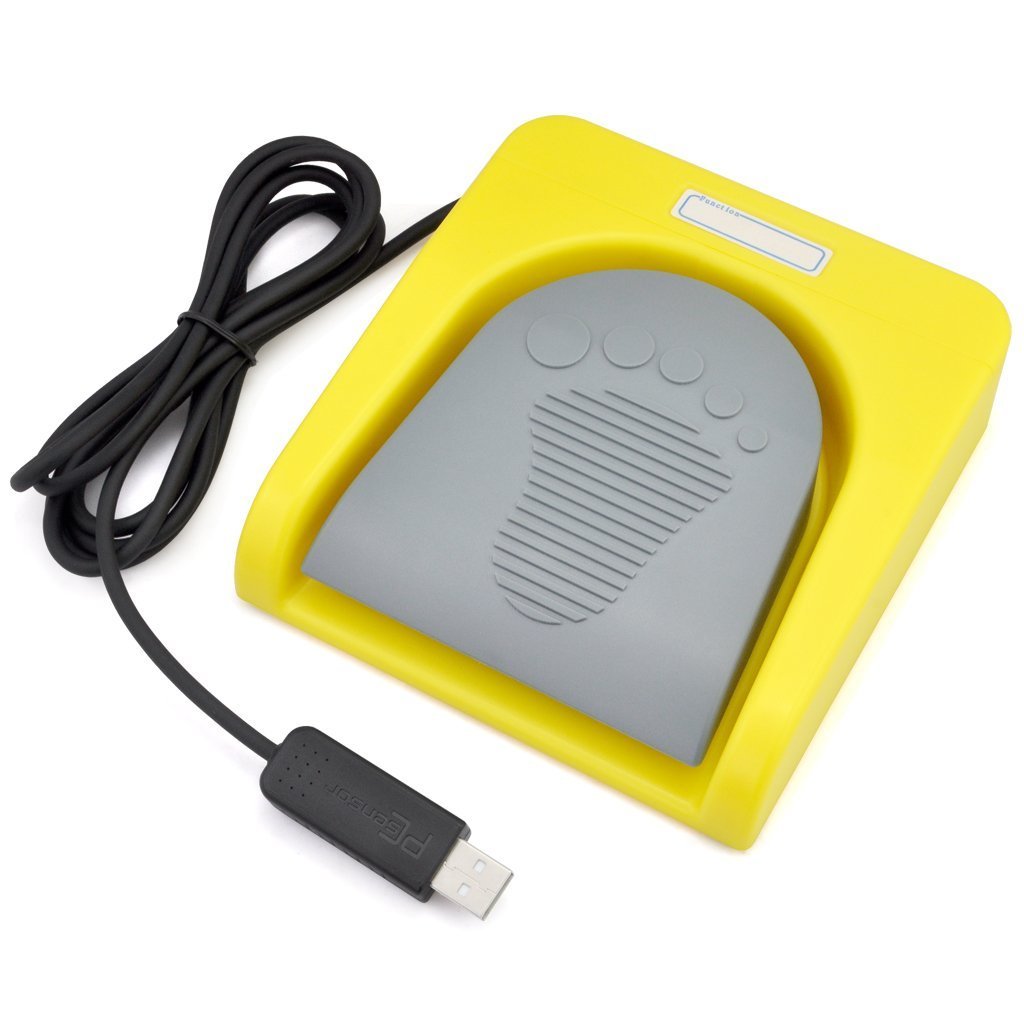
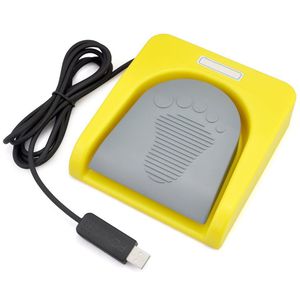
Beautiful Design: Yellow shell and light control button with footmark, which is child friendly
Footswitch is one key customized computer keyboard.Compatible with
(l)Dos
(2)Win 2000
(3)Win xp
(4)Win 7
(5)Win 8
(6)Win 10
(7)Linux
(8)MAC
(9)Android
(Note: if your computer system is DOS, Mac, Linux, IOS or android, you'll need to configure the device on a Windows machine. After successful configuration, you may then use the device on your Linux or other system computer.)
Software Installation
1. Download software http://software.pcsensor.com "FootSwitch.exe" or newest software
2. Plug the USB Foot Pedal to USB Port of your computer;
3. Run "FootSwitch.exe";
4. Select the function that you want to setting, assign it and program it to any key of your choice .Once you have adjusted the pedal settings with the software it will work with your other programs as the function you programmed it to be;
5. When complete, click the "Save" icon.
Specifications
Item Size: 5.55"x5.15"x1.38" / 141x131x35mm
Item Weight: 9.7 oz / 274g
Internal Switch: 5A/250VAC
Lifetime: over 100,000 times
Package included
1x Foot Switch with USB cable
1x Use Manual
Safe: Keeps your hands clear of dangerous machinery
Multifunctional: Program it as a key shortcut, key combination, mouse action, type a string, multimedia control, or game control
Easy and Convenient: Simply install the software to customize the action based on the instructions below, and the multifunction control button can assist you in automating your tasks
Beautiful Design: Yellow shell and light control button with footmark, which is child friendly
Footswitch is one key customized computer keyboard.Compatible with
(l)Dos
(2)Win 2000
(3)Win xp
(4)Win 7
(5)Win 8
(6)Win 10
(7)Linux
(8)MAC
(9)Android
(Note: if your computer system is DOS, Mac, Linux, IOS or android, you'll need to configure the device on a Windows machine. After successful configuration, you may then use the device on your Linux or other system computer.)
Software Installation
1. Download software http://software.pcsensor.com "FootSwitch.exe" or newest software
2. Plug the USB Foot Pedal to USB Port of your computer;
3. Run "FootSwitch.exe";
4. Select the function that you want to setting, assign it and program it to any key of your choice .Once you have adjusted the pedal settings with the software it will work with your other programs as the function you programmed it to be;
5. When complete, click the "Save" icon.
Specifications
Item Size: 5.55"x5.15"x1.38" / 141x131x35mm
Item Weight: 9.7 oz / 274g
Internal Switch: 5A/250VAC
Lifetime: over 100,000 times
Package included
1x Foot Switch with USB cable
1x Use Manual
iKKEGOL USB Single Foot Switch Control One Key Customized Computer Keyboard Action Pedal HID Yellow
Current Price
$23.99
Average
$23.66
Min Price
$22.99
Max Price
$23.99
Price dynamics
1%
Description
Description
Safe: Keeps your hands clear of dangerous machinery
Multifunctional: Program it as a key shortcut, key combination, mouse action, type a string, multimedia control, or game control
Easy and Convenient: Simply install the software to customize the action based on the instructions below, and the multifunction control button can assist you in automating your tasks
Beautiful Design: Yellow shell and light control button with footmark, which is child friendly
Footswitch is one key customized computer keyboard.Compatible with
(l)Dos
(2)Win 2000
(3)Win xp
(4)Win 7
(5)Win 8
(6)Win 10
(7)Linux
(8)MAC
(9)Android
(Note: if your computer system is DOS, Mac, Linux, IOS or android, you'll need to configure the device on a Windows machine. After successful configuration, you may then use the device on your Linux or other system computer.)
Software Installation
1. Download software http://software.pcsensor.com "FootSwitch.exe" or newest software
2. Plug the USB Foot Pedal to USB Port of your computer;
3. Run "FootSwitch.exe";
4. Select the function that you want to setting, assign it and program it to any key of your choice .Once you have adjusted the pedal settings with the software it will work with your other programs as the function you programmed it to be;
5. When complete, click the "Save" icon.
Specifications
Item Size: 5.55"x5.15"x1.38" / 141x131x35mm
Item Weight: 9.7 oz / 274g
Internal Switch: 5A/250VAC
Lifetime: over 100,000 times
Package included
1x Foot Switch with USB cable
1x Use Manual
Safe: Keeps your hands clear of dangerous machinery
Multifunctional: Program it as a key shortcut, key combination, mouse action, type a string, multimedia control, or game control
Easy and Convenient: Simply install the software to customize the action based on the instructions below, and the multifunction control button can assist you in automating your tasks
Beautiful Design: Yellow shell and light control button with footmark, which is child friendly
Footswitch is one key customized computer keyboard.Compatible with
(l)Dos
(2)Win 2000
(3)Win xp
(4)Win 7
(5)Win 8
(6)Win 10
(7)Linux
(8)MAC
(9)Android
(Note: if your computer system is DOS, Mac, Linux, IOS or android, you'll need to configure the device on a Windows machine. After successful configuration, you may then use the device on your Linux or other system computer.)
Software Installation
1. Download software http://software.pcsensor.com "FootSwitch.exe" or newest software
2. Plug the USB Foot Pedal to USB Port of your computer;
3. Run "FootSwitch.exe";
4. Select the function that you want to setting, assign it and program it to any key of your choice .Once you have adjusted the pedal settings with the software it will work with your other programs as the function you programmed it to be;
5. When complete, click the "Save" icon.
Specifications
Item Size: 5.55"x5.15"x1.38" / 141x131x35mm
Item Weight: 9.7 oz / 274g
Internal Switch: 5A/250VAC
Lifetime: over 100,000 times
Package included
1x Foot Switch with USB cable
1x Use Manual
Price will be lower
in next 2 weeks
in next 2 weeks
According to the data, price will be lower in next two weeks, so not waste your money and track better price!
Product review & video
what is up everyone here with a another product review so I've been getting a lot of questions like truth what do you use on your stream what kind of setup do you have what different equipment do you have throughout the room so I want to do that for you guys keep in mind this is a review from a streamers perspective I live stream on Twitch in fact I'm a full-time live streamer into it so please go check me out there to hear and see all this equipment live in action item I'm reviewing is the Cagle USB foot switch so I picked this up on Amazon and it's only $24 so definitely a steal and I was using this for a very particular reason I wanted something that I could use as essentially a push-to-talk key as I was playing games so my hands were free to game because I had one hand on my keyboard then one hand out of my mouse and I was like okay what point am I going to press for push-to-talk an



Similar products