Description
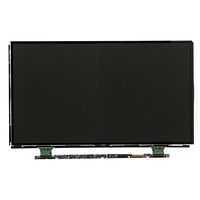
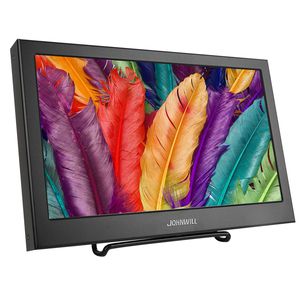
JOHNWILL 11.6 inch Portable Monitor:
Detailed Specification:
Screen size: 11.6"
Panel type: IPS
Shell material: CNC aluminum alloy
Resolution: 1920 * 1080
Response time: 2ms
Brightness: 300cd / m
Contrast: 800:1
Widescreen: yes
Screen ratio: 16:9
Viewing angle: 178°
Monitor weight: 33.84pounds
Monitor thickness: 11mm
Monitor size: 281 x 170x 11 mm
It Can Use For Following Area:
1、The Monitor Can Used as second screen for Laptop,smartphone,mobile phone,iphone.
2、Work As Portable Game Monitor,It Compatible With XBOX ONE S,XBOX ONE,PS4,PS3,Xbox 360.
3、Streaming Media Play/TV Box Monitor:It Support Most Hdmi Input Device,It Give A Full HD Visual Enjoyment.
Connection Method:
Step1: Connect your device with the monitor via mini HDMI to HDMI carble;
Step2: Power the monitor with the included Micro USB carble.
Steps to Change the Language Setting:
1. Press the first button (menu)
2. Press the third button (-) ODS
3. Press the first button twice (语言选择)
4. Press the third button (-) to select ENGLISH
5. Press the first button (menu)
Setup is complete
Detailed Specification:
Screen size: 11.6"
Panel type: IPS
Shell material: CNC aluminum alloy
Resolution: 1920 * 1080
Response time: 2ms
Brightness: 300cd / m
Contrast: 800:1
Widescreen: yes
Screen ratio: 16:9
Viewing angle: 178°
Monitor weight: 33.84pounds
Monitor thickness: 11mm
Monitor size: 281 x 170x 11 mm
It Can Use For Following Area:
1、The Monitor Can Used as second screen for Laptop,smartphone,mobile phone,iphone.
2、Work As Portable Game Monitor,It Compatible With XBOX ONE S,XBOX ONE,PS4,PS3,Xbox 360.
3、Streaming Media Play/TV Box Monitor:It Support Most Hdmi Input Device,It Give A Full HD Visual Enjoyment.
Connection Method:
Step1: Connect your device with the monitor via mini HDMI to HDMI carble;
Step2: Power the monitor with the included Micro USB carble.
Steps to Change the Language Setting:
1. Press the first button (menu)
2. Press the third button (-) ODS
3. Press the first button twice (语言选择)
4. Press the third button (-) to select ENGLISH
5. Press the first button (menu)
Setup is complete
Portable HDMI Monitor,JOHNWILL 11.6 Inch 1920X1080 HDMI VGA Gaming Monitor for PS3 PS4 WiiU Xbox360 Display Monitor for Raspberry Pi Windows 7 8 10, Built-in Speaker, for Security Camera
Current Price
$95.99
Average
$88.62
Min Price
$72.5
Max Price
$95.99
Price dynamics
8%
Description
JOHNWILL 11.6 inch Portable Monitor:
Detailed Specification:
Screen size: 11.6"
Panel type: IPS
Shell material: CNC aluminum alloy
Resolution: 1920 * 1080
Response time: 2ms
Brightness: 300cd / m
Contrast: 800:1
Widescreen: yes
Screen ratio: 16:9
Viewing angle: 178°
Monitor weight: 33.84pounds
Monitor thickness: 11mm
Monitor size: 281 x 170x 11 mm
It Can Use For Following Area:
1、The Monitor Can Used as second screen for Laptop,smartphone,mobile phone,iphone.
2、Work As Portable Game Monitor,It Compatible With XBOX ONE S,XBOX ONE,PS4,PS3,Xbox 360.
3、Streaming Media Play/TV Box Monitor:It Support Most Hdmi Input Device,It Give A Full HD Visual Enjoyment.
Connection Method:
Step1: Connect your device with the monitor via mini HDMI to HDMI carble;
Step2: Power the monitor with the included Micro USB carble.
Steps to Change the Language Setting:
1. Press the first button (menu)
2. Press the third button (-) ODS
3. Press the first button twice (语言选择)
4. Press the third button (-) to select ENGLISH
5. Press the first button (menu)
Setup is complete
Detailed Specification:
Screen size: 11.6"
Panel type: IPS
Shell material: CNC aluminum alloy
Resolution: 1920 * 1080
Response time: 2ms
Brightness: 300cd / m
Contrast: 800:1
Widescreen: yes
Screen ratio: 16:9
Viewing angle: 178°
Monitor weight: 33.84pounds
Monitor thickness: 11mm
Monitor size: 281 x 170x 11 mm
It Can Use For Following Area:
1、The Monitor Can Used as second screen for Laptop,smartphone,mobile phone,iphone.
2、Work As Portable Game Monitor,It Compatible With XBOX ONE S,XBOX ONE,PS4,PS3,Xbox 360.
3、Streaming Media Play/TV Box Monitor:It Support Most Hdmi Input Device,It Give A Full HD Visual Enjoyment.
Connection Method:
Step1: Connect your device with the monitor via mini HDMI to HDMI carble;
Step2: Power the monitor with the included Micro USB carble.
Steps to Change the Language Setting:
1. Press the first button (menu)
2. Press the third button (-) ODS
3. Press the first button twice (语言选择)
4. Press the third button (-) to select ENGLISH
5. Press the first button (menu)
Setup is complete
Price will be lower
in next 2 weeks
in next 2 weeks
According to the data, price will be lower in next two weeks, so not waste your money and track better price!

Similar products