Description
► How to connect wirelessly?
1. Connect to console with cable(included) while the controller is off, charge for 10 minutes, press and hold HOME button (Red/Yellow round button) for 3 seconds until only 1 indicator works.
2. Then disconnect the cable, wait for one or two minutes. It will pair Bluetooth automatically with the console (The 4 indicators will stop blinking, instead only 1 indicator remains bright, meaning it is connected already).
3. If the initial sync fails, put a needle (pin/paper clip) into the mini hole at the back of the controller and press the button to reset it.
► How to turn on/off?
The controller will start when you press the round button or connect with computer by date cable. It will turn off when it takes 5 minutes after it is disconnected.
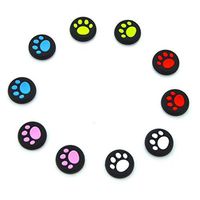
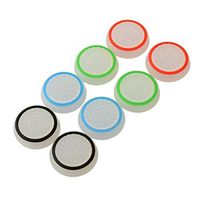
If it can not stop working after a long time, please plug the data cable in computer then pull it out, thus it will be power off. What You Get: 2 x PS3 Wireless Controller, 1x Charging Cable, 4 x Thumb Grip(Gift).
► Note: - Third-party controller, not made by SONY.
- Please charge the controller fully before use.
- If your PS3 controller is not charging, press the "Reset" button (mini hole at the back of the controller) and then charge the controller as usual.
- Our controller doesn't fit for the charging dock as its unique design.
- If you are not 100% happy with our PS3 controller for any reason please contact us in time. We will reply within 24 hours and try our best to offer a satisfactory solution.
1. Connect to console with cable(included) while the controller is off, charge for 10 minutes, press and hold HOME button (Red/Yellow round button) for 3 seconds until only 1 indicator works.
2. Then disconnect the cable, wait for one or two minutes. It will pair Bluetooth automatically with the console (The 4 indicators will stop blinking, instead only 1 indicator remains bright, meaning it is connected already).
3. If the initial sync fails, put a needle (pin/paper clip) into the mini hole at the back of the controller and press the button to reset it.
► How to turn on/off?
The controller will start when you press the round button or connect with computer by date cable. It will turn off when it takes 5 minutes after it is disconnected.
If it can not stop working after a long time, please plug the data cable in computer then pull it out, thus it will be power off. What You Get: 2 x PS3 Wireless Controller, 1x Charging Cable, 4 x Thumb Grip(Gift).
► Note: - Third-party controller, not made by SONY.
- Please charge the controller fully before use.
- If your PS3 controller is not charging, press the "Reset" button (mini hole at the back of the controller) and then charge the controller as usual.
- Our controller doesn't fit for the charging dock as its unique design.
- If you are not 100% happy with our PS3 controller for any reason please contact us in time. We will reply within 24 hours and try our best to offer a satisfactory solution.
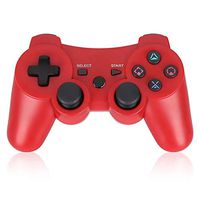
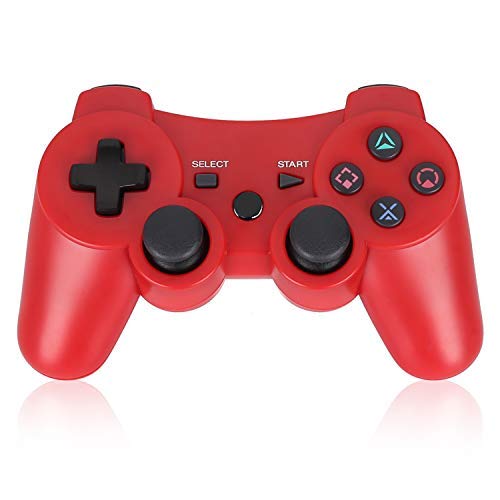
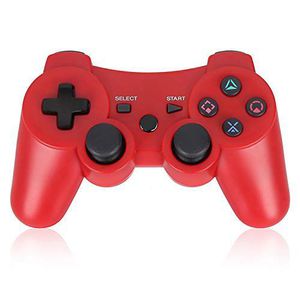
PS3 Controller Wireless Double Shock Gamepad for Playstation 3, Sixaxis Wireless PS3 Controller with Charging Cable,Compatible with Playstation 3 (RED)
Price is below average
Current Price
$9.9
Average
$11.52
Min Price
$8.99
Max Price
$15.99
Price dynamics
14%
Description
► How to connect wirelessly?
1. Connect to console with cable(included) while the controller is off, charge for 10 minutes, press and hold HOME button (Red/Yellow round button) for 3 seconds until only 1 indicator works.
2. Then disconnect the cable, wait for one or two minutes. It will pair Bluetooth automatically with the console (The 4 indicators will stop blinking, instead only 1 indicator remains bright, meaning it is connected already).
3. If the initial sync fails, put a needle (pin/paper clip) into the mini hole at the back of the controller and press the button to reset it.
► How to turn on/off?
The controller will start when you press the round button or connect with computer by date cable. It will turn off when it takes 5 minutes after it is disconnected.
If it can not stop working after a long time, please plug the data cable in computer then pull it out, thus it will be power off. What You Get: 2 x PS3 Wireless Controller, 1x Charging Cable, 4 x Thumb Grip(Gift).
► Note: - Third-party controller, not made by SONY.
- Please charge the controller fully before use.
- If your PS3 controller is not charging, press the "Reset" button (mini hole at the back of the controller) and then charge the controller as usual.
- Our controller doesn't fit for the charging dock as its unique design.
- If you are not 100% happy with our PS3 controller for any reason please contact us in time. We will reply within 24 hours and try our best to offer a satisfactory solution.
1. Connect to console with cable(included) while the controller is off, charge for 10 minutes, press and hold HOME button (Red/Yellow round button) for 3 seconds until only 1 indicator works.
2. Then disconnect the cable, wait for one or two minutes. It will pair Bluetooth automatically with the console (The 4 indicators will stop blinking, instead only 1 indicator remains bright, meaning it is connected already).
3. If the initial sync fails, put a needle (pin/paper clip) into the mini hole at the back of the controller and press the button to reset it.
► How to turn on/off?
The controller will start when you press the round button or connect with computer by date cable. It will turn off when it takes 5 minutes after it is disconnected.
If it can not stop working after a long time, please plug the data cable in computer then pull it out, thus it will be power off. What You Get: 2 x PS3 Wireless Controller, 1x Charging Cable, 4 x Thumb Grip(Gift).
► Note: - Third-party controller, not made by SONY.
- Please charge the controller fully before use.
- If your PS3 controller is not charging, press the "Reset" button (mini hole at the back of the controller) and then charge the controller as usual.
- Our controller doesn't fit for the charging dock as its unique design.
- If you are not 100% happy with our PS3 controller for any reason please contact us in time. We will reply within 24 hours and try our best to offer a satisfactory solution.
Price will be lower
in next 2 weeks
in next 2 weeks
According to the data, price will be lower in next two weeks, so not waste your money and track better price!
Similar products