Description
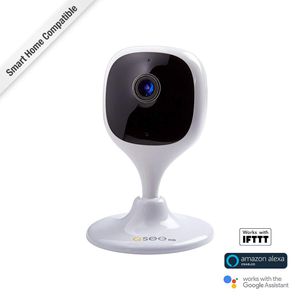
Featuring motion alerts, night vision, 2-way communication and more, let the Q-See 1080P Wi-Fi Camera Mini be your eyes and ears while you're away from your home. With quick installation and easy mounting solutions, ensuring your home is safe and sound has never been easier. When you download Q-See App, your home is always just a tap away. Access and control your camera from anywhere in the world with your smartphone or tablet. When you set your camera up with motion detection, alerts are immediately sent to your mobile device for quick review and action. Mount your cube Camera with the included 3M Adhesive for optimal positioning and angle. Or, use the built-in magnetic base to simply stick to a magnetic surface for the quickest of mounting solutions. An all-one-one solution for your lifestyle and home security needs. Let Q-See give you, a security advantage. Package Contents: Q-See - QCW2MP - 1080P Wi-Fi Indoor Cube Camera Mini Power Adapter USB Cable Attachment bBag Quick Start Guide Product Type: Network Camera Product Type: Network Camera Manufacturer Part Number: QCW2MP Color Supported: Color Connectivity Technology: Wireless Form Factor: Cube Color Supported: Color Connectivity Technology: Wireless Form Factor: Cube Manufacturer: Q-see Product Model: QCW2MP Product Name: QCW2MP - 1080P Wi-Fi Indoor Cube Camera Mini Video Formats: H.264 Video Formats: H.265 Brand Name: Q-see Brand Name: Q-see Maximum Video Resolution: 1920 x 1080 Maximum Focal Length: 2.80 mm Maximum Video Resolution: 1920 x 1080 Maximum Focal Length: 2.80 mm Remote Management: Yes HD Recording: Yes Night Vision Distance: 32.50 ft
Q-See 1080p WI-FI Cube Camera Mini QCW2MP
Current Price
$49.99
Average
$46.4
Min Price
$19.99
Max Price
$69.99
Price dynamics
7%
Description
Featuring motion alerts, night vision, 2-way communication and more, let the Q-See 1080P Wi-Fi Camera Mini be your eyes and ears while you're away from your home. With quick installation and easy mounting solutions, ensuring your home is safe and sound has never been easier. When you download Q-See App, your home is always just a tap away. Access and control your camera from anywhere in the world with your smartphone or tablet. When you set your camera up with motion detection, alerts are immediately sent to your mobile device for quick review and action. Mount your cube Camera with the included 3M Adhesive for optimal positioning and angle. Or, use the built-in magnetic base to simply stick to a magnetic surface for the quickest of mounting solutions. An all-one-one solution for your lifestyle and home security needs. Let Q-See give you, a security advantage. Package Contents: Q-See - QCW2MP - 1080P Wi-Fi Indoor Cube Camera Mini Power Adapter USB Cable Attachment bBag Quick Start Guide Product Type: Network Camera Product Type: Network Camera Manufacturer Part Number: QCW2MP Color Supported: Color Connectivity Technology: Wireless Form Factor: Cube Color Supported: Color Connectivity Technology: Wireless Form Factor: Cube Manufacturer: Q-see Product Model: QCW2MP Product Name: QCW2MP - 1080P Wi-Fi Indoor Cube Camera Mini Video Formats: H.264 Video Formats: H.265 Brand Name: Q-see Brand Name: Q-see Maximum Video Resolution: 1920 x 1080 Maximum Focal Length: 2.80 mm Maximum Video Resolution: 1920 x 1080 Maximum Focal Length: 2.80 mm Remote Management: Yes HD Recording: Yes Night Vision Distance: 32.50 ft
Price will be lower
in next 2 weeks
in next 2 weeks
According to the data, price will be lower in next two weeks, so not waste your money and track better price!
Product review & video
all right so now we're going to load the qc+ app from the App Store right there and we're gonna give the app some permissions and this is the first time we're setting up so we're going to sign up and we're in the United States enter the email and set a password and we're going to confirm to the privacy agreement if you don't see the icon you still need to select it send the verification code and we should be receiving an email shortly there's a registration email open the verification code okay I'm successful now we're going to add the camera to the app I'm going to use the flash enter the password to your Wi-Fi make sure it's a 2.4 gigahertz Wi-Fi connection and confirm that the light on the front of the cameras flashing green before you proceed hit next hit next and you're going to enter the password that you want to change to your device set your time zone and if you use daylight sav



Similar products







































