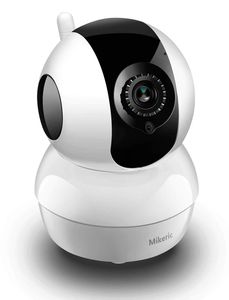
Description
Specifications:
Video playback device : iPhone ,Android phone, Windows PC
Wireless: 2.4G WiFi IEEE 802.11b/g/n
Video Resolution:720p (1280 x 720 Pixels)
Lens: 3.6mm 120 degrees
Night vision: Dual IR-CUT Filter auto switch, 6pcs 850nm Diameter 5mm LED,10m/30ft IR distance
Micro SD Card: Max 64GB(Not include Micro SD)
Power Supply: DC 5V/1.6 A
Dimensions (L x W x H): 3.1x 3.1x4.3 inch
Operating App: iCSee
Online visitor: Support 4 online visitors simutaneoursly
Alarm trigger : Intelligent motion detection
Alarm action : alarm bell, mobile phone client push
Real-time Talking: Support (built-in microphone and speaker)
App Take Photo: Support
Using Environment: Indoor
Precautions:
1. This security camera only supports 2.4GHz band, does not work with 5GHz WiFi.
2. Make sure your Wi-Fi password is not contain special characters such as: "&" "@" "?" "!" and etc
3. Please turn off the camera before inserting or unplugging a SD card.
4. After the camera is connected to Wi-Fi for the first time, please open the recording mode in iCSee. If you need to detect the alarm information, you need to set it according to your preference.
5. In normal video recording, the video in the camera's Micro SD card can be played back via iCSee. However, if there is a situation in which the Wi-Fi signal is lost midway, it is necessary to restart the camera, then restart the APP.
Video playback device : iPhone ,Android phone, Windows PC
Wireless: 2.4G WiFi IEEE 802.11b/g/n
Video Resolution:720p (1280 x 720 Pixels)
Lens: 3.6mm 120 degrees
Night vision: Dual IR-CUT Filter auto switch, 6pcs 850nm Diameter 5mm LED,10m/30ft IR distance
Micro SD Card: Max 64GB(Not include Micro SD)
Power Supply: DC 5V/1.6 A
Dimensions (L x W x H): 3.1x 3.1x4.3 inch
Operating App: iCSee
Online visitor: Support 4 online visitors simutaneoursly
Alarm trigger : Intelligent motion detection
Alarm action : alarm bell, mobile phone client push
Real-time Talking: Support (built-in microphone and speaker)
App Take Photo: Support
Using Environment: Indoor
Precautions:
1. This security camera only supports 2.4GHz band, does not work with 5GHz WiFi.
2. Make sure your Wi-Fi password is not contain special characters such as: "&" "@" "?" "!" and etc
3. Please turn off the camera before inserting or unplugging a SD card.
4. After the camera is connected to Wi-Fi for the first time, please open the recording mode in iCSee. If you need to detect the alarm information, you need to set it according to your preference.
5. In normal video recording, the video in the camera's Micro SD card can be played back via iCSee. However, if there is a situation in which the Wi-Fi signal is lost midway, it is necessary to restart the camera, then restart the APP.
Mikeric IP WiFi Security Camera 720P, Does not Include Micro SD-Camera with Motion Detection Night Vision 2-Way Audio for Home/Office/Baby/Nanny/Pet Monitor,Work with iOS/Android/Windows
Price is below average
Current Price
$22.91
Average
$28.47
Min Price
$22.91
Max Price
$32.98
Price dynamics
20%
Description
Specifications:
Video playback device : iPhone ,Android phone, Windows PC
Wireless: 2.4G WiFi IEEE 802.11b/g/n
Video Resolution:720p (1280 x 720 Pixels)
Lens: 3.6mm 120 degrees
Night vision: Dual IR-CUT Filter auto switch, 6pcs 850nm Diameter 5mm LED,10m/30ft IR distance
Micro SD Card: Max 64GB(Not include Micro SD)
Power Supply: DC 5V/1.6 A
Dimensions (L x W x H): 3.1x 3.1x4.3 inch
Operating App: iCSee
Online visitor: Support 4 online visitors simutaneoursly
Alarm trigger : Intelligent motion detection
Alarm action : alarm bell, mobile phone client push
Real-time Talking: Support (built-in microphone and speaker)
App Take Photo: Support
Using Environment: Indoor
Precautions:
1. This security camera only supports 2.4GHz band, does not work with 5GHz WiFi.
2. Make sure your Wi-Fi password is not contain special characters such as: "&" "@" "?" "!" and etc
3. Please turn off the camera before inserting or unplugging a SD card.
4. After the camera is connected to Wi-Fi for the first time, please open the recording mode in iCSee. If you need to detect the alarm information, you need to set it according to your preference.
5. In normal video recording, the video in the camera's Micro SD card can be played back via iCSee. However, if there is a situation in which the Wi-Fi signal is lost midway, it is necessary to restart the camera, then restart the APP.
Video playback device : iPhone ,Android phone, Windows PC
Wireless: 2.4G WiFi IEEE 802.11b/g/n
Video Resolution:720p (1280 x 720 Pixels)
Lens: 3.6mm 120 degrees
Night vision: Dual IR-CUT Filter auto switch, 6pcs 850nm Diameter 5mm LED,10m/30ft IR distance
Micro SD Card: Max 64GB(Not include Micro SD)
Power Supply: DC 5V/1.6 A
Dimensions (L x W x H): 3.1x 3.1x4.3 inch
Operating App: iCSee
Online visitor: Support 4 online visitors simutaneoursly
Alarm trigger : Intelligent motion detection
Alarm action : alarm bell, mobile phone client push
Real-time Talking: Support (built-in microphone and speaker)
App Take Photo: Support
Using Environment: Indoor
Precautions:
1. This security camera only supports 2.4GHz band, does not work with 5GHz WiFi.
2. Make sure your Wi-Fi password is not contain special characters such as: "&" "@" "?" "!" and etc
3. Please turn off the camera before inserting or unplugging a SD card.
4. After the camera is connected to Wi-Fi for the first time, please open the recording mode in iCSee. If you need to detect the alarm information, you need to set it according to your preference.
5. In normal video recording, the video in the camera's Micro SD card can be played back via iCSee. However, if there is a situation in which the Wi-Fi signal is lost midway, it is necessary to restart the camera, then restart the APP.
Price will be lower
in next 2 weeks
in next 2 weeks
According to the data, price will be lower in next two weeks, so not waste your money and track better price!
Product review & video
hi guys uh we have one new product it's called mini wireless camera you can use as a spy or hidden camera so so let's see what we have inside in envelope first of all we have a user manual then we have one usb charging camera with micro usb port and we have a camera and it's a stand for the camera okay so let's see what we have in this camera first of all over here we have a on off button we have power light indicator we have mic over here and this is more button you can reset the camera password over here we have sd card slot over here we have charging port you can just click plug micro usb cable over here and charge it from with the help of your usb on back side we have a camera unique id mentioned with the qr code and below that we have a magnetic um small magnetic install in the camera so with the help of this tab with the help of this magnet you can just put your camera on stand li


Similar products







































