Description
Description:
Support to Native Linux with UAC2 compliant kernel,Native MacOS 10.6 and later
Android OS 4.2 and above need to support OTG.
The Android 5.0 is default supported,the others need to used it with a dedicated player.
I2S and clock configuration:
Switch 1-4 corresponds to the PIN 13-16 pin of the HDMI socket. When it is pulled to the ON position, it means that the PIN pin has the output function of the DSD_ON signal;
Switches 5 and 6 are modes for configuring the clock output:
When the switch 5 is at O, the clock outputs MCLK, and when it is ON, the clock outputs WCK;
Switch 6 configures the frequency of MCLK, which is 22.5792M/24.576M for O and 45.1584M/49.152M for ON.
The configuration of switch 6 is valid for CLK OUT, RJ45-I2S, and HDMI-I2S.
The switch 7 can separately set the left and right channels in the DSD mode of the I2S signal.
Switch 8 can set the line sequence of BCLK in I2S signal; when O, PIN4 is BCLK+, PIN6 is BCLK-;
Switch 9 can set the line sequence of LRCLK in I2S signal; when O, PIN7 is LRCLK+, PIN9 is LRCLK-;
Switch 10 can set the line sequence of DATA in I2S signal; when O, PIN1 is DATA+, PIN3 is DATA-;
Note: Coaxial, optical fiber, AES/EBU output is not affected by the above code switch; RJ45-I2S wire sequence is fixed, need to adapt to different interfaces
Technical indicators:
Sample rate supported by each output interface:
PCM: 44.1KHz, 48KHz, 88.2KHz, 96KHz,
176.4KHz, 192KHz, 352.8KHz, 384KHz
[I2S out and WCLK out support all sampling rates, S/PDI and AES/EBU support up to 384K, of which fiber supports up to 192K]
DSD: 2.8 MHz (DSD64) - DoP, native
5.6 MHz (DSD128) - DoP, native
11.2 MHz (DSD256) - DoP, native
22.5 MHz (DSD512) - native
[I2S out supports all DSD formats, S/PDI and AES/EBU support DSD128 DOP mode, of which fiber supports up to DOP64]
Bit width: up to 32 bit over I2S output
Up to 24 bit over S/PDI, AES/EBU
Support to Native Linux with UAC2 compliant kernel,Native MacOS 10.6 and later
Android OS 4.2 and above need to support OTG.
The Android 5.0 is default supported,the others need to used it with a dedicated player.
I2S and clock configuration:
Switch 1-4 corresponds to the PIN 13-16 pin of the HDMI socket. When it is pulled to the ON position, it means that the PIN pin has the output function of the DSD_ON signal;
Switches 5 and 6 are modes for configuring the clock output:
When the switch 5 is at O, the clock outputs MCLK, and when it is ON, the clock outputs WCK;
Switch 6 configures the frequency of MCLK, which is 22.5792M/24.576M for O and 45.1584M/49.152M for ON.
The configuration of switch 6 is valid for CLK OUT, RJ45-I2S, and HDMI-I2S.
The switch 7 can separately set the left and right channels in the DSD mode of the I2S signal.
Switch 8 can set the line sequence of BCLK in I2S signal; when O, PIN4 is BCLK+, PIN6 is BCLK-;
Switch 9 can set the line sequence of LRCLK in I2S signal; when O, PIN7 is LRCLK+, PIN9 is LRCLK-;
Switch 10 can set the line sequence of DATA in I2S signal; when O, PIN1 is DATA+, PIN3 is DATA-;
Note: Coaxial, optical fiber, AES/EBU output is not affected by the above code switch; RJ45-I2S wire sequence is fixed, need to adapt to different interfaces
Technical indicators:
Sample rate supported by each output interface:
PCM: 44.1KHz, 48KHz, 88.2KHz, 96KHz,
176.4KHz, 192KHz, 352.8KHz, 384KHz
[I2S out and WCLK out support all sampling rates, S/PDI and AES/EBU support up to 384K, of which fiber supports up to 192K]
DSD: 2.8 MHz (DSD64) - DoP, native
5.6 MHz (DSD128) - DoP, native
11.2 MHz (DSD256) - DoP, native
22.5 MHz (DSD512) - native
[I2S out supports all DSD formats, S/PDI and AES/EBU support DSD128 DOP mode, of which fiber supports up to DOP64]
Bit width: up to 32 bit over I2S output
Up to 24 bit over S/PDI, AES/EBU
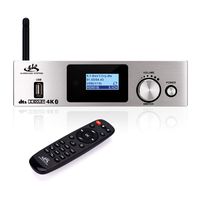
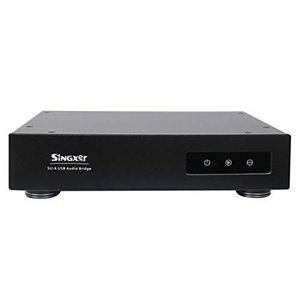
Singxer SU-6 USB Digital Interface XMOS XU208 CPLD Femtosecond Clock Interface
Current Price
$650
Average
$650
Min Price
$650
Max Price
$650
Price dynamics
0%
Description
Description:
Support to Native Linux with UAC2 compliant kernel,Native MacOS 10.6 and later
Android OS 4.2 and above need to support OTG.
The Android 5.0 is default supported,the others need to used it with a dedicated player.
I2S and clock configuration:
Switch 1-4 corresponds to the PIN 13-16 pin of the HDMI socket. When it is pulled to the ON position, it means that the PIN pin has the output function of the DSD_ON signal;
Switches 5 and 6 are modes for configuring the clock output:
When the switch 5 is at O, the clock outputs MCLK, and when it is ON, the clock outputs WCK;
Switch 6 configures the frequency of MCLK, which is 22.5792M/24.576M for O and 45.1584M/49.152M for ON.
The configuration of switch 6 is valid for CLK OUT, RJ45-I2S, and HDMI-I2S.
The switch 7 can separately set the left and right channels in the DSD mode of the I2S signal.
Switch 8 can set the line sequence of BCLK in I2S signal; when O, PIN4 is BCLK+, PIN6 is BCLK-;
Switch 9 can set the line sequence of LRCLK in I2S signal; when O, PIN7 is LRCLK+, PIN9 is LRCLK-;
Switch 10 can set the line sequence of DATA in I2S signal; when O, PIN1 is DATA+, PIN3 is DATA-;
Note: Coaxial, optical fiber, AES/EBU output is not affected by the above code switch; RJ45-I2S wire sequence is fixed, need to adapt to different interfaces
Technical indicators:
Sample rate supported by each output interface:
PCM: 44.1KHz, 48KHz, 88.2KHz, 96KHz,
176.4KHz, 192KHz, 352.8KHz, 384KHz
[I2S out and WCLK out support all sampling rates, S/PDI and AES/EBU support up to 384K, of which fiber supports up to 192K]
DSD: 2.8 MHz (DSD64) - DoP, native
5.6 MHz (DSD128) - DoP, native
11.2 MHz (DSD256) - DoP, native
22.5 MHz (DSD512) - native
[I2S out supports all DSD formats, S/PDI and AES/EBU support DSD128 DOP mode, of which fiber supports up to DOP64]
Bit width: up to 32 bit over I2S output
Up to 24 bit over S/PDI, AES/EBU
Support to Native Linux with UAC2 compliant kernel,Native MacOS 10.6 and later
Android OS 4.2 and above need to support OTG.
The Android 5.0 is default supported,the others need to used it with a dedicated player.
I2S and clock configuration:
Switch 1-4 corresponds to the PIN 13-16 pin of the HDMI socket. When it is pulled to the ON position, it means that the PIN pin has the output function of the DSD_ON signal;
Switches 5 and 6 are modes for configuring the clock output:
When the switch 5 is at O, the clock outputs MCLK, and when it is ON, the clock outputs WCK;
Switch 6 configures the frequency of MCLK, which is 22.5792M/24.576M for O and 45.1584M/49.152M for ON.
The configuration of switch 6 is valid for CLK OUT, RJ45-I2S, and HDMI-I2S.
The switch 7 can separately set the left and right channels in the DSD mode of the I2S signal.
Switch 8 can set the line sequence of BCLK in I2S signal; when O, PIN4 is BCLK+, PIN6 is BCLK-;
Switch 9 can set the line sequence of LRCLK in I2S signal; when O, PIN7 is LRCLK+, PIN9 is LRCLK-;
Switch 10 can set the line sequence of DATA in I2S signal; when O, PIN1 is DATA+, PIN3 is DATA-;
Note: Coaxial, optical fiber, AES/EBU output is not affected by the above code switch; RJ45-I2S wire sequence is fixed, need to adapt to different interfaces
Technical indicators:
Sample rate supported by each output interface:
PCM: 44.1KHz, 48KHz, 88.2KHz, 96KHz,
176.4KHz, 192KHz, 352.8KHz, 384KHz
[I2S out and WCLK out support all sampling rates, S/PDI and AES/EBU support up to 384K, of which fiber supports up to 192K]
DSD: 2.8 MHz (DSD64) - DoP, native
5.6 MHz (DSD128) - DoP, native
11.2 MHz (DSD256) - DoP, native
22.5 MHz (DSD512) - native
[I2S out supports all DSD formats, S/PDI and AES/EBU support DSD128 DOP mode, of which fiber supports up to DOP64]
Bit width: up to 32 bit over I2S output
Up to 24 bit over S/PDI, AES/EBU
Price will be lower
in next 2 weeks
in next 2 weeks
According to the data, price will be lower in next two weeks, so not waste your money and track better price!
Product review & video
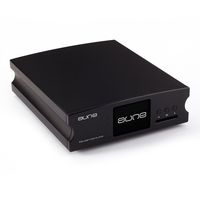
hello this is mike from headquarter audio this one and i will show you today um the dinner frips iris i hope you heard from it um because it's a very p a small piece of art and you can use this one for usb to improve the sound quality of your usb connection from your personal computer or every other usb device to your deck and i will show you this little piece that's it and here you can see on the back side here that is one usb in here and clock in maybe big terminator maybe it's clock in yeah from the output of the big terminator plus maybe you can use this but i think this is not the right device for the terminator plus but then you can see it's digital converting to digital out like coax optical isabu i square s in two different types hdmi and here this um i don't know the name of this western western or something else and it's a pin configuration is ps audio compatible and that's th


Similar products