Description
Before you buy it,please note:
ALL cameras checked and strict inspectioin before packing,
we have strict QC and work flow to test each camera,if there is any questions or technical consulting, please contact sinissecurity@sina.com firstly for help with no hesitate.
Importance:
1>This default 5MP TVI camera,switch to HD-CVI,HD-AHD,CVBS output via joystick cable.
2>Connect 5MP TVI or Hybrid 4 in 1(TVI/CVI/AHD/Analog) DVR,if your DVR not TVI DVR,just switch the camera to correspondent output
3>Do not compatible with HD EXSDI or SDI DVR
4>Power need: DC12V,0.5~2A power supplier,sometimes camera working or not depends on the power cable length and quality
5>Power adapter do not included
Switch to TVI: Press Rightward for 3 Seconds
Switch to AHD: Press leftward for 3 Seconds
Switch to CVBS: Press Upward for 3 Seconds
Switch to CVI: Press Downward for 3 Seconds
Importance:
1.5MP camera need to connect 5mp DVR,4K TV that will show the best 5mega pixel piture,please check your DVR system before you order it.
2.If your DVR can not support 5mp output,please upwards for 3 second on the cable button switch to CVBS first, then please enter the menu to choose the 4mp or 1080p output.
5 Megapixel camera with Progressive scan CMOS sensor and TVI / HD-CVI / HD-AHD / CVBS.
The TVI / HD-CVI / HD-AHD interface allows to transmission of analog video signal via coaxial cable in 5 Mpx (TVI / HD-AHD) / 4 Mpx (HD-CVI) resolution. During transmission there are no delays and is maintained the original, high quality image. Change of the TVI / HD-CVI / HD-AHD / NTSC standard is done with the corresponding button by keeping it pressed for approx. 3 seconds.
In the case of video Warranty
Lifetime technical support and 2 years warranty
ALL cameras checked and strict inspectioin before packing,
we have strict QC and work flow to test each camera,if there is any questions or technical consulting, please contact sinissecurity@sina.com firstly for help with no hesitate.
Importance:
1>This default 5MP TVI camera,switch to HD-CVI,HD-AHD,CVBS output via joystick cable.
2>Connect 5MP TVI or Hybrid 4 in 1(TVI/CVI/AHD/Analog) DVR,if your DVR not TVI DVR,just switch the camera to correspondent output
3>Do not compatible with HD EXSDI or SDI DVR
4>Power need: DC12V,0.5~2A power supplier,sometimes camera working or not depends on the power cable length and quality
5>Power adapter do not included
Switch to TVI: Press Rightward for 3 Seconds
Switch to AHD: Press leftward for 3 Seconds
Switch to CVBS: Press Upward for 3 Seconds
Switch to CVI: Press Downward for 3 Seconds
Importance:
1.5MP camera need to connect 5mp DVR,4K TV that will show the best 5mega pixel piture,please check your DVR system before you order it.
2.If your DVR can not support 5mp output,please upwards for 3 second on the cable button switch to CVBS first, then please enter the menu to choose the 4mp or 1080p output.
5 Megapixel camera with Progressive scan CMOS sensor and TVI / HD-CVI / HD-AHD / CVBS.
The TVI / HD-CVI / HD-AHD interface allows to transmission of analog video signal via coaxial cable in 5 Mpx (TVI / HD-AHD) / 4 Mpx (HD-CVI) resolution. During transmission there are no delays and is maintained the original, high quality image. Change of the TVI / HD-CVI / HD-AHD / NTSC standard is done with the corresponding button by keeping it pressed for approx. 3 seconds.
In the case of video Warranty
Lifetime technical support and 2 years warranty
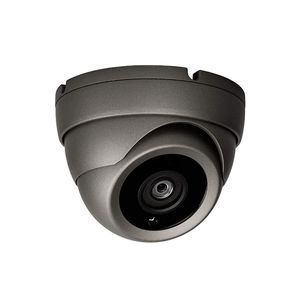
Sinis Super Hybrid 5MP 4MP 1080P HD-TVI/CVI/AHD/960H CCTV Surveillance Security Camera Day Night Vision Waterproof Outdoor/Indoor Wide Angle 2.8mm Fixed Lens Reach 90° Metal Dome Video System
Price is below average
Current Price
$29.99
Average
$33.42
Min Price
$24.99
Max Price
$40.99
Price dynamics
10%
Description
Before you buy it,please note:
ALL cameras checked and strict inspectioin before packing,
we have strict QC and work flow to test each camera,if there is any questions or technical consulting, please contact sinissecurity@sina.com firstly for help with no hesitate.
Importance:
1>This default 5MP TVI camera,switch to HD-CVI,HD-AHD,CVBS output via joystick cable.
2>Connect 5MP TVI or Hybrid 4 in 1(TVI/CVI/AHD/Analog) DVR,if your DVR not TVI DVR,just switch the camera to correspondent output
3>Do not compatible with HD EXSDI or SDI DVR
4>Power need: DC12V,0.5~2A power supplier,sometimes camera working or not depends on the power cable length and quality
5>Power adapter do not included
Switch to TVI: Press Rightward for 3 Seconds
Switch to AHD: Press leftward for 3 Seconds
Switch to CVBS: Press Upward for 3 Seconds
Switch to CVI: Press Downward for 3 Seconds
Importance:
1.5MP camera need to connect 5mp DVR,4K TV that will show the best 5mega pixel piture,please check your DVR system before you order it.
2.If your DVR can not support 5mp output,please upwards for 3 second on the cable button switch to CVBS first, then please enter the menu to choose the 4mp or 1080p output.
5 Megapixel camera with Progressive scan CMOS sensor and TVI / HD-CVI / HD-AHD / CVBS.
The TVI / HD-CVI / HD-AHD interface allows to transmission of analog video signal via coaxial cable in 5 Mpx (TVI / HD-AHD) / 4 Mpx (HD-CVI) resolution. During transmission there are no delays and is maintained the original, high quality image. Change of the TVI / HD-CVI / HD-AHD / NTSC standard is done with the corresponding button by keeping it pressed for approx. 3 seconds.
In the case of video Warranty
Lifetime technical support and 2 years warranty
ALL cameras checked and strict inspectioin before packing,
we have strict QC and work flow to test each camera,if there is any questions or technical consulting, please contact sinissecurity@sina.com firstly for help with no hesitate.
Importance:
1>This default 5MP TVI camera,switch to HD-CVI,HD-AHD,CVBS output via joystick cable.
2>Connect 5MP TVI or Hybrid 4 in 1(TVI/CVI/AHD/Analog) DVR,if your DVR not TVI DVR,just switch the camera to correspondent output
3>Do not compatible with HD EXSDI or SDI DVR
4>Power need: DC12V,0.5~2A power supplier,sometimes camera working or not depends on the power cable length and quality
5>Power adapter do not included
Switch to TVI: Press Rightward for 3 Seconds
Switch to AHD: Press leftward for 3 Seconds
Switch to CVBS: Press Upward for 3 Seconds
Switch to CVI: Press Downward for 3 Seconds
Importance:
1.5MP camera need to connect 5mp DVR,4K TV that will show the best 5mega pixel piture,please check your DVR system before you order it.
2.If your DVR can not support 5mp output,please upwards for 3 second on the cable button switch to CVBS first, then please enter the menu to choose the 4mp or 1080p output.
5 Megapixel camera with Progressive scan CMOS sensor and TVI / HD-CVI / HD-AHD / CVBS.
The TVI / HD-CVI / HD-AHD interface allows to transmission of analog video signal via coaxial cable in 5 Mpx (TVI / HD-AHD) / 4 Mpx (HD-CVI) resolution. During transmission there are no delays and is maintained the original, high quality image. Change of the TVI / HD-CVI / HD-AHD / NTSC standard is done with the corresponding button by keeping it pressed for approx. 3 seconds.
In the case of video Warranty
Lifetime technical support and 2 years warranty
Price will be lower
in next 2 weeks
in next 2 weeks
According to the data, price will be lower in next two weeks, so not waste your money and track better price!

Similar products







































