Description
--Features:--
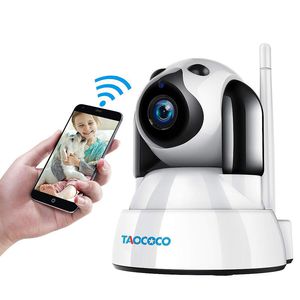
·Vivid 1080P HD video:With this 1080P HD doggy camera monitor, you can know what happen to your little puppy anywhere any time.
· Easy Installation: Follow the manual book, easily finish the wifi configuration setup. Along with the installation bracket, this camera can be installed any corner in your home.
· Micro SD card storage & Auto recording: This camera supports max 128GB micro SD card(Not included). It will record automatically after you insert the SD card.
· Listen and talk to your family: With two-way audio function, you can hear and talk to your home members at any time.
--Important Tips before configuration:--
1.The camera is NOT battery camera, the power supply MUST be connected all the time.
2.Keep your camera and phone nearby the router while setting.
3.The camera works with 2.4GHz WiFi only not 5GHz. Please select the 2.4GHz before connecting.
4.Reset the camera if it fails to connect. Press the reset button under the camera, until you hear a short sound.
--Dtailed Installation Steps:--
Step 1: Download "Yoosee" App from App Store or Google play, connect the power line and wait about 30 seconds for booting up.
Step 2: Open the App ,register an account with email address and log in. Click '+' > Add New Device> Choose 'Fast Networking'
Step 3: Input the home WiFi password, then "Next". > Click the WiFi start with 'GW_AP' >Then when you hear 'Ding' sound click 'Already hearing connect successfully' > Wait for a few second, the camera will be online.
For More details, please kindly refer to our Quick Installation Manual Guideline.
--Package Include--
1 x Wireless Camera
1 x Adapter (5V1.5A)
1 x Power line
1 x Base bracket
1 x ENG Manual
1 x Screw
·Vivid 1080P HD video:With this 1080P HD doggy camera monitor, you can know what happen to your little puppy anywhere any time.
· Easy Installation: Follow the manual book, easily finish the wifi configuration setup. Along with the installation bracket, this camera can be installed any corner in your home.
· Micro SD card storage & Auto recording: This camera supports max 128GB micro SD card(Not included). It will record automatically after you insert the SD card.
· Listen and talk to your family: With two-way audio function, you can hear and talk to your home members at any time.
--Important Tips before configuration:--
1.The camera is NOT battery camera, the power supply MUST be connected all the time.
2.Keep your camera and phone nearby the router while setting.
3.The camera works with 2.4GHz WiFi only not 5GHz. Please select the 2.4GHz before connecting.
4.Reset the camera if it fails to connect. Press the reset button under the camera, until you hear a short sound.
--Dtailed Installation Steps:--
Step 1: Download "Yoosee" App from App Store or Google play, connect the power line and wait about 30 seconds for booting up.
Step 2: Open the App ,register an account with email address and log in. Click '+' > Add New Device> Choose 'Fast Networking'
Step 3: Input the home WiFi password, then "Next". > Click the WiFi start with 'GW_AP' >Then when you hear 'Ding' sound click 'Already hearing connect successfully' > Wait for a few second, the camera will be online.
For More details, please kindly refer to our Quick Installation Manual Guideline.
--Package Include--
1 x Wireless Camera
1 x Adapter (5V1.5A)
1 x Power line
1 x Base bracket
1 x ENG Manual
1 x Screw
TAOCOCO Dog Camera, Pet Camera, 1080P FHD WiFi IP Surveillance Camera, Wireless Security Dome Camera for 2.4 GHz, Home Baby Monitor Nanny Cam with Smart Pan/Tilt/Zoom, Motion Detection, Night Vision
Price is below average
Current Price
$35.99
Average
$48.94
Min Price
$30.98
Max Price
$81.99
Price dynamics
26%
Description
--Features:--
·Vivid 1080P HD video:With this 1080P HD doggy camera monitor, you can know what happen to your little puppy anywhere any time.
· Easy Installation: Follow the manual book, easily finish the wifi configuration setup. Along with the installation bracket, this camera can be installed any corner in your home.
· Micro SD card storage & Auto recording: This camera supports max 128GB micro SD card(Not included). It will record automatically after you insert the SD card.
· Listen and talk to your family: With two-way audio function, you can hear and talk to your home members at any time.
--Important Tips before configuration:--
1.The camera is NOT battery camera, the power supply MUST be connected all the time.
2.Keep your camera and phone nearby the router while setting.
3.The camera works with 2.4GHz WiFi only not 5GHz. Please select the 2.4GHz before connecting.
4.Reset the camera if it fails to connect. Press the reset button under the camera, until you hear a short sound.
--Dtailed Installation Steps:--
Step 1: Download "Yoosee" App from App Store or Google play, connect the power line and wait about 30 seconds for booting up.
Step 2: Open the App ,register an account with email address and log in. Click '+' > Add New Device> Choose 'Fast Networking'
Step 3: Input the home WiFi password, then "Next". > Click the WiFi start with 'GW_AP' >Then when you hear 'Ding' sound click 'Already hearing connect successfully' > Wait for a few second, the camera will be online.
For More details, please kindly refer to our Quick Installation Manual Guideline.
--Package Include--
1 x Wireless Camera
1 x Adapter (5V1.5A)
1 x Power line
1 x Base bracket
1 x ENG Manual
1 x Screw
·Vivid 1080P HD video:With this 1080P HD doggy camera monitor, you can know what happen to your little puppy anywhere any time.
· Easy Installation: Follow the manual book, easily finish the wifi configuration setup. Along with the installation bracket, this camera can be installed any corner in your home.
· Micro SD card storage & Auto recording: This camera supports max 128GB micro SD card(Not included). It will record automatically after you insert the SD card.
· Listen and talk to your family: With two-way audio function, you can hear and talk to your home members at any time.
--Important Tips before configuration:--
1.The camera is NOT battery camera, the power supply MUST be connected all the time.
2.Keep your camera and phone nearby the router while setting.
3.The camera works with 2.4GHz WiFi only not 5GHz. Please select the 2.4GHz before connecting.
4.Reset the camera if it fails to connect. Press the reset button under the camera, until you hear a short sound.
--Dtailed Installation Steps:--
Step 1: Download "Yoosee" App from App Store or Google play, connect the power line and wait about 30 seconds for booting up.
Step 2: Open the App ,register an account with email address and log in. Click '+' > Add New Device> Choose 'Fast Networking'
Step 3: Input the home WiFi password, then "Next". > Click the WiFi start with 'GW_AP' >Then when you hear 'Ding' sound click 'Already hearing connect successfully' > Wait for a few second, the camera will be online.
For More details, please kindly refer to our Quick Installation Manual Guideline.
--Package Include--
1 x Wireless Camera
1 x Adapter (5V1.5A)
1 x Power line
1 x Base bracket
1 x ENG Manual
1 x Screw
Price will be lower
in next 2 weeks
in next 2 weeks
According to the data, price will be lower in next two weeks, so not waste your money and track better price!

Similar products