Description
1602 LCD module read and write operations, screen and cursor operations are programmed to achieve through the instructions.
(Note: 1- High level, 0 -Low level)
Instruction1: clear display, instruction 01H, cursor reset to address 00H position.
Instruction 2: The cursor is reset and the cursor returns to address 00H.
Instruction 3: Cursor and display mode setting I / D: cursor movement direction, high level shift right, low left shift S: whether all the text on the screen left or right. High level is valid, low level is invalid.
Instruction 4: Display switch control. D: control the overall display of the open and close, high level that open display, low level that off display C: control the cursor on and off, high level that has a cursor, low level that no cursor B: control whether the cursor Flashing, high level flashing, low level does not blink.
Instruction 5: Cursor or display shift S / C: Move the displayed text at high level, move the cursor at low level.
Instruction 6: Function setting command DL: 4-bit bus at high level, 8-bit bus at low level N: Single-line display at low level, double-line display at high level F: 5x7 dot matrix character when low level is displayed, High-level display of 5x10 dot matrix characters.
Instruction 7: Character generator RAM address setting.
Instruction 8: DDRAM address setting.
Instruction 9: read busy signal and cursor address BF: busy flag, high level that busy, then the module can not connect Receive the command or data, if the low level that is not busy.
Instruction 10: Write data.
Instruction 11: Read data.
Package Included:
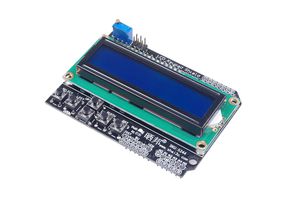
1*LCD1602 Expansion Board Module Display LCD Keypad Shield
(Note: 1- High level, 0 -Low level)
Instruction1: clear display, instruction 01H, cursor reset to address 00H position.
Instruction 2: The cursor is reset and the cursor returns to address 00H.
Instruction 3: Cursor and display mode setting I / D: cursor movement direction, high level shift right, low left shift S: whether all the text on the screen left or right. High level is valid, low level is invalid.
Instruction 4: Display switch control. D: control the overall display of the open and close, high level that open display, low level that off display C: control the cursor on and off, high level that has a cursor, low level that no cursor B: control whether the cursor Flashing, high level flashing, low level does not blink.
Instruction 5: Cursor or display shift S / C: Move the displayed text at high level, move the cursor at low level.
Instruction 6: Function setting command DL: 4-bit bus at high level, 8-bit bus at low level N: Single-line display at low level, double-line display at high level F: 5x7 dot matrix character when low level is displayed, High-level display of 5x10 dot matrix characters.
Instruction 7: Character generator RAM address setting.
Instruction 8: DDRAM address setting.
Instruction 9: read busy signal and cursor address BF: busy flag, high level that busy, then the module can not connect Receive the command or data, if the low level that is not busy.
Instruction 10: Write data.
Instruction 11: Read data.
Package Included:
1*LCD1602 Expansion Board Module Display LCD Keypad Shield
KNACRO LCD1602 Expansion Board Module Display LCD Keypad Shield
Price is below average
Current Price
$6.48
Average
$7.33
Min Price
$6.48
Max Price
$7.5
Price dynamics
12%
Description
1602 LCD module read and write operations, screen and cursor operations are programmed to achieve through the instructions.
(Note: 1- High level, 0 -Low level)
Instruction1: clear display, instruction 01H, cursor reset to address 00H position.
Instruction 2: The cursor is reset and the cursor returns to address 00H.
Instruction 3: Cursor and display mode setting I / D: cursor movement direction, high level shift right, low left shift S: whether all the text on the screen left or right. High level is valid, low level is invalid.
Instruction 4: Display switch control. D: control the overall display of the open and close, high level that open display, low level that off display C: control the cursor on and off, high level that has a cursor, low level that no cursor B: control whether the cursor Flashing, high level flashing, low level does not blink.
Instruction 5: Cursor or display shift S / C: Move the displayed text at high level, move the cursor at low level.
Instruction 6: Function setting command DL: 4-bit bus at high level, 8-bit bus at low level N: Single-line display at low level, double-line display at high level F: 5x7 dot matrix character when low level is displayed, High-level display of 5x10 dot matrix characters.
Instruction 7: Character generator RAM address setting.
Instruction 8: DDRAM address setting.
Instruction 9: read busy signal and cursor address BF: busy flag, high level that busy, then the module can not connect Receive the command or data, if the low level that is not busy.
Instruction 10: Write data.
Instruction 11: Read data.
Package Included:
1*LCD1602 Expansion Board Module Display LCD Keypad Shield
(Note: 1- High level, 0 -Low level)
Instruction1: clear display, instruction 01H, cursor reset to address 00H position.
Instruction 2: The cursor is reset and the cursor returns to address 00H.
Instruction 3: Cursor and display mode setting I / D: cursor movement direction, high level shift right, low left shift S: whether all the text on the screen left or right. High level is valid, low level is invalid.
Instruction 4: Display switch control. D: control the overall display of the open and close, high level that open display, low level that off display C: control the cursor on and off, high level that has a cursor, low level that no cursor B: control whether the cursor Flashing, high level flashing, low level does not blink.
Instruction 5: Cursor or display shift S / C: Move the displayed text at high level, move the cursor at low level.
Instruction 6: Function setting command DL: 4-bit bus at high level, 8-bit bus at low level N: Single-line display at low level, double-line display at high level F: 5x7 dot matrix character when low level is displayed, High-level display of 5x10 dot matrix characters.
Instruction 7: Character generator RAM address setting.
Instruction 8: DDRAM address setting.
Instruction 9: read busy signal and cursor address BF: busy flag, high level that busy, then the module can not connect Receive the command or data, if the low level that is not busy.
Instruction 10: Write data.
Instruction 11: Read data.
Package Included:
1*LCD1602 Expansion Board Module Display LCD Keypad Shield
Price will be lower
in next 2 weeks
in next 2 weeks
According to the data, price will be lower in next two weeks, so not waste your money and track better price!
Product review & video
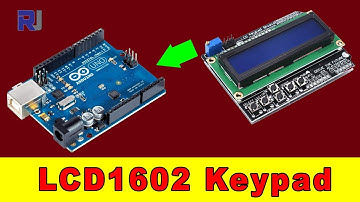
hi welcome to Robo Jack's in this video we are going to learn how we can program and use this 1602 this is a 16 character by 2 line LCD shield with a keypad so this is called the keepers shield and you just try get plug this in directly into the or doing a board so the test that I did the program or the code that I have for this will work for this shield but if you have the Arduino Uno the code will not work so I'm going to use this one and test it so let me plug this in so when I turn this on this is the text that I put and the test is that when I press the right key it shows the right key up down left select then you can program your Ord we know board to do something when right is press or left this press to select or move that character or anything so the first thing is to make this work when you press all these buttons so let me go to the IDE I'll show you the key code this is a fil


Similar products