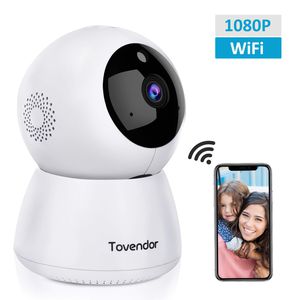
Description
Features:
➤ Instant APP alarm push
➤ Superb 1080P Full HD video
➤ Supports two-way voice intercom
➤ Panoramic quick video positioning
➤ Easy to install and use, plug and play
➤ 9pcs Infrared light night vision up to 23ft
➤ Up to 5 users access and management devices
➤ Video supports digital electronic zoom function
➤ Support cloud storage, micro SD card (up to 128GB)
➤ Remote control pan/tilt (horizontal: 355° & vertical: 80°)
Wi-Fi Connection
Step 1: Launch the IPC360 app, Click + to select the device and smart wireless mode.
Step 2: Make the camera plugged in, wait for 15-30s until the "red light" is flashing, click "next" on the app and choose wifi (2.4GHZ only) and enter correct password
Step 3: Make sure your phone is on the "Ring" or "Vibration" mode other than "Silence" mode. Turn up the phone volume and bring the phone closer to the camera. It's the sound from your phone that makes your phone and camera connected.
Step 4: Click Next until you hear "Ding dong"
Step 5: After sevral personalized settings, connection should be successful!
Notice before configuration: ✔ It only supports 2.4GHz band not 5GHz ✔Your Wi-Fi encryption is WPA2-PSK(AES) ✔Hear the tone after pressing the reset button for 1-2s
What's in the box? :
1 x Tovendor IP Camera.
1 x Power Adapter.
1 x USB cable.
1 x Base.
1 x Manual.
2 x Screw.
Warm Tips:
Manufacturer's 1-year warranty.
Works with 2.4GHz Wi-Fi networks only.
Micro SD Card is NOT included in the package.
Please do not insert or take out the Micro SD card when the camera is ON.
➤ Instant APP alarm push
➤ Superb 1080P Full HD video
➤ Supports two-way voice intercom
➤ Panoramic quick video positioning
➤ Easy to install and use, plug and play
➤ 9pcs Infrared light night vision up to 23ft
➤ Up to 5 users access and management devices
➤ Video supports digital electronic zoom function
➤ Support cloud storage, micro SD card (up to 128GB)
➤ Remote control pan/tilt (horizontal: 355° & vertical: 80°)
Wi-Fi Connection
Step 1: Launch the IPC360 app, Click + to select the device and smart wireless mode.
Step 2: Make the camera plugged in, wait for 15-30s until the "red light" is flashing, click "next" on the app and choose wifi (2.4GHZ only) and enter correct password
Step 3: Make sure your phone is on the "Ring" or "Vibration" mode other than "Silence" mode. Turn up the phone volume and bring the phone closer to the camera. It's the sound from your phone that makes your phone and camera connected.
Step 4: Click Next until you hear "Ding dong"
Step 5: After sevral personalized settings, connection should be successful!
Notice before configuration: ✔ It only supports 2.4GHz band not 5GHz ✔Your Wi-Fi encryption is WPA2-PSK(AES) ✔Hear the tone after pressing the reset button for 1-2s
What's in the box? :
1 x Tovendor IP Camera.
1 x Power Adapter.
1 x USB cable.
1 x Base.
1 x Manual.
2 x Screw.
Warm Tips:
Manufacturer's 1-year warranty.
Works with 2.4GHz Wi-Fi networks only.
Micro SD Card is NOT included in the package.
Please do not insert or take out the Micro SD card when the camera is ON.
Tovendor IP Camera WiFi 1080P, Pan/Tilt/Zoom Dome Camera, Home Security System with Night Vision, Motion Detection, 2 Way Audio For Surveillance/Elder/Pet/Office/Baby Monitor - Cloud Service
Current Price
$29.99
Average
$29.99
Min Price
$29.99
Max Price
$29.99
Price dynamics
0%
Description
Features:
➤ Instant APP alarm push
➤ Superb 1080P Full HD video
➤ Supports two-way voice intercom
➤ Panoramic quick video positioning
➤ Easy to install and use, plug and play
➤ 9pcs Infrared light night vision up to 23ft
➤ Up to 5 users access and management devices
➤ Video supports digital electronic zoom function
➤ Support cloud storage, micro SD card (up to 128GB)
➤ Remote control pan/tilt (horizontal: 355° & vertical: 80°)
Wi-Fi Connection
Step 1: Launch the IPC360 app, Click + to select the device and smart wireless mode.
Step 2: Make the camera plugged in, wait for 15-30s until the "red light" is flashing, click "next" on the app and choose wifi (2.4GHZ only) and enter correct password
Step 3: Make sure your phone is on the "Ring" or "Vibration" mode other than "Silence" mode. Turn up the phone volume and bring the phone closer to the camera. It's the sound from your phone that makes your phone and camera connected.
Step 4: Click Next until you hear "Ding dong"
Step 5: After sevral personalized settings, connection should be successful!
Notice before configuration: ✔ It only supports 2.4GHz band not 5GHz ✔Your Wi-Fi encryption is WPA2-PSK(AES) ✔Hear the tone after pressing the reset button for 1-2s
What's in the box? :
1 x Tovendor IP Camera.
1 x Power Adapter.
1 x USB cable.
1 x Base.
1 x Manual.
2 x Screw.
Warm Tips:
Manufacturer's 1-year warranty.
Works with 2.4GHz Wi-Fi networks only.
Micro SD Card is NOT included in the package.
Please do not insert or take out the Micro SD card when the camera is ON.
➤ Instant APP alarm push
➤ Superb 1080P Full HD video
➤ Supports two-way voice intercom
➤ Panoramic quick video positioning
➤ Easy to install and use, plug and play
➤ 9pcs Infrared light night vision up to 23ft
➤ Up to 5 users access and management devices
➤ Video supports digital electronic zoom function
➤ Support cloud storage, micro SD card (up to 128GB)
➤ Remote control pan/tilt (horizontal: 355° & vertical: 80°)
Wi-Fi Connection
Step 1: Launch the IPC360 app, Click + to select the device and smart wireless mode.
Step 2: Make the camera plugged in, wait for 15-30s until the "red light" is flashing, click "next" on the app and choose wifi (2.4GHZ only) and enter correct password
Step 3: Make sure your phone is on the "Ring" or "Vibration" mode other than "Silence" mode. Turn up the phone volume and bring the phone closer to the camera. It's the sound from your phone that makes your phone and camera connected.
Step 4: Click Next until you hear "Ding dong"
Step 5: After sevral personalized settings, connection should be successful!
Notice before configuration: ✔ It only supports 2.4GHz band not 5GHz ✔Your Wi-Fi encryption is WPA2-PSK(AES) ✔Hear the tone after pressing the reset button for 1-2s
What's in the box? :
1 x Tovendor IP Camera.
1 x Power Adapter.
1 x USB cable.
1 x Base.
1 x Manual.
2 x Screw.
Warm Tips:
Manufacturer's 1-year warranty.
Works with 2.4GHz Wi-Fi networks only.
Micro SD Card is NOT included in the package.
Please do not insert or take out the Micro SD card when the camera is ON.
Price will be lower
in next 2 weeks
in next 2 weeks
According to the data, price will be lower in next two weeks, so not waste your money and track better price!

Similar products







































