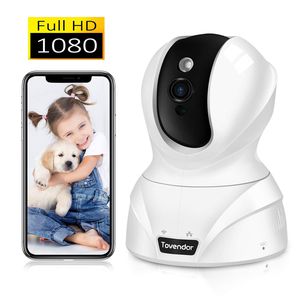
Description
SWITCHABLE INDICATOR | CARRIER-GRADE SIGNAL PROCESSING | SOUND DETECTION | SMART TRACKING
➤ Upgrade Video Coding Technology - Smart H.264 video compression algorithm | Faster connection | Super long time recording
➤ Financial Standard Data Protection - 1024bit dynamic encryption | Guarantee the security of data flow transmission
➤ Discover More Interesting Features - Work with Alexa | Online firmware upgrades | Smart home linkage
Wi-Fi Connection
Step 1: Launch the MIPC app, Click + to select the device mode
Step 2: Scan the QR code on the bottom of the camera, add and Click the Wi-Fi Connection.
Step 3: Press the camera RESET button, Hold for 3-5s to Enter the Wi-Fi configuration mode.
Step 4: Input the wifi password. Turn up the phone volume and bring the phone closer to the camera.
Step 5: After sevral personalized settings, connection should be successful!
Notice before configuration: ✔ It only supports 2.4GHz band not 5GHz ✔Your Wi-Fi encryption is WPA2-PSK(AES) ✔Heard the sound of droplets after plugging in
What's in the box? :
1 x Tovendor IP Camera.
1 x Power Adapter.
1 x 6.6ft USB cable.
1 x Network cable.
1 x Bracket.
1 x Manual.
2 x Screw.
Warm Tips:
*Manufacturer's 1-year warranty
*Works with 2.4GHz Wi-Fi networks only
*Micro SD Card are are NOT included in the package.
*SD card needs to be inserted when the camera is OFF
*Currently only supports Alexa devices with screens(Echo Show)
➤ Upgrade Video Coding Technology - Smart H.264 video compression algorithm | Faster connection | Super long time recording
➤ Financial Standard Data Protection - 1024bit dynamic encryption | Guarantee the security of data flow transmission
➤ Discover More Interesting Features - Work with Alexa | Online firmware upgrades | Smart home linkage
Wi-Fi Connection
Step 1: Launch the MIPC app, Click + to select the device mode
Step 2: Scan the QR code on the bottom of the camera, add and Click the Wi-Fi Connection.
Step 3: Press the camera RESET button, Hold for 3-5s to Enter the Wi-Fi configuration mode.
Step 4: Input the wifi password. Turn up the phone volume and bring the phone closer to the camera.
Step 5: After sevral personalized settings, connection should be successful!
Notice before configuration: ✔ It only supports 2.4GHz band not 5GHz ✔Your Wi-Fi encryption is WPA2-PSK(AES) ✔Heard the sound of droplets after plugging in
What's in the box? :
1 x Tovendor IP Camera.
1 x Power Adapter.
1 x 6.6ft USB cable.
1 x Network cable.
1 x Bracket.
1 x Manual.
2 x Screw.
Warm Tips:
*Manufacturer's 1-year warranty
*Works with 2.4GHz Wi-Fi networks only
*Micro SD Card are are NOT included in the package.
*SD card needs to be inserted when the camera is OFF
*Currently only supports Alexa devices with screens(Echo Show)
Tovendor Pet Dog Camera, 1080P Pan/Tilt/Zoom Monitor for Baby/Elderly/Nanny, Indoor Security Video Cloud Camera with IR Night Vision, 2 Way Talk
Price is below average
Current Price
$39.99
Average
$42.25
Min Price
$33.99
Max Price
$49.99
Price dynamics
5%
Description
SWITCHABLE INDICATOR | CARRIER-GRADE SIGNAL PROCESSING | SOUND DETECTION | SMART TRACKING
➤ Upgrade Video Coding Technology - Smart H.264 video compression algorithm | Faster connection | Super long time recording
➤ Financial Standard Data Protection - 1024bit dynamic encryption | Guarantee the security of data flow transmission
➤ Discover More Interesting Features - Work with Alexa | Online firmware upgrades | Smart home linkage
Wi-Fi Connection
Step 1: Launch the MIPC app, Click + to select the device mode
Step 2: Scan the QR code on the bottom of the camera, add and Click the Wi-Fi Connection.
Step 3: Press the camera RESET button, Hold for 3-5s to Enter the Wi-Fi configuration mode.
Step 4: Input the wifi password. Turn up the phone volume and bring the phone closer to the camera.
Step 5: After sevral personalized settings, connection should be successful!
Notice before configuration: ✔ It only supports 2.4GHz band not 5GHz ✔Your Wi-Fi encryption is WPA2-PSK(AES) ✔Heard the sound of droplets after plugging in
What's in the box? :
1 x Tovendor IP Camera.
1 x Power Adapter.
1 x 6.6ft USB cable.
1 x Network cable.
1 x Bracket.
1 x Manual.
2 x Screw.
Warm Tips:
*Manufacturer's 1-year warranty
*Works with 2.4GHz Wi-Fi networks only
*Micro SD Card are are NOT included in the package.
*SD card needs to be inserted when the camera is OFF
*Currently only supports Alexa devices with screens(Echo Show)
➤ Upgrade Video Coding Technology - Smart H.264 video compression algorithm | Faster connection | Super long time recording
➤ Financial Standard Data Protection - 1024bit dynamic encryption | Guarantee the security of data flow transmission
➤ Discover More Interesting Features - Work with Alexa | Online firmware upgrades | Smart home linkage
Wi-Fi Connection
Step 1: Launch the MIPC app, Click + to select the device mode
Step 2: Scan the QR code on the bottom of the camera, add and Click the Wi-Fi Connection.
Step 3: Press the camera RESET button, Hold for 3-5s to Enter the Wi-Fi configuration mode.
Step 4: Input the wifi password. Turn up the phone volume and bring the phone closer to the camera.
Step 5: After sevral personalized settings, connection should be successful!
Notice before configuration: ✔ It only supports 2.4GHz band not 5GHz ✔Your Wi-Fi encryption is WPA2-PSK(AES) ✔Heard the sound of droplets after plugging in
What's in the box? :
1 x Tovendor IP Camera.
1 x Power Adapter.
1 x 6.6ft USB cable.
1 x Network cable.
1 x Bracket.
1 x Manual.
2 x Screw.
Warm Tips:
*Manufacturer's 1-year warranty
*Works with 2.4GHz Wi-Fi networks only
*Micro SD Card are are NOT included in the package.
*SD card needs to be inserted when the camera is OFF
*Currently only supports Alexa devices with screens(Echo Show)
Price will be lower
in next 2 weeks
in next 2 weeks
According to the data, price will be lower in next two weeks, so not waste your money and track better price!
Product review & video
so I got a new security camera for my home this secure camera is by Cup and called E and comes with four camera package it's going to take this out so I decided go with a security camera because it's got everything that I was looking for first of all it supports multiple camera and it's wireless walks on Wi-Fi he uses a micro SD for storage the camera runs an USB power supply and then supports motion detection and night vision and others good stuff and you can find for camera package for under 120 and Amazon see description below for doing first here's quick unboxing setting up the camera is very easy first thing you gotta do is download the app just go to app store and defer II home and download app next insert your micro SD card it doesn't come with one so I have to fly separately if you don't have one though is still work and then the X going plug in your power so as you see a yellow



Similar products







































