Description
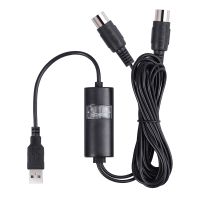
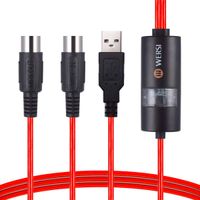
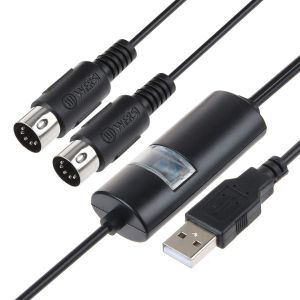
VSEER USB IN-OUT MIDI Cable Converter, Professional PC/ Laptop/ Mac to Music Keyboard Adapter Cord for Home Music Studio
Function:
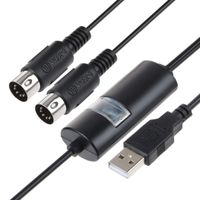
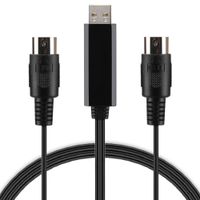
VSEER MIDI cable is essentially a data link between the MIDI instrument and the PC. Plays MIDI input signal by MIDI keyboard, through this MIDI Cable, implement MIDI to usb, so as to achieve the editing of music on the computer.
Instructions:
1. Connect the cable marked "IN" to the MIDI "OUT" socket of a MIDI keyboard (or MIDI device).
2. Connect the cable marked "OUT" to the MIDI "IN" socket of a MIDI keyboard (or MIDI device).
3. Plug the USB cable into any free USB socket on your computer, Led indicats power on.
4. Open your music software program, e.g. Cubase, Sonar, MIDI Connections, etc.
5. Set the music programs MIDI in and MIDI out devices to "USB Audio Device".
6. Your USB to MIDI interface is now ready for use.
7. To save potential problems, it is recommended that this interface is always connected to the same SUB as it was originally installed on USB to prevent multiple installations of the driver.
Package Included:
1 * MIDI Cable
1 * User Manual
Warranty:
90 days money-back and 12-month worry-free Guarantee!
Function:
VSEER MIDI cable is essentially a data link between the MIDI instrument and the PC. Plays MIDI input signal by MIDI keyboard, through this MIDI Cable, implement MIDI to usb, so as to achieve the editing of music on the computer.
Instructions:
1. Connect the cable marked "IN" to the MIDI "OUT" socket of a MIDI keyboard (or MIDI device).
2. Connect the cable marked "OUT" to the MIDI "IN" socket of a MIDI keyboard (or MIDI device).
3. Plug the USB cable into any free USB socket on your computer, Led indicats power on.
4. Open your music software program, e.g. Cubase, Sonar, MIDI Connections, etc.
5. Set the music programs MIDI in and MIDI out devices to "USB Audio Device".
6. Your USB to MIDI interface is now ready for use.
7. To save potential problems, it is recommended that this interface is always connected to the same SUB as it was originally installed on USB to prevent multiple installations of the driver.
Package Included:
1 * MIDI Cable
1 * User Manual
Warranty:
90 days money-back and 12-month worry-free Guarantee!
USB IN-OUT MIDI Cable, VSEER Pofessional Piano Keyboard to PC/Laptop/Mac MIDI Adapter Cord for Home Music Studio - 6.5Ft
Current Price
$12.99
Average
$12.2
Min Price
$9.99
Max Price
$18.99
Price dynamics
6%
Description
VSEER USB IN-OUT MIDI Cable Converter, Professional PC/ Laptop/ Mac to Music Keyboard Adapter Cord for Home Music Studio
Function:
VSEER MIDI cable is essentially a data link between the MIDI instrument and the PC. Plays MIDI input signal by MIDI keyboard, through this MIDI Cable, implement MIDI to usb, so as to achieve the editing of music on the computer.
Instructions:
1. Connect the cable marked "IN" to the MIDI "OUT" socket of a MIDI keyboard (or MIDI device).
2. Connect the cable marked "OUT" to the MIDI "IN" socket of a MIDI keyboard (or MIDI device).
3. Plug the USB cable into any free USB socket on your computer, Led indicats power on.
4. Open your music software program, e.g. Cubase, Sonar, MIDI Connections, etc.
5. Set the music programs MIDI in and MIDI out devices to "USB Audio Device".
6. Your USB to MIDI interface is now ready for use.
7. To save potential problems, it is recommended that this interface is always connected to the same SUB as it was originally installed on USB to prevent multiple installations of the driver.
Package Included:
1 * MIDI Cable
1 * User Manual
Warranty:
90 days money-back and 12-month worry-free Guarantee!
Function:
VSEER MIDI cable is essentially a data link between the MIDI instrument and the PC. Plays MIDI input signal by MIDI keyboard, through this MIDI Cable, implement MIDI to usb, so as to achieve the editing of music on the computer.
Instructions:
1. Connect the cable marked "IN" to the MIDI "OUT" socket of a MIDI keyboard (or MIDI device).
2. Connect the cable marked "OUT" to the MIDI "IN" socket of a MIDI keyboard (or MIDI device).
3. Plug the USB cable into any free USB socket on your computer, Led indicats power on.
4. Open your music software program, e.g. Cubase, Sonar, MIDI Connections, etc.
5. Set the music programs MIDI in and MIDI out devices to "USB Audio Device".
6. Your USB to MIDI interface is now ready for use.
7. To save potential problems, it is recommended that this interface is always connected to the same SUB as it was originally installed on USB to prevent multiple installations of the driver.
Package Included:
1 * MIDI Cable
1 * User Manual
Warranty:
90 days money-back and 12-month worry-free Guarantee!
Price will be lower
in next 2 weeks
in next 2 weeks
According to the data, price will be lower in next two weeks, so not waste your money and track better price!
Similar products