- HomeElectronicsComputers & AccessoriesComputer Accessories & PeripheralsCleaning & RepairRepair Kits
Description
What's Included:
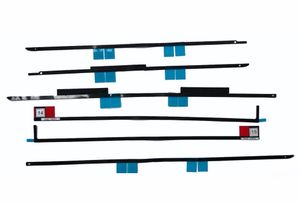
- LCD display adhesive strip kit (6 pieces), not including any other tools as pictures.
Description:
- Our VHB (very high bond) adhesive strips keep your LCD where it should be on your iMac
- These adhesive strips are designed specifically to perfectly fit the contours of the iMac model A1419 ,but will NOT work for A1418 as there are thiner stickers designed specifically for that model
- It requires 100% correct installation upon perfectly clean parts that have no trace of dirt/ dust or the previous adhes
Compatible for iMac 27" A1419
- For iMac13,2 Late 2012: MD095LL/A (2.9 GHz Core i5)
- For iMac13,2 Late 2012: MD096LL/A (3.2 GHz Core i5)
- For iMac13,2 Late 2012: MD096LL/A (3.4 GHz Core i7)
- For iMac14,2 Late 2013: MD088LL/A (3.2 GHz Core i5)
- For iMac14,2 Late 2013: MD089LL/A (3.4 GHz Core i5)
- For iMac14,2 Late 2013: MD089LL/A (3.5 GHz Core i7)
- For iMac15,1 Retina 5K Late 2014: MF886LL/A (3.5 GHz Core i5)
- For iMac15,1 Retina 5K Late 2014: MF886LL/A (4.0 GHz Core i7)
- For iMac15,1 Retina 5K Mid 2015: MF885LL/A (3.3 GHz Core i5)
- For iMac17,1 Retina 5K Late 2015: MK462LL/A (3.2 GHz Core i5)
- For iMac17,1 Retina 5K Late 2015: MK482LL/A (3.3 GHz Core i5)
- For iMac17,1 Retina 5K Late 2015: MK482LL/A (4.0 GHz Core i7)
Identifying Numbers:
- Part #: 946-4547, 946-4548, 946-4549, 946-4550, 946-4551, 946-4552, 946-01031, 946-01032, 946-01033, 946-03774, 946-03775
- Related Part #: 076-00009, 076-1419, 076-1444
Extremely Important:On the iMac Intel 27" Retina 5K Display, strip 12's blue tabs will not line up with the top antenna in the same way as the regular model. This is perfectly acceptable and won't impact the performance of the strips or antenna.
Here is the link for instructions:
https://www.ifixit.com/Guide/iMac+Intel+27-Inch+EMC+2639+Adhesive+Strips+Replacement/2431
- LCD display adhesive strip kit (6 pieces), not including any other tools as pictures.
Description:
- Our VHB (very high bond) adhesive strips keep your LCD where it should be on your iMac
- These adhesive strips are designed specifically to perfectly fit the contours of the iMac model A1419 ,but will NOT work for A1418 as there are thiner stickers designed specifically for that model
- It requires 100% correct installation upon perfectly clean parts that have no trace of dirt/ dust or the previous adhes
Compatible for iMac 27" A1419
- For iMac13,2 Late 2012: MD095LL/A (2.9 GHz Core i5)
- For iMac13,2 Late 2012: MD096LL/A (3.2 GHz Core i5)
- For iMac13,2 Late 2012: MD096LL/A (3.4 GHz Core i7)
- For iMac14,2 Late 2013: MD088LL/A (3.2 GHz Core i5)
- For iMac14,2 Late 2013: MD089LL/A (3.4 GHz Core i5)
- For iMac14,2 Late 2013: MD089LL/A (3.5 GHz Core i7)
- For iMac15,1 Retina 5K Late 2014: MF886LL/A (3.5 GHz Core i5)
- For iMac15,1 Retina 5K Late 2014: MF886LL/A (4.0 GHz Core i7)
- For iMac15,1 Retina 5K Mid 2015: MF885LL/A (3.3 GHz Core i5)
- For iMac17,1 Retina 5K Late 2015: MK462LL/A (3.2 GHz Core i5)
- For iMac17,1 Retina 5K Late 2015: MK482LL/A (3.3 GHz Core i5)
- For iMac17,1 Retina 5K Late 2015: MK482LL/A (4.0 GHz Core i7)
Identifying Numbers:
- Part #: 946-4547, 946-4548, 946-4549, 946-4550, 946-4551, 946-4552, 946-01031, 946-01032, 946-01033, 946-03774, 946-03775
- Related Part #: 076-00009, 076-1419, 076-1444
Extremely Important:On the iMac Intel 27" Retina 5K Display, strip 12's blue tabs will not line up with the top antenna in the same way as the regular model. This is perfectly acceptable and won't impact the performance of the strips or antenna.
Here is the link for instructions:
https://www.ifixit.com/Guide/iMac+Intel+27-Inch+EMC+2639+Adhesive+Strips+Replacement/2431
Willhom (076-1444) LCD Display Screen Adhesive Strips Tape Compatible for iMac 27" A1419 (Late 2012- Mid 2017)
Price is below average
Current Price
$4.45
Average
$6.81
Min Price
$4.45
Max Price
$8.99
Price dynamics
35%
Description
What's Included:
- LCD display adhesive strip kit (6 pieces), not including any other tools as pictures.
Description:
- Our VHB (very high bond) adhesive strips keep your LCD where it should be on your iMac
- These adhesive strips are designed specifically to perfectly fit the contours of the iMac model A1419 ,but will NOT work for A1418 as there are thiner stickers designed specifically for that model
- It requires 100% correct installation upon perfectly clean parts that have no trace of dirt/ dust or the previous adhes
Compatible for iMac 27" A1419
- For iMac13,2 Late 2012: MD095LL/A (2.9 GHz Core i5)
- For iMac13,2 Late 2012: MD096LL/A (3.2 GHz Core i5)
- For iMac13,2 Late 2012: MD096LL/A (3.4 GHz Core i7)
- For iMac14,2 Late 2013: MD088LL/A (3.2 GHz Core i5)
- For iMac14,2 Late 2013: MD089LL/A (3.4 GHz Core i5)
- For iMac14,2 Late 2013: MD089LL/A (3.5 GHz Core i7)
- For iMac15,1 Retina 5K Late 2014: MF886LL/A (3.5 GHz Core i5)
- For iMac15,1 Retina 5K Late 2014: MF886LL/A (4.0 GHz Core i7)
- For iMac15,1 Retina 5K Mid 2015: MF885LL/A (3.3 GHz Core i5)
- For iMac17,1 Retina 5K Late 2015: MK462LL/A (3.2 GHz Core i5)
- For iMac17,1 Retina 5K Late 2015: MK482LL/A (3.3 GHz Core i5)
- For iMac17,1 Retina 5K Late 2015: MK482LL/A (4.0 GHz Core i7)
Identifying Numbers:
- Part #: 946-4547, 946-4548, 946-4549, 946-4550, 946-4551, 946-4552, 946-01031, 946-01032, 946-01033, 946-03774, 946-03775
- Related Part #: 076-00009, 076-1419, 076-1444
Extremely Important:On the iMac Intel 27" Retina 5K Display, strip 12's blue tabs will not line up with the top antenna in the same way as the regular model. This is perfectly acceptable and won't impact the performance of the strips or antenna.
Here is the link for instructions:
https://www.ifixit.com/Guide/iMac+Intel+27-Inch+EMC+2639+Adhesive+Strips+Replacement/2431
- LCD display adhesive strip kit (6 pieces), not including any other tools as pictures.
Description:
- Our VHB (very high bond) adhesive strips keep your LCD where it should be on your iMac
- These adhesive strips are designed specifically to perfectly fit the contours of the iMac model A1419 ,but will NOT work for A1418 as there are thiner stickers designed specifically for that model
- It requires 100% correct installation upon perfectly clean parts that have no trace of dirt/ dust or the previous adhes
Compatible for iMac 27" A1419
- For iMac13,2 Late 2012: MD095LL/A (2.9 GHz Core i5)
- For iMac13,2 Late 2012: MD096LL/A (3.2 GHz Core i5)
- For iMac13,2 Late 2012: MD096LL/A (3.4 GHz Core i7)
- For iMac14,2 Late 2013: MD088LL/A (3.2 GHz Core i5)
- For iMac14,2 Late 2013: MD089LL/A (3.4 GHz Core i5)
- For iMac14,2 Late 2013: MD089LL/A (3.5 GHz Core i7)
- For iMac15,1 Retina 5K Late 2014: MF886LL/A (3.5 GHz Core i5)
- For iMac15,1 Retina 5K Late 2014: MF886LL/A (4.0 GHz Core i7)
- For iMac15,1 Retina 5K Mid 2015: MF885LL/A (3.3 GHz Core i5)
- For iMac17,1 Retina 5K Late 2015: MK462LL/A (3.2 GHz Core i5)
- For iMac17,1 Retina 5K Late 2015: MK482LL/A (3.3 GHz Core i5)
- For iMac17,1 Retina 5K Late 2015: MK482LL/A (4.0 GHz Core i7)
Identifying Numbers:
- Part #: 946-4547, 946-4548, 946-4549, 946-4550, 946-4551, 946-4552, 946-01031, 946-01032, 946-01033, 946-03774, 946-03775
- Related Part #: 076-00009, 076-1419, 076-1444
Extremely Important:On the iMac Intel 27" Retina 5K Display, strip 12's blue tabs will not line up with the top antenna in the same way as the regular model. This is perfectly acceptable and won't impact the performance of the strips or antenna.
Here is the link for instructions:
https://www.ifixit.com/Guide/iMac+Intel+27-Inch+EMC+2639+Adhesive+Strips+Replacement/2431
Price will be lower
in next 2 weeks
in next 2 weeks
According to the data, price will be lower in next two weeks, so not waste your money and track better price!
Product review & video
hi I'm Gwendolyn with iFixit and today I'll be walking you through applying the adhesive strips on your IMAX display I'm working on a 27-inch late 2012 iMac but the procedure is nearly identical to a late 2013 and even the latest 5k Retina models to get started make sure you have your replacement adhesive strips in a spudger on hand and then we'll get started by making sure the old strips on your computer and display have been completely removed if you have a few remaining you can use the help of your handy spudger to scrape them off the rear case now it's time to replace those strips remember to take your time and be very careful the adhesive is very sticky and you don't want to misalign it start with lucky number 13 which goes on the right vertical side before peeling off any backing line it up against the frame of the iMac to get an idea of where it goes then you can peel the short p


Similar products