Description
How to connect bluetooth
1. Close all your bluetooth in the phone.
2. Long press the "on/off" button to red/blue light flash.
3. Open your bluetooth in the phone, find the bluetooth named"BT-FAAH", then connect.
4. You can listen to the music directly after connect the bluetooth.
5. Only connect bluetooth in one device at one time, please make sure disconnect with the previous bluetooth device when connect a new device.
Bluetooth Musuc Play Instruction:
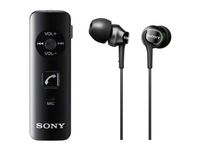
1. Press once PLAY/STOP botton start playing, press once again to stop playing.
2. Press Vol- for previous song
3. Press Vol+ for next song
4. Long press Vol- will constant reduce volume to minimum;
Long press Vol+ will constant increase volume to max, a "di di" sound sill be heard when reaches max level.
Bluetooth Handfree
1. Incoming call, press once PLAY/STOP botton for auto receives call.
2. Incoming call, press and hold PLAY/STOP for 3 seconds to reject call.
3. During call, long press PLAY/STOP botton for 3 seconds to switch to mobile device, press PLAY/STOP botton again for 3 seconds will switch back to earphone.
Charging Function Operation Instruction
Connect the data cable to USB charge (or computer USB port), the other end connect to our device, our device have a LED indication on the right, RED light constant on shows that device is charging, RED light off and then became blue when charged fully.
Include:
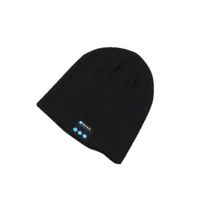
1 x Wireless Bluetooth Hat
1 x Instruction Menu
1 x Charging Cable
1. Close all your bluetooth in the phone.
2. Long press the "on/off" button to red/blue light flash.
3. Open your bluetooth in the phone, find the bluetooth named"BT-FAAH", then connect.
4. You can listen to the music directly after connect the bluetooth.
5. Only connect bluetooth in one device at one time, please make sure disconnect with the previous bluetooth device when connect a new device.
Bluetooth Musuc Play Instruction:
1. Press once PLAY/STOP botton start playing, press once again to stop playing.
2. Press Vol- for previous song
3. Press Vol+ for next song
4. Long press Vol- will constant reduce volume to minimum;
Long press Vol+ will constant increase volume to max, a "di di" sound sill be heard when reaches max level.
Bluetooth Handfree
1. Incoming call, press once PLAY/STOP botton for auto receives call.
2. Incoming call, press and hold PLAY/STOP for 3 seconds to reject call.
3. During call, long press PLAY/STOP botton for 3 seconds to switch to mobile device, press PLAY/STOP botton again for 3 seconds will switch back to earphone.
Charging Function Operation Instruction
Connect the data cable to USB charge (or computer USB port), the other end connect to our device, our device have a LED indication on the right, RED light constant on shows that device is charging, RED light off and then became blue when charged fully.
Include:
1 x Wireless Bluetooth Hat
1 x Instruction Menu
1 x Charging Cable
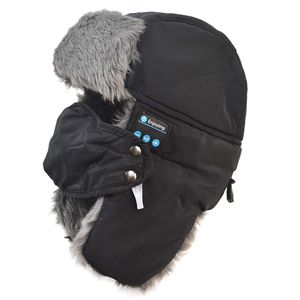
Winter Bluetooth Hat with Windproof Mask, Wireless Headset with Soft Plush, Suit for Snowboarding, Skiing, Skating
Price is below average
Current Price
$29.28
Average
$29.85
Min Price
$29.28
Max Price
$29.99
Price dynamics
2%
Description
How to connect bluetooth
1. Close all your bluetooth in the phone.
2. Long press the "on/off" button to red/blue light flash.
3. Open your bluetooth in the phone, find the bluetooth named"BT-FAAH", then connect.
4. You can listen to the music directly after connect the bluetooth.
5. Only connect bluetooth in one device at one time, please make sure disconnect with the previous bluetooth device when connect a new device.
Bluetooth Musuc Play Instruction:
1. Press once PLAY/STOP botton start playing, press once again to stop playing.
2. Press Vol- for previous song
3. Press Vol+ for next song
4. Long press Vol- will constant reduce volume to minimum;
Long press Vol+ will constant increase volume to max, a "di di" sound sill be heard when reaches max level.
Bluetooth Handfree
1. Incoming call, press once PLAY/STOP botton for auto receives call.
2. Incoming call, press and hold PLAY/STOP for 3 seconds to reject call.
3. During call, long press PLAY/STOP botton for 3 seconds to switch to mobile device, press PLAY/STOP botton again for 3 seconds will switch back to earphone.
Charging Function Operation Instruction
Connect the data cable to USB charge (or computer USB port), the other end connect to our device, our device have a LED indication on the right, RED light constant on shows that device is charging, RED light off and then became blue when charged fully.
Include:
1 x Wireless Bluetooth Hat
1 x Instruction Menu
1 x Charging Cable
1. Close all your bluetooth in the phone.
2. Long press the "on/off" button to red/blue light flash.
3. Open your bluetooth in the phone, find the bluetooth named"BT-FAAH", then connect.
4. You can listen to the music directly after connect the bluetooth.
5. Only connect bluetooth in one device at one time, please make sure disconnect with the previous bluetooth device when connect a new device.
Bluetooth Musuc Play Instruction:
1. Press once PLAY/STOP botton start playing, press once again to stop playing.
2. Press Vol- for previous song
3. Press Vol+ for next song
4. Long press Vol- will constant reduce volume to minimum;
Long press Vol+ will constant increase volume to max, a "di di" sound sill be heard when reaches max level.
Bluetooth Handfree
1. Incoming call, press once PLAY/STOP botton for auto receives call.
2. Incoming call, press and hold PLAY/STOP for 3 seconds to reject call.
3. During call, long press PLAY/STOP botton for 3 seconds to switch to mobile device, press PLAY/STOP botton again for 3 seconds will switch back to earphone.
Charging Function Operation Instruction
Connect the data cable to USB charge (or computer USB port), the other end connect to our device, our device have a LED indication on the right, RED light constant on shows that device is charging, RED light off and then became blue when charged fully.
Include:
1 x Wireless Bluetooth Hat
1 x Instruction Menu
1 x Charging Cable
Price will be lower
in next 2 weeks
in next 2 weeks
According to the data, price will be lower in next two weeks, so not waste your money and track better price!
Product review & video
what's up geeks kids it's me Omar from geeks free labs and today make sure you got a very cool product as you can see it's on top of my head right now and this was sent to me free for review from swag Tron this is the swag Tron snow tide smart Bluetooth ski / snowboarding helmet and so this product retails for 150 bucks it comes available in black and also white and it does a lot more than just allow you to listen to music while you're on the slopes it actually has a really cool iOS and Android app a little to do a ton of different things so enough talking let me start showing you this product alright guys so let's take some close-up looks at the snow tied helmet here so one of the things I will say that it does include with this is a USB so this is a micro USB 2 regular USB and this works you used to charge up the helmet so this helmet does have a built in battery obviously uses blueto