Description
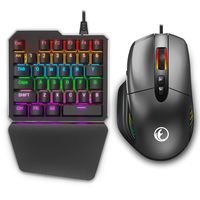
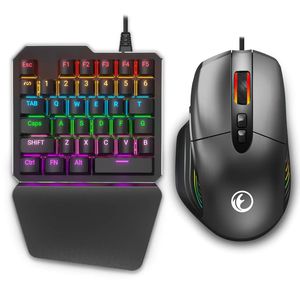
- 【IFYOO KMAX1 Pro Wired Gaming Keyboard and Mouse Set Adapter Converter for Xbox One / PS4 / Switch / PS3 / PC】
- 【How to use on Xbox One / PS4】
- (1) Connect the mouse and the Xbox One / PS4 Controller(powered off status) to the keyboard.
- (2) Connect the keyboard to the Xbox One / PS4 Console.
- (3) And then wait for about 10 seconds, start playing the games by using the keyboard and mouse according to the key mapping guide diagrams on the manual.
- (4) To adjust mouse speed, You can press ""F3"" to decrease or ""F4"" to increase Mouse Speed.
- 【Notice on Xbox One / PS4】
- (1) After connecting the keyboard to PS4, it will show ""mouse connected"" tips.
- (2) After activating the keyboard and mouse successfully, it will show ""mouse connected"" tips.
- (3) If you use the keyboard and mouse set to play the games, you will not use the controller and the headset on controller at the same time.
- 【How to use on PS3 / Switch】
- (1) Connect the mouse to the keyboard.
- (2) Connect the keyboard to the PS3 / Switch Console.(Switch console should be in TV mode and Adapter should be pluged into the Switch Dock.)
- (3) Press ""Ctrl+1"" to activate the keyboard and mouse set on PS3. Press ""Ctrl+2"" to activate the keyboard and mouse set on Switch.
- (4) And then wait for about 10 seconds, start playing the games by using the keyboard and mouse according to the key mapping guide diagrams on the manual.
- (5) To adjust mouse speed, You can press ""F3"" to decrease or ""F4"" to increase Mouse Speed.
- 【Notice on PS3 / Switch】
- Turn on the option: ""Settings"" - ""Controllers and Sensors"" and click ""On"" of ""PRO Controller Wired Communication"" on the Switch.
Wired Gaming Keyboard and Mouse Adapter Converter for Xbox One / PS4 / Switch / PS3 / PC, IFYOO KMAX1 Pro Keypad and Mouse Combo Set for Game Consoles and Computer/Laptop
Price is below average
Current Price
$69.99
Average
$87.15
Min Price
$59.99
Max Price
$99
Price dynamics
20%
Description
- 【IFYOO KMAX1 Pro Wired Gaming Keyboard and Mouse Set Adapter Converter for Xbox One / PS4 / Switch / PS3 / PC】
- 【How to use on Xbox One / PS4】
- (1) Connect the mouse and the Xbox One / PS4 Controller(powered off status) to the keyboard.
- (2) Connect the keyboard to the Xbox One / PS4 Console.
- (3) And then wait for about 10 seconds, start playing the games by using the keyboard and mouse according to the key mapping guide diagrams on the manual.
- (4) To adjust mouse speed, You can press ""F3"" to decrease or ""F4"" to increase Mouse Speed.
- 【Notice on Xbox One / PS4】
- (1) After connecting the keyboard to PS4, it will show ""mouse connected"" tips.
- (2) After activating the keyboard and mouse successfully, it will show ""mouse connected"" tips.
- (3) If you use the keyboard and mouse set to play the games, you will not use the controller and the headset on controller at the same time.
- 【How to use on PS3 / Switch】
- (1) Connect the mouse to the keyboard.
- (2) Connect the keyboard to the PS3 / Switch Console.(Switch console should be in TV mode and Adapter should be pluged into the Switch Dock.)
- (3) Press ""Ctrl+1"" to activate the keyboard and mouse set on PS3. Press ""Ctrl+2"" to activate the keyboard and mouse set on Switch.
- (4) And then wait for about 10 seconds, start playing the games by using the keyboard and mouse according to the key mapping guide diagrams on the manual.
- (5) To adjust mouse speed, You can press ""F3"" to decrease or ""F4"" to increase Mouse Speed.
- 【Notice on PS3 / Switch】
- Turn on the option: ""Settings"" - ""Controllers and Sensors"" and click ""On"" of ""PRO Controller Wired Communication"" on the Switch.
Price will be lower
in next 2 weeks
in next 2 weeks
According to the data, price will be lower in next two weeks, so not waste your money and track better price!
Similar products