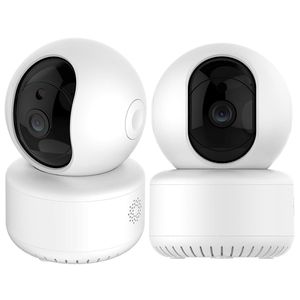
Description
How dose the camera store the video?
This camera external TF card slot ,it is recommended to insert 4-128GB TF card ,or can not store video,view the history of video,picture and other important feature.
How is the camera off the line?
Check that the power supply and cable are normal
Re-plug the power supply to restart the device
reconfigure the camera
Check whether the hone network broadband is normal
How to swith the network environment?
In the new network environment,please use the thimble long press the rear end of the device to reset the hole(SET hole)for about 6 seconds,to be heard[to restore the factory settings,do not power]voice prompt release ,Reset successully.Reboot after the network configuration connection.
★Note★: This wireless camera indoor does not support phone cards. Does not include memory card, please purchase separately
PARAMETER
WifiFrequency:2.4GHz
Resolution:1280X960P (1.3MP)
Power supply: AC100-240V
Power port: E27port
Viewing angle: 360°
Maximum WIFI distance:15m(Unblocked environment)
Audio: Two-way intercom
Video frame rate: 25 FPS at maximum resolution Audio
Input: Built-in microphone; output: built-in speaker
Local storage: TF card, max support 128G
--Package Include--
Camera x 1
USB Cable x 1
Manual x1
This camera external TF card slot ,it is recommended to insert 4-128GB TF card ,or can not store video,view the history of video,picture and other important feature.
How is the camera off the line?
Check that the power supply and cable are normal
Re-plug the power supply to restart the device
reconfigure the camera
Check whether the hone network broadband is normal
How to swith the network environment?
In the new network environment,please use the thimble long press the rear end of the device to reset the hole(SET hole)for about 6 seconds,to be heard[to restore the factory settings,do not power]voice prompt release ,Reset successully.Reboot after the network configuration connection.
★Note★: This wireless camera indoor does not support phone cards. Does not include memory card, please purchase separately
PARAMETER
WifiFrequency:2.4GHz
Resolution:1280X960P (1.3MP)
Power supply: AC100-240V
Power port: E27port
Viewing angle: 360°
Maximum WIFI distance:15m(Unblocked environment)
Audio: Two-way intercom
Video frame rate: 25 FPS at maximum resolution Audio
Input: Built-in microphone; output: built-in speaker
Local storage: TF card, max support 128G
--Package Include--
Camera x 1
USB Cable x 1
Manual x1
Wireless Security Camera with Two-Way Audio 720P HD WiFi Security Surveillance IP Cam Home Baby Monitor with Motion Detection Night Vision
Current Price
$29.99
Average
$19.51
Min Price
$17.79
Max Price
$29.99
Price dynamics
35%
Description
How dose the camera store the video?
This camera external TF card slot ,it is recommended to insert 4-128GB TF card ,or can not store video,view the history of video,picture and other important feature.
How is the camera off the line?
Check that the power supply and cable are normal
Re-plug the power supply to restart the device
reconfigure the camera
Check whether the hone network broadband is normal
How to swith the network environment?
In the new network environment,please use the thimble long press the rear end of the device to reset the hole(SET hole)for about 6 seconds,to be heard[to restore the factory settings,do not power]voice prompt release ,Reset successully.Reboot after the network configuration connection.
★Note★: This wireless camera indoor does not support phone cards. Does not include memory card, please purchase separately
PARAMETER
WifiFrequency:2.4GHz
Resolution:1280X960P (1.3MP)
Power supply: AC100-240V
Power port: E27port
Viewing angle: 360°
Maximum WIFI distance:15m(Unblocked environment)
Audio: Two-way intercom
Video frame rate: 25 FPS at maximum resolution Audio
Input: Built-in microphone; output: built-in speaker
Local storage: TF card, max support 128G
--Package Include--
Camera x 1
USB Cable x 1
Manual x1
This camera external TF card slot ,it is recommended to insert 4-128GB TF card ,or can not store video,view the history of video,picture and other important feature.
How is the camera off the line?
Check that the power supply and cable are normal
Re-plug the power supply to restart the device
reconfigure the camera
Check whether the hone network broadband is normal
How to swith the network environment?
In the new network environment,please use the thimble long press the rear end of the device to reset the hole(SET hole)for about 6 seconds,to be heard[to restore the factory settings,do not power]voice prompt release ,Reset successully.Reboot after the network configuration connection.
★Note★: This wireless camera indoor does not support phone cards. Does not include memory card, please purchase separately
PARAMETER
WifiFrequency:2.4GHz
Resolution:1280X960P (1.3MP)
Power supply: AC100-240V
Power port: E27port
Viewing angle: 360°
Maximum WIFI distance:15m(Unblocked environment)
Audio: Two-way intercom
Video frame rate: 25 FPS at maximum resolution Audio
Input: Built-in microphone; output: built-in speaker
Local storage: TF card, max support 128G
--Package Include--
Camera x 1
USB Cable x 1
Manual x1
Price will be lower
in next 2 weeks
in next 2 weeks
According to the data, price will be lower in next two weeks, so not waste your money and track better price!
Product review & video
hi guys we we are back with another new product this is a wireless IP cameras so let's see how we can configure it and what's device can do first of all we have this device that IR receiver motion sensor we have one mic over here well back you can see the speaker the two antennas on back we can see power adapters or slow reset button with memory card and on the bottom you can see mounting bracket with QR code with the device so let's see how it's calculated first of all we need to insert this power adapter in here and it will start up and it will give you a vacation from this you can know this camera is started and it's moved around for the Android application you need to download v3 80 once you hear this sound access point a sublist what in it do you need to connect this IP camera to your mobile phone via Wi-Fi go to your setting go to Wi-Fi then on you can get IP camera with your devi



Similar products







































