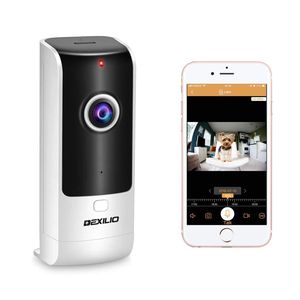
Description
DEXILIO V1 smart camera is a latest device that monitor and manage your home all day,Simply scan, connect, and See What you want to see! View your camera online Within minutes. With the P2P Server Technology, no complicated port mapping or DDNS settings needed. Everything is simple and smoothly.
HOW IT WORKS
Visit Apple APP Store or Google Play to download and install application "HDIPC 360". Launch the APP and create a new account. Alternatively you may scan the following QR Code with your smartphone which will bring you to the site(check the user manual)
Get the camera connected with power and wait until red light blinks.
Connected your Android or IOS device to your Wi-Fi and enter Wi-Fi password in APP as guided (5G Wi-Fi is not available for now), turn on the phone volume and get it close to the camera. When heard beeping sound from camera, please click"next" and wait until green light blink accompany with the voice "camera ready" which means connection is done.
Use the APP name the camera and enjoy the video.
YOU SHOULD KNOW:
1.WIFI : The camera only support 2.4G WIFI can not support 5G WIFI.
2.It can not link to computer or a Notebook,only Use the phone to connect.
3.Please be sure the power is off when remove/insert micro SD card.
4.To make the connection well among router ,camera and phone,please ensuyre the device camera is suitable for indoor environment; please keep it away from humidity such as humidifiers.
5.About onekey call function: The camera will not respond if people are watching the real-time video, in this situation, you can just talk, cellphone user can hear you. When people are not watching the real-time video, press the call button, the camera and cellphone will sound "ding dong".
HOW IT WORKS
Visit Apple APP Store or Google Play to download and install application "HDIPC 360". Launch the APP and create a new account. Alternatively you may scan the following QR Code with your smartphone which will bring you to the site(check the user manual)
Get the camera connected with power and wait until red light blinks.
Connected your Android or IOS device to your Wi-Fi and enter Wi-Fi password in APP as guided (5G Wi-Fi is not available for now), turn on the phone volume and get it close to the camera. When heard beeping sound from camera, please click"next" and wait until green light blink accompany with the voice "camera ready" which means connection is done.
Use the APP name the camera and enjoy the video.
YOU SHOULD KNOW:
1.WIFI : The camera only support 2.4G WIFI can not support 5G WIFI.
2.It can not link to computer or a Notebook,only Use the phone to connect.
3.Please be sure the power is off when remove/insert micro SD card.
4.To make the connection well among router ,camera and phone,please ensuyre the device camera is suitable for indoor environment; please keep it away from humidity such as humidifiers.
5.About onekey call function: The camera will not respond if people are watching the real-time video, in this situation, you can just talk, cellphone user can hear you. When people are not watching the real-time video, press the call button, the camera and cellphone will sound "ding dong".
Wireless Security WiFi Camera with Call Button, DEXILIO Home Surveillance Indoor IP Camera for Baby/Elder/Pet/Nanny Monitor, 180°Fisheye/Two-Way Audio/Motion Detection/Cloud Storge,with 32GB Card
Current Price
$36.99
Average
$35.61
Min Price
$29.9
Max Price
$43.99
Price dynamics
4%
Description
DEXILIO V1 smart camera is a latest device that monitor and manage your home all day,Simply scan, connect, and See What you want to see! View your camera online Within minutes. With the P2P Server Technology, no complicated port mapping or DDNS settings needed. Everything is simple and smoothly.
HOW IT WORKS
Visit Apple APP Store or Google Play to download and install application "HDIPC 360". Launch the APP and create a new account. Alternatively you may scan the following QR Code with your smartphone which will bring you to the site(check the user manual)
Get the camera connected with power and wait until red light blinks.
Connected your Android or IOS device to your Wi-Fi and enter Wi-Fi password in APP as guided (5G Wi-Fi is not available for now), turn on the phone volume and get it close to the camera. When heard beeping sound from camera, please click"next" and wait until green light blink accompany with the voice "camera ready" which means connection is done.
Use the APP name the camera and enjoy the video.
YOU SHOULD KNOW:
1.WIFI : The camera only support 2.4G WIFI can not support 5G WIFI.
2.It can not link to computer or a Notebook,only Use the phone to connect.
3.Please be sure the power is off when remove/insert micro SD card.
4.To make the connection well among router ,camera and phone,please ensuyre the device camera is suitable for indoor environment; please keep it away from humidity such as humidifiers.
5.About onekey call function: The camera will not respond if people are watching the real-time video, in this situation, you can just talk, cellphone user can hear you. When people are not watching the real-time video, press the call button, the camera and cellphone will sound "ding dong".
HOW IT WORKS
Visit Apple APP Store or Google Play to download and install application "HDIPC 360". Launch the APP and create a new account. Alternatively you may scan the following QR Code with your smartphone which will bring you to the site(check the user manual)
Get the camera connected with power and wait until red light blinks.
Connected your Android or IOS device to your Wi-Fi and enter Wi-Fi password in APP as guided (5G Wi-Fi is not available for now), turn on the phone volume and get it close to the camera. When heard beeping sound from camera, please click"next" and wait until green light blink accompany with the voice "camera ready" which means connection is done.
Use the APP name the camera and enjoy the video.
YOU SHOULD KNOW:
1.WIFI : The camera only support 2.4G WIFI can not support 5G WIFI.
2.It can not link to computer or a Notebook,only Use the phone to connect.
3.Please be sure the power is off when remove/insert micro SD card.
4.To make the connection well among router ,camera and phone,please ensuyre the device camera is suitable for indoor environment; please keep it away from humidity such as humidifiers.
5.About onekey call function: The camera will not respond if people are watching the real-time video, in this situation, you can just talk, cellphone user can hear you. When people are not watching the real-time video, press the call button, the camera and cellphone will sound "ding dong".
Price will be lower
in next 2 weeks
in next 2 weeks
According to the data, price will be lower in next two weeks, so not waste your money and track better price!
Product review & video
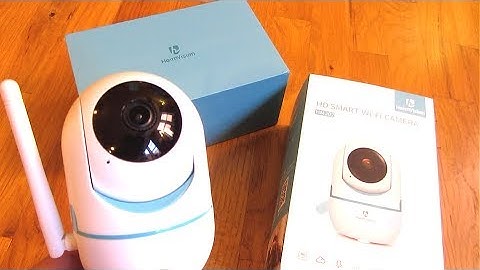
so what I got here is a $30 real-time camera so this camera is by haim vision the model is HM 202 and you'll find this in the description area of the video a link to Amazon so this camera moves 95 degrees up and down and also 355 degrees almost 360 degrees left and right so this camera is a security camera or a camera you could use for your pets or for your kids or even for your elderly parents where you can put this in the corner and control it from your phone so I'll be demoing the app now I want to show you how smooth the video is so as you can see I have the camera actually pointing to the TV there there's the camera it's pointing to the TV and this is the app on my phone and so you can see it's basically real-time and it's very smooth I could also zoom in and you can see just how smooth it is you could also hear my voice in the background and that's from the camera they're broadcas


Similar products







































