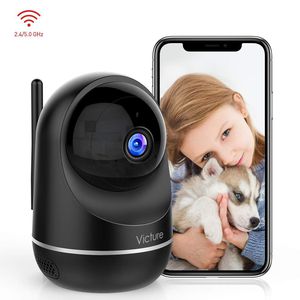
Description
【Warranty】
If you have any questions, please email Customer Service at ipc.support@govicture.com. We provide 100% satisfaction and will do our best to solve the problem.
【AP-Mode Connection】
1.Please open location information of your phone and agree all the app requests.
1.If fail to connect, pls try second way of connection-AP-Mode, now red light flashes quickly:
Click "+"mark on app→ Camera → No QR code → AP mode( reset to make red indicator flashes quickly )
2.Choose Wi-Fi and input password (no special characters) → Select Device"s Hotspot → Connect "IPC365_AP-number"→ Rename
【Micro SD Card Tips】
1.32G-64G card at C10 is best.
2. Insert the card when power is lost.
3. Update the setting information in the settings menu.
【Two-way audio tips】
1.Please activate the ringtone of the phone before using two-way audio
【Tips for positioning the camera】
1.Please do not place the camera outdoors or next to glass.
【Specifications】
Size: 93 * 114.5 mm
Application: iOS & Android
TF Card (NOT INCLUDED): 8-64G / C10
Wide angle: 90 °
Resolution: 2 million pixels, 1920 x 1080 (1080P)
Infrared light: 850nm 10PCS, range up to 30 feet
Night vision: The IR-CUT filter automatically switches
WiFi LAN frequency: 2.4&5GHz, WPA2 encryption, IEEE802.11b / g / n
【Package】
1. Victure Wifi Camera * 1
2. Pan / tilt unit * 1
3. Screw * 2
4. 4.92ft power cable * 1
5. Power plug * 1
6. User Manual * 1
If you have any questions, please email Customer Service at ipc.support@govicture.com. We provide 100% satisfaction and will do our best to solve the problem.
【AP-Mode Connection】
1.Please open location information of your phone and agree all the app requests.
1.If fail to connect, pls try second way of connection-AP-Mode, now red light flashes quickly:
Click "+"mark on app→ Camera → No QR code → AP mode( reset to make red indicator flashes quickly )
2.Choose Wi-Fi and input password (no special characters) → Select Device"s Hotspot → Connect "IPC365_AP-number"→ Rename
【Micro SD Card Tips】
1.32G-64G card at C10 is best.
2. Insert the card when power is lost.
3. Update the setting information in the settings menu.
【Two-way audio tips】
1.Please activate the ringtone of the phone before using two-way audio
【Tips for positioning the camera】
1.Please do not place the camera outdoors or next to glass.
【Specifications】
Size: 93 * 114.5 mm
Application: iOS & Android
TF Card (NOT INCLUDED): 8-64G / C10
Wide angle: 90 °
Resolution: 2 million pixels, 1920 x 1080 (1080P)
Infrared light: 850nm 10PCS, range up to 30 feet
Night vision: The IR-CUT filter automatically switches
WiFi LAN frequency: 2.4&5GHz, WPA2 encryption, IEEE802.11b / g / n
【Package】
1. Victure Wifi Camera * 1
2. Pan / tilt unit * 1
3. Screw * 2
4. 4.92ft power cable * 1
5. Power plug * 1
6. User Manual * 1
Victure Dualband 2.4Ghz and 5Ghz 1080P WiFi Camera Baby Monitor,FHD Wireless Security Camera with Motion Detection via IPC360 Pro, Pan Tilt, 2-Way Audio, Night Vision
Price is below average
Current Price
$39.99
Average
$44.43
Min Price
$39.99
Max Price
$49.99
Price dynamics
10%
Description
【Warranty】
If you have any questions, please email Customer Service at ipc.support@govicture.com. We provide 100% satisfaction and will do our best to solve the problem.
【AP-Mode Connection】
1.Please open location information of your phone and agree all the app requests.
1.If fail to connect, pls try second way of connection-AP-Mode, now red light flashes quickly:
Click "+"mark on app→ Camera → No QR code → AP mode( reset to make red indicator flashes quickly )
2.Choose Wi-Fi and input password (no special characters) → Select Device"s Hotspot → Connect "IPC365_AP-number"→ Rename
【Micro SD Card Tips】
1.32G-64G card at C10 is best.
2. Insert the card when power is lost.
3. Update the setting information in the settings menu.
【Two-way audio tips】
1.Please activate the ringtone of the phone before using two-way audio
【Tips for positioning the camera】
1.Please do not place the camera outdoors or next to glass.
【Specifications】
Size: 93 * 114.5 mm
Application: iOS & Android
TF Card (NOT INCLUDED): 8-64G / C10
Wide angle: 90 °
Resolution: 2 million pixels, 1920 x 1080 (1080P)
Infrared light: 850nm 10PCS, range up to 30 feet
Night vision: The IR-CUT filter automatically switches
WiFi LAN frequency: 2.4&5GHz, WPA2 encryption, IEEE802.11b / g / n
【Package】
1. Victure Wifi Camera * 1
2. Pan / tilt unit * 1
3. Screw * 2
4. 4.92ft power cable * 1
5. Power plug * 1
6. User Manual * 1
If you have any questions, please email Customer Service at ipc.support@govicture.com. We provide 100% satisfaction and will do our best to solve the problem.
【AP-Mode Connection】
1.Please open location information of your phone and agree all the app requests.
1.If fail to connect, pls try second way of connection-AP-Mode, now red light flashes quickly:
Click "+"mark on app→ Camera → No QR code → AP mode( reset to make red indicator flashes quickly )
2.Choose Wi-Fi and input password (no special characters) → Select Device"s Hotspot → Connect "IPC365_AP-number"→ Rename
【Micro SD Card Tips】
1.32G-64G card at C10 is best.
2. Insert the card when power is lost.
3. Update the setting information in the settings menu.
【Two-way audio tips】
1.Please activate the ringtone of the phone before using two-way audio
【Tips for positioning the camera】
1.Please do not place the camera outdoors or next to glass.
【Specifications】
Size: 93 * 114.5 mm
Application: iOS & Android
TF Card (NOT INCLUDED): 8-64G / C10
Wide angle: 90 °
Resolution: 2 million pixels, 1920 x 1080 (1080P)
Infrared light: 850nm 10PCS, range up to 30 feet
Night vision: The IR-CUT filter automatically switches
WiFi LAN frequency: 2.4&5GHz, WPA2 encryption, IEEE802.11b / g / n
【Package】
1. Victure Wifi Camera * 1
2. Pan / tilt unit * 1
3. Screw * 2
4. 4.92ft power cable * 1
5. Power plug * 1
6. User Manual * 1
Price will be lower
in next 2 weeks
in next 2 weeks
According to the data, price will be lower in next two weeks, so not waste your money and track better price!
Product review & video
what's up guys this is a quick video under venture PC 650 wireless security camera so right guys this actual videos on how to connect to the Wi-Fi and how to connect to the IP C 360 brought up so first of all I just want to let you know I bought this from Amazon and I paid $29.99 and what I'll do is I'll leave a link in the description below just in case if you need any more information or if you want actually buy one so right guys the first thing we need to do is fit the micro SD card so I'm going to use this micro SD card which is a Sun disc extreme plus it's a 64 gigabyte class 10 card so what we need to do is get the camera I'll just put the light on so if you can see down there there's the factory reset button underneath there there's a slot so get the micro SD card turn it this way and put it into the slot and now push it into place until it clicks into place now that's clicked in



Similar products







































