Description
Setting Up Your Camera With YI Home App
1.Install YI Home App and create a YI Home Account
2.Turn your camera on and select the '+' icon in YI Home App to add your camera
3.Select your Wi-Fi network and enter your Wi-Fi password, then select Connect to Wi-Fi
4.Scan the QR Code shown on the app, then select Next once the QR Code has scanned
5.Select Save, then select Start using to finish pairing
6.If connection failed, please push the Reset button and try again
WiFi Settings
1.YI Home cameras will need to connect to a 2.4GHz band network. 5GHz WiFi band is not supported
2.Turning on the location service on the phone if you encounter Unknown SSID issue
3.Encryption mode must be set to WPA/WPA2 (mixed mode) or WPA2
4.Your Wi-Fi password must be 8-20 characters in length
How to clip the coupon for product bundle?
1. Click "Add to Cart"
2. Clip coupon in your Shopping Cart and then proceed to checkout.
If you have any other problem, please contact us via support@yitechnology.com.
1.Install YI Home App and create a YI Home Account
2.Turn your camera on and select the '+' icon in YI Home App to add your camera
3.Select your Wi-Fi network and enter your Wi-Fi password, then select Connect to Wi-Fi
4.Scan the QR Code shown on the app, then select Next once the QR Code has scanned
5.Select Save, then select Start using to finish pairing
6.If connection failed, please push the Reset button and try again
WiFi Settings
1.YI Home cameras will need to connect to a 2.4GHz band network. 5GHz WiFi band is not supported
2.Turning on the location service on the phone if you encounter Unknown SSID issue
3.Encryption mode must be set to WPA/WPA2 (mixed mode) or WPA2
4.Your Wi-Fi password must be 8-20 characters in length
How to clip the coupon for product bundle?
1. Click "Add to Cart"
2. Clip coupon in your Shopping Cart and then proceed to checkout.
If you have any other problem, please contact us via support@yitechnology.com.
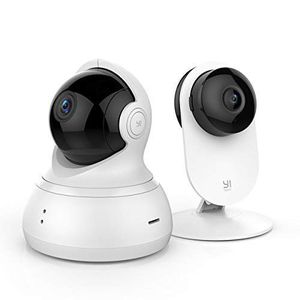
YI 1080P Indoor Security Camera Bundle Set, 2.4G WiFi Home Surveillance System with 24/7 Emergency Response, App/Cloud Service Available for Advanced Features-1080p Dome Camera and 1080p Home Camera
Price is below average
Current Price
$55
Average
$57.36
Min Price
$49.99
Max Price
$65.98
Price dynamics
4%
Description
Setting Up Your Camera With YI Home App
1.Install YI Home App and create a YI Home Account
2.Turn your camera on and select the '+' icon in YI Home App to add your camera
3.Select your Wi-Fi network and enter your Wi-Fi password, then select Connect to Wi-Fi
4.Scan the QR Code shown on the app, then select Next once the QR Code has scanned
5.Select Save, then select Start using to finish pairing
6.If connection failed, please push the Reset button and try again
WiFi Settings
1.YI Home cameras will need to connect to a 2.4GHz band network. 5GHz WiFi band is not supported
2.Turning on the location service on the phone if you encounter Unknown SSID issue
3.Encryption mode must be set to WPA/WPA2 (mixed mode) or WPA2
4.Your Wi-Fi password must be 8-20 characters in length
How to clip the coupon for product bundle?
1. Click "Add to Cart"
2. Clip coupon in your Shopping Cart and then proceed to checkout.
If you have any other problem, please contact us via support@yitechnology.com.
1.Install YI Home App and create a YI Home Account
2.Turn your camera on and select the '+' icon in YI Home App to add your camera
3.Select your Wi-Fi network and enter your Wi-Fi password, then select Connect to Wi-Fi
4.Scan the QR Code shown on the app, then select Next once the QR Code has scanned
5.Select Save, then select Start using to finish pairing
6.If connection failed, please push the Reset button and try again
WiFi Settings
1.YI Home cameras will need to connect to a 2.4GHz band network. 5GHz WiFi band is not supported
2.Turning on the location service on the phone if you encounter Unknown SSID issue
3.Encryption mode must be set to WPA/WPA2 (mixed mode) or WPA2
4.Your Wi-Fi password must be 8-20 characters in length
How to clip the coupon for product bundle?
1. Click "Add to Cart"
2. Clip coupon in your Shopping Cart and then proceed to checkout.
If you have any other problem, please contact us via support@yitechnology.com.
Price will be lower
in next 2 weeks
in next 2 weeks
According to the data, price will be lower in next two weeks, so not waste your money and track better price!

Similar products







































