Description
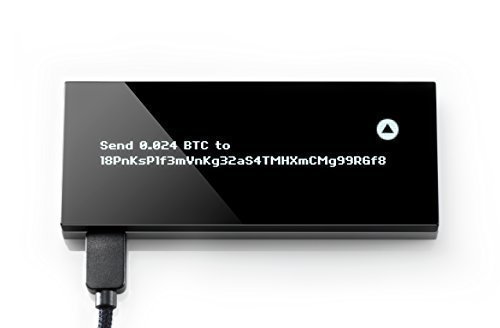
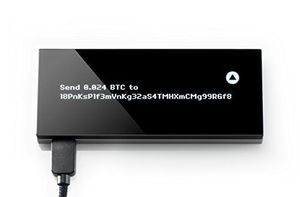
KeepKey is a USB device that stores and secures your bitcoins. When you entrust KeepKey with your money, each and every bitcoin transaction you make must be reviewed and approved via its OLED display and confirmation button. It now becomes nearly impossible for virtual attackers like malware or viruses to steal your valuable bitcoins. How it Works KeepKey works with the bitcoin wallet software on your computer by taking over the management of private key generation, private key storage, and transaction signing. Initialization and Backup KeepKey generates your Bitcoin private key using its hardware-based random number generator, combined with randomness provided by your computer. Once your private key is generated, you are given the one-time opportunity to write down a backup of your KeepKey in the form of a twelve-word recovery sentence. Secure Storage Your private key is stored securely on your KeepKey, never leaving the device. Your KeepKey is PIN-protected, which renders it useless even if it falls into the wrong hands. Transacting KeepKey's large display gives clarity to every bitcoin leaving the device. Each transaction must be manually approved using KeepKey's confirmation button. Recover If your KeepKey is lost or stolen, you can safely recover your device without compromising its private keys. What's in the Box: KeepKey Bitcoin Hardware Wallet, Woven Nylon USB Cable, Recovery Sentence Backup Card, Genuine Leather Backup Card Sleeve, and Quick Start Guide
KeepKey - The Simple Cryptocurrency Hardware Wallet
Price is below average
Current Price
$41
Average
$90.22
Min Price
$18
Max Price
$512.72
Price dynamics
55%
Description
KeepKey is a USB device that stores and secures your bitcoins. When you entrust KeepKey with your money, each and every bitcoin transaction you make must be reviewed and approved via its OLED display and confirmation button. It now becomes nearly impossible for virtual attackers like malware or viruses to steal your valuable bitcoins. How it Works KeepKey works with the bitcoin wallet software on your computer by taking over the management of private key generation, private key storage, and transaction signing. Initialization and Backup KeepKey generates your Bitcoin private key using its hardware-based random number generator, combined with randomness provided by your computer. Once your private key is generated, you are given the one-time opportunity to write down a backup of your KeepKey in the form of a twelve-word recovery sentence. Secure Storage Your private key is stored securely on your KeepKey, never leaving the device. Your KeepKey is PIN-protected, which renders it useless even if it falls into the wrong hands. Transacting KeepKey's large display gives clarity to every bitcoin leaving the device. Each transaction must be manually approved using KeepKey's confirmation button. Recover If your KeepKey is lost or stolen, you can safely recover your device without compromising its private keys. What's in the Box: KeepKey Bitcoin Hardware Wallet, Woven Nylon USB Cable, Recovery Sentence Backup Card, Genuine Leather Backup Card Sleeve, and Quick Start Guide
Price will be lower
in next 2 weeks
in next 2 weeks
According to the data, price will be lower in next two weeks, so not waste your money and track better price!
Product review & video
hey guys crypto dad here again and today I'm going to show you how to set up the keep key hardware wallet so let's get going [Music] okay so here's our keep key hardware wallet comes in a nice subtle black box it's got a laser seal down here from the factory alright so pretty straightforward they give you a web address at the top for the initialization get started this is the device it's got one micro USB connector on the side there for the interface cable and then one button here on the top alright and it's metal looks pretty nice alright let's see what else is in the box here's our recovery sentence card alright it looks like the key key uses a 12 word recovery phrase alright so we're here on the keep key website and I've got the device ready to go I've got the cable connected to my USB port on my computer and I'm ready to connect the device so I'm just gonna go over here where it say



Similar products