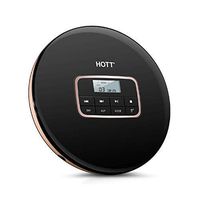
Description
How to use ?
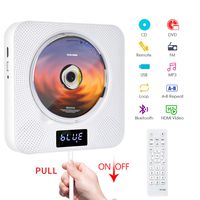
1. Make sure the "HOLD" button is on OFF side.
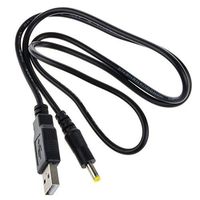
2. Power by the included USB power cable and adapter or 2 x 1.5V AA Batteries (not included).
3. Open the CD player lid by sliding the OPEN switch(at the side of player); put into the CD and close the player lid.
4. Long pressing the power on button >= until numbers shows up on LCD screen, at the same time, you would hear the the disc rotation.
5. Long pressing the MODE button to Bluetooth mode(until Bluetooth logo shows up and keep flashing on LCD screen).
6. Turn on Bluetooth function of external BT speaker/headphone; the CD player will auto detect the speaker and auto connect to it. (It takes for about 10 seconds for BT connection; but for the first connection, it needs 30-60 seconds).
Specifications:
Bluetooth Version: Bluetooth 4.2
Support CD Types: CD, CD - R, CD - RW and MP3 Disc
Playback Formats: CD - DA, MP3, WMA
Suitable for disc size: 8cm and 12cm in diameter
NOTE:
1. Please make sure the HOLD switch(at the back of CD player) is on OFF position before powering on. When "HOLD" turns on, all buttons will be locked.
2. The CD player doesn't have speaker, MUST be used with wired earphone or connect Bluetooth speakers/headphones via Bluetooth.
3. The USB cable only powered and it does not charge the CD player, cd player does not built-in battery.
4. Screen displays diSC? "diSC" on screen indicates that the inserted disc is not compatible with CD player. Please replace the CD discs in the supported format.
5.We recommend connecting the CD player to the car using our delivered audio cable. It is not recommended to connect the CD player to the car via Bluetooth (because the CD player may not be compatible with your car's audio line system)
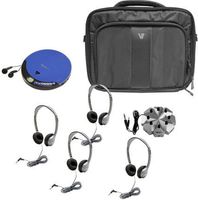
Package List:
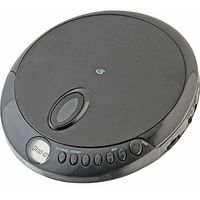
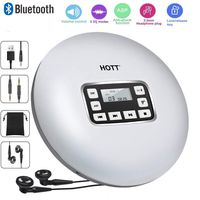
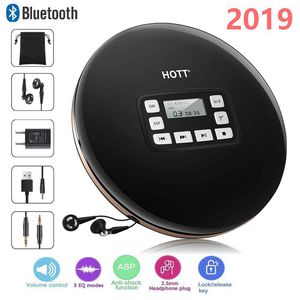
1 x Bluetooth CD Player
1 x USB Cable
1 x Power Adapter
1 x AUX Cable
1 x Earphone
1 x Manual
1 x CD Player Bag
1. Make sure the "HOLD" button is on OFF side.
2. Power by the included USB power cable and adapter or 2 x 1.5V AA Batteries (not included).
3. Open the CD player lid by sliding the OPEN switch(at the side of player); put into the CD and close the player lid.
4. Long pressing the power on button >= until numbers shows up on LCD screen, at the same time, you would hear the the disc rotation.
5. Long pressing the MODE button to Bluetooth mode(until Bluetooth logo shows up and keep flashing on LCD screen).
6. Turn on Bluetooth function of external BT speaker/headphone; the CD player will auto detect the speaker and auto connect to it. (It takes for about 10 seconds for BT connection; but for the first connection, it needs 30-60 seconds).
Specifications:
Bluetooth Version: Bluetooth 4.2
Support CD Types: CD, CD - R, CD - RW and MP3 Disc
Playback Formats: CD - DA, MP3, WMA
Suitable for disc size: 8cm and 12cm in diameter
NOTE:
1. Please make sure the HOLD switch(at the back of CD player) is on OFF position before powering on. When "HOLD" turns on, all buttons will be locked.
2. The CD player doesn't have speaker, MUST be used with wired earphone or connect Bluetooth speakers/headphones via Bluetooth.
3. The USB cable only powered and it does not charge the CD player, cd player does not built-in battery.
4. Screen displays diSC? "diSC" on screen indicates that the inserted disc is not compatible with CD player. Please replace the CD discs in the supported format.
5.We recommend connecting the CD player to the car using our delivered audio cable. It is not recommended to connect the CD player to the car via Bluetooth (because the CD player may not be compatible with your car's audio line system)
Package List:
1 x Bluetooth CD Player
1 x USB Cable
1 x Power Adapter
1 x AUX Cable
1 x Earphone
1 x Manual
1 x CD Player Bag
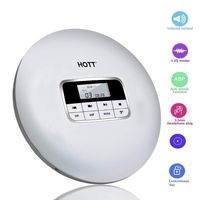
Portable CD Player Bluetooth, Personal Compact Disc Player with Headphones/LCD Display/USB Power Adapter/Aux Cable for Car, Electronic Skip Protection, Anti-Shock Function CD Music Player(Black)
Price is below average
Current Price
$89.99
Average
$95.56
Min Price
$89.99
Max Price
$99.99
Price dynamics
6%
Description
How to use ?
1. Make sure the "HOLD" button is on OFF side.
2. Power by the included USB power cable and adapter or 2 x 1.5V AA Batteries (not included).
3. Open the CD player lid by sliding the OPEN switch(at the side of player); put into the CD and close the player lid.
4. Long pressing the power on button >= until numbers shows up on LCD screen, at the same time, you would hear the the disc rotation.
5. Long pressing the MODE button to Bluetooth mode(until Bluetooth logo shows up and keep flashing on LCD screen).
6. Turn on Bluetooth function of external BT speaker/headphone; the CD player will auto detect the speaker and auto connect to it. (It takes for about 10 seconds for BT connection; but for the first connection, it needs 30-60 seconds).
Specifications:
Bluetooth Version: Bluetooth 4.2
Support CD Types: CD, CD - R, CD - RW and MP3 Disc
Playback Formats: CD - DA, MP3, WMA
Suitable for disc size: 8cm and 12cm in diameter
NOTE:
1. Please make sure the HOLD switch(at the back of CD player) is on OFF position before powering on. When "HOLD" turns on, all buttons will be locked.
2. The CD player doesn't have speaker, MUST be used with wired earphone or connect Bluetooth speakers/headphones via Bluetooth.
3. The USB cable only powered and it does not charge the CD player, cd player does not built-in battery.
4. Screen displays diSC? "diSC" on screen indicates that the inserted disc is not compatible with CD player. Please replace the CD discs in the supported format.
5.We recommend connecting the CD player to the car using our delivered audio cable. It is not recommended to connect the CD player to the car via Bluetooth (because the CD player may not be compatible with your car's audio line system)
Package List:
1 x Bluetooth CD Player
1 x USB Cable
1 x Power Adapter
1 x AUX Cable
1 x Earphone
1 x Manual
1 x CD Player Bag
1. Make sure the "HOLD" button is on OFF side.
2. Power by the included USB power cable and adapter or 2 x 1.5V AA Batteries (not included).
3. Open the CD player lid by sliding the OPEN switch(at the side of player); put into the CD and close the player lid.
4. Long pressing the power on button >= until numbers shows up on LCD screen, at the same time, you would hear the the disc rotation.
5. Long pressing the MODE button to Bluetooth mode(until Bluetooth logo shows up and keep flashing on LCD screen).
6. Turn on Bluetooth function of external BT speaker/headphone; the CD player will auto detect the speaker and auto connect to it. (It takes for about 10 seconds for BT connection; but for the first connection, it needs 30-60 seconds).
Specifications:
Bluetooth Version: Bluetooth 4.2
Support CD Types: CD, CD - R, CD - RW and MP3 Disc
Playback Formats: CD - DA, MP3, WMA
Suitable for disc size: 8cm and 12cm in diameter
NOTE:
1. Please make sure the HOLD switch(at the back of CD player) is on OFF position before powering on. When "HOLD" turns on, all buttons will be locked.
2. The CD player doesn't have speaker, MUST be used with wired earphone or connect Bluetooth speakers/headphones via Bluetooth.
3. The USB cable only powered and it does not charge the CD player, cd player does not built-in battery.
4. Screen displays diSC? "diSC" on screen indicates that the inserted disc is not compatible with CD player. Please replace the CD discs in the supported format.
5.We recommend connecting the CD player to the car using our delivered audio cable. It is not recommended to connect the CD player to the car via Bluetooth (because the CD player may not be compatible with your car's audio line system)
Package List:
1 x Bluetooth CD Player
1 x USB Cable
1 x Power Adapter
1 x AUX Cable
1 x Earphone
1 x Manual
1 x CD Player Bag
Price will be lower
in next 2 weeks
in next 2 weeks
According to the data, price will be lower in next two weeks, so not waste your money and track better price!
Similar products