Description
Products description:
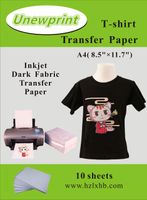
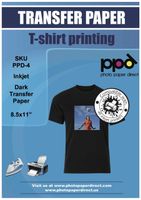
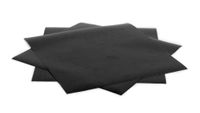
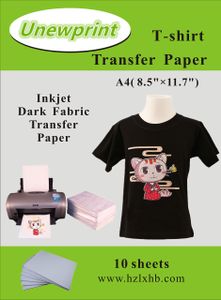
Dark-colored inkjet transfer paper is suitable for transferring images onto dark-colored cotton or cotton-mixed fabrics. It is printed with common color inkjet printers using water-based ink. The pattern transferred onto the products are of high quality, and are sharp, detailed, colorful, and has a good fastness to washing.
How to Use:
1.Printing
-Printer setup. Recommend to select "Photo Quality Inkjet Paper" mode for satisfactory printing results.
-Print the wishful image onto the transfer paper. Then leave it to dry for about 10 minutes.
-Cut out the image, leaving a narrow margin of 5 mm around the pattern edges.
2.Transferring
-Preheat the heat press machine and set the recommended transfer temperature to 170-180℃.
-Peel off the base paper from the printed coating, and the coating would remain as a film-like material.
-Place the image coating on the textile, printed (image) side facing up.
-Put the isolation paper on the image, the glossy side facing down.
-Transfer for 15-30 seconds, then remove the textile from machine, peel the isolation paper after cooled.
3.Washing
-It's best not to wash the textile in 24 hours after transferring.
-Washing the textile in cold or 30-40℃ water. Do not wash with strongly alkaline detergents, and no bleach. Avoid rubbing the transferred pattern when hand washing.
-Do not wring. Line dry in shade recommended.
-Don't dry-clean.
Dark-colored inkjet transfer paper is suitable for transferring images onto dark-colored cotton or cotton-mixed fabrics. It is printed with common color inkjet printers using water-based ink. The pattern transferred onto the products are of high quality, and are sharp, detailed, colorful, and has a good fastness to washing.
How to Use:
1.Printing
-Printer setup. Recommend to select "Photo Quality Inkjet Paper" mode for satisfactory printing results.
-Print the wishful image onto the transfer paper. Then leave it to dry for about 10 minutes.
-Cut out the image, leaving a narrow margin of 5 mm around the pattern edges.
2.Transferring
-Preheat the heat press machine and set the recommended transfer temperature to 170-180℃.
-Peel off the base paper from the printed coating, and the coating would remain as a film-like material.
-Place the image coating on the textile, printed (image) side facing up.
-Put the isolation paper on the image, the glossy side facing down.
-Transfer for 15-30 seconds, then remove the textile from machine, peel the isolation paper after cooled.
3.Washing
-It's best not to wash the textile in 24 hours after transferring.
-Washing the textile in cold or 30-40℃ water. Do not wash with strongly alkaline detergents, and no bleach. Avoid rubbing the transferred pattern when hand washing.
-Do not wring. Line dry in shade recommended.
-Don't dry-clean.
Heat Transfer Paper for Dark Fabric, Inkjet Heat Transfer Paper for t-Shirts, Customer Pack 10 Sheets, by Unewprint (8.3"11.7")
Current Price
$8.99
Average
$8.16
Min Price
$6.5
Max Price
$8.99
Price dynamics
9%
Description
Products description:
Dark-colored inkjet transfer paper is suitable for transferring images onto dark-colored cotton or cotton-mixed fabrics. It is printed with common color inkjet printers using water-based ink. The pattern transferred onto the products are of high quality, and are sharp, detailed, colorful, and has a good fastness to washing.
How to Use:
1.Printing
-Printer setup. Recommend to select "Photo Quality Inkjet Paper" mode for satisfactory printing results.
-Print the wishful image onto the transfer paper. Then leave it to dry for about 10 minutes.
-Cut out the image, leaving a narrow margin of 5 mm around the pattern edges.
2.Transferring
-Preheat the heat press machine and set the recommended transfer temperature to 170-180℃.
-Peel off the base paper from the printed coating, and the coating would remain as a film-like material.
-Place the image coating on the textile, printed (image) side facing up.
-Put the isolation paper on the image, the glossy side facing down.
-Transfer for 15-30 seconds, then remove the textile from machine, peel the isolation paper after cooled.
3.Washing
-It's best not to wash the textile in 24 hours after transferring.
-Washing the textile in cold or 30-40℃ water. Do not wash with strongly alkaline detergents, and no bleach. Avoid rubbing the transferred pattern when hand washing.
-Do not wring. Line dry in shade recommended.
-Don't dry-clean.
Dark-colored inkjet transfer paper is suitable for transferring images onto dark-colored cotton or cotton-mixed fabrics. It is printed with common color inkjet printers using water-based ink. The pattern transferred onto the products are of high quality, and are sharp, detailed, colorful, and has a good fastness to washing.
How to Use:
1.Printing
-Printer setup. Recommend to select "Photo Quality Inkjet Paper" mode for satisfactory printing results.
-Print the wishful image onto the transfer paper. Then leave it to dry for about 10 minutes.
-Cut out the image, leaving a narrow margin of 5 mm around the pattern edges.
2.Transferring
-Preheat the heat press machine and set the recommended transfer temperature to 170-180℃.
-Peel off the base paper from the printed coating, and the coating would remain as a film-like material.
-Place the image coating on the textile, printed (image) side facing up.
-Put the isolation paper on the image, the glossy side facing down.
-Transfer for 15-30 seconds, then remove the textile from machine, peel the isolation paper after cooled.
3.Washing
-It's best not to wash the textile in 24 hours after transferring.
-Washing the textile in cold or 30-40℃ water. Do not wash with strongly alkaline detergents, and no bleach. Avoid rubbing the transferred pattern when hand washing.
-Do not wring. Line dry in shade recommended.
-Don't dry-clean.
Price will be lower
in next 2 weeks
in next 2 weeks
According to the data, price will be lower in next two weeks, so not waste your money and track better price!

Similar products