Description
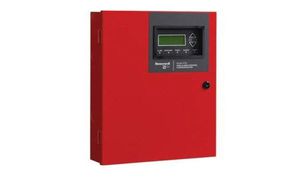
The 6700 is an addressable fire alarm control panel (FACP) that can be configured to achieve an overall point capacity of up to 100 points. It has one built-in signaling line circuit (SLC), which can support 50 System Sensor (SK) sensors and 50 SK modules or 50 Hochiki (SD) devices per loop. A common communications and annunciation link allows up to 17 panels to be connected via copper or fiber optic cable. A designated panel is configured as the communicator for all panels in the link for convenient single-point communications. It also has a built-in, dualline POTs and IP communicator and optional cellular side-cars. The 6700 system can be enhanced by adding modules such as the 6860 remote annunciator which also has four programmable function buttons to help automate tasks and reduce time spent at the panel. SWIFT wireless compatibility provides options for wireless detection through a Class A mesh network. It is ideal for hardto-wire locations, buildings where new wiring is not allowed, or to provide an easy install fire system for new construction projects. SWIFT devices can be combined with other hard-wired 6700 compatible devices. SWIFT is only compatible with System Sensor (SK) devices. It is not compatible with Hochiki (SD) devices. The 6700 also has Form C trouble relay, and two programmable Form C relays, along with powerful features such as drift compensation, pretrouble maintenance alert, a built-in sensor test to comply with NFPA 72 calibration testing requirements, and calibration trouble alert. 6700 It supports a variety of devices, including the 6860, 5860, and 6855 remote annunciators, 5824 serial parallel printer interface module (for printing system reports), the 5496 NAC expander, 5895XL power module, and SK or SD devices
SK-6700 FACP 50-Point Addressable Fire Alarm Control Panel Silent Knight by Honeywell
Current Price
$1 143.57
Average
$1 128.05
Min Price
$1 112.52
Max Price
$1 143.57
Price dynamics
1%
Description
The 6700 is an addressable fire alarm control panel (FACP) that can be configured to achieve an overall point capacity of up to 100 points. It has one built-in signaling line circuit (SLC), which can support 50 System Sensor (SK) sensors and 50 SK modules or 50 Hochiki (SD) devices per loop. A common communications and annunciation link allows up to 17 panels to be connected via copper or fiber optic cable. A designated panel is configured as the communicator for all panels in the link for convenient single-point communications. It also has a built-in, dualline POTs and IP communicator and optional cellular side-cars. The 6700 system can be enhanced by adding modules such as the 6860 remote annunciator which also has four programmable function buttons to help automate tasks and reduce time spent at the panel. SWIFT wireless compatibility provides options for wireless detection through a Class A mesh network. It is ideal for hardto-wire locations, buildings where new wiring is not allowed, or to provide an easy install fire system for new construction projects. SWIFT devices can be combined with other hard-wired 6700 compatible devices. SWIFT is only compatible with System Sensor (SK) devices. It is not compatible with Hochiki (SD) devices. The 6700 also has Form C trouble relay, and two programmable Form C relays, along with powerful features such as drift compensation, pretrouble maintenance alert, a built-in sensor test to comply with NFPA 72 calibration testing requirements, and calibration trouble alert. 6700 It supports a variety of devices, including the 6860, 5860, and 6855 remote annunciators, 5824 serial parallel printer interface module (for printing system reports), the 5496 NAC expander, 5895XL power module, and SK or SD devices
Price will be lower
in next 2 weeks
in next 2 weeks
According to the data, price will be lower in next two weeks, so not waste your money and track better price!
Product review & video
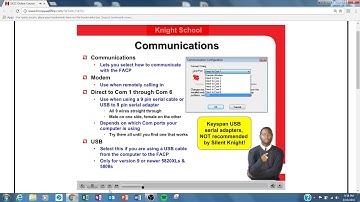
welcome to night school today let's take a look at our solonite software suite at the end of this section given to understand all the flexibilities that the software has to offer you over the download upload your panels configuration make customized settings map input zones discern an output group and upload such information as event history or to catch your status report you first open up the software it should look just like this notice all the cool vibrant icons right up there in the toolbar if they're grayed out for any reason probably means you don't have the correct CD key number installed if you click on help then go to about SKS s is to show this window about SKS s should have satellite software suite 5660 you have to check online to make sure you have the current version and the correct CD key number under options you'll see communications file username and passwords communicat

Similar products