- HomeAutomotiveTires & WheelsAccessories & PartsTire Pressure Monitoring Systems (TPMS)Aftermarket Systems
Description
Before tire pressure monitoring system works normally properly, the body control module will record ID information of each position in the tire pressure sensor; and use the following methods to read the tire pressure sensor after replacing a tire or wheel speed sensor.
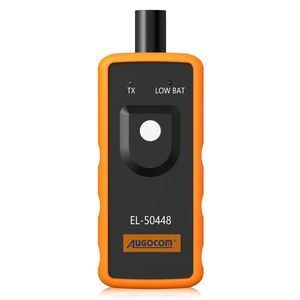
Instruction for using AUGOCOM GM TPMS Re-learn tool:
Note: The tool back can be touched on side wall of the tire, and antenna shall be pointed to valve stem almost perpendicularly. Depress Learn button firmly, rather than depress once and then release button. The green LED indicates that the tool is transmitting. The reset order is Front Left - Front Right -Back Right -Back Left.
Step 1 - Enter leaning mode
Set the gearshift lever to "P"
Put the ignition switch to "ON"
Enter the interface of tire pressure display by DIC
DIC shows "Press Set / Ctrl to re-learn"
Press "Set / Ctrl"
The turn signal is lighted for 3 seconds and the horn beep sound twice to enter the learning mode
Step 2 - Read tire pressure sensor information
Start from the front-left wheel,
Make the J-46079 or Diagnostic Tool EL-50448 antenna up against the valve core position & close to the rim of the tire sidewall
The tire pressure tool starts by the start switch
Successful to read the tire pressure sensor information when the horn bleeps once
Step 3 - Same method to read other tire pressure information
Follow the instuction above to read tire pussure of the front-right, rear-right, rear-left wheels.
Turn signals is lighted for 3 seconds and the horn bleeps twice when the learning is complete.
Package including:
1pc x GM TPMS Re-learn tool
Instruction for using AUGOCOM GM TPMS Re-learn tool:
Note: The tool back can be touched on side wall of the tire, and antenna shall be pointed to valve stem almost perpendicularly. Depress Learn button firmly, rather than depress once and then release button. The green LED indicates that the tool is transmitting. The reset order is Front Left - Front Right -Back Right -Back Left.
Step 1 - Enter leaning mode
Set the gearshift lever to "P"
Put the ignition switch to "ON"
Enter the interface of tire pressure display by DIC
DIC shows "Press Set / Ctrl to re-learn"
Press "Set / Ctrl"
The turn signal is lighted for 3 seconds and the horn beep sound twice to enter the learning mode
Step 2 - Read tire pressure sensor information
Start from the front-left wheel,
Make the J-46079 or Diagnostic Tool EL-50448 antenna up against the valve core position & close to the rim of the tire sidewall
The tire pressure tool starts by the start switch
Successful to read the tire pressure sensor information when the horn bleeps once
Step 3 - Same method to read other tire pressure information
Follow the instuction above to read tire pussure of the front-right, rear-right, rear-left wheels.
Turn signals is lighted for 3 seconds and the horn bleeps twice when the learning is complete.
Package including:
1pc x GM TPMS Re-learn tool
AUGOCOM Auto Tire Pressure Monitor Sensor TPMS Activation Tool for GM TPMS Re-Learn
Current Price
$12.99
Average
$12.99
Min Price
$12.99
Max Price
$12.99
Description
Before tire pressure monitoring system works normally properly, the body control module will record ID information of each position in the tire pressure sensor; and use the following methods to read the tire pressure sensor after replacing a tire or wheel speed sensor.
Instruction for using AUGOCOM GM TPMS Re-learn tool:
Note: The tool back can be touched on side wall of the tire, and antenna shall be pointed to valve stem almost perpendicularly. Depress Learn button firmly, rather than depress once and then release button. The green LED indicates that the tool is transmitting. The reset order is Front Left - Front Right -Back Right -Back Left.
Step 1 - Enter leaning mode
Set the gearshift lever to "P"
Put the ignition switch to "ON"
Enter the interface of tire pressure display by DIC
DIC shows "Press Set / Ctrl to re-learn"
Press "Set / Ctrl"
The turn signal is lighted for 3 seconds and the horn beep sound twice to enter the learning mode
Step 2 - Read tire pressure sensor information
Start from the front-left wheel,
Make the J-46079 or Diagnostic Tool EL-50448 antenna up against the valve core position & close to the rim of the tire sidewall
The tire pressure tool starts by the start switch
Successful to read the tire pressure sensor information when the horn bleeps once
Step 3 - Same method to read other tire pressure information
Follow the instuction above to read tire pussure of the front-right, rear-right, rear-left wheels.
Turn signals is lighted for 3 seconds and the horn bleeps twice when the learning is complete.
Package including:
1pc x GM TPMS Re-learn tool
Instruction for using AUGOCOM GM TPMS Re-learn tool:
Note: The tool back can be touched on side wall of the tire, and antenna shall be pointed to valve stem almost perpendicularly. Depress Learn button firmly, rather than depress once and then release button. The green LED indicates that the tool is transmitting. The reset order is Front Left - Front Right -Back Right -Back Left.
Step 1 - Enter leaning mode
Set the gearshift lever to "P"
Put the ignition switch to "ON"
Enter the interface of tire pressure display by DIC
DIC shows "Press Set / Ctrl to re-learn"
Press "Set / Ctrl"
The turn signal is lighted for 3 seconds and the horn beep sound twice to enter the learning mode
Step 2 - Read tire pressure sensor information
Start from the front-left wheel,
Make the J-46079 or Diagnostic Tool EL-50448 antenna up against the valve core position & close to the rim of the tire sidewall
The tire pressure tool starts by the start switch
Successful to read the tire pressure sensor information when the horn bleeps once
Step 3 - Same method to read other tire pressure information
Follow the instuction above to read tire pussure of the front-right, rear-right, rear-left wheels.
Turn signals is lighted for 3 seconds and the horn bleeps twice when the learning is complete.
Package including:
1pc x GM TPMS Re-learn tool
Price will be lower
in next 2 weeks
in next 2 weeks
According to the data, price will be lower in next two weeks, so not waste your money and track better price!
Similar products