Description
Make magical things at the push of a button.
What if you could sketch a design, then turn it into something real you could actually use? What if you could print things you wanted, needed, or just dreamed up on your desk, instead of relying on factories half a world away?
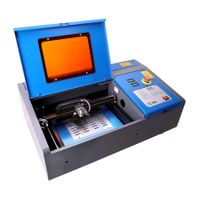
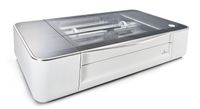
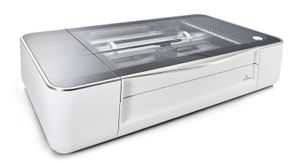
Meet Glowforge. It uses a beam of light the width of a human hair to cut, engrave, and shape designs from a variety of materials.
There's a lot you can do with that kind of power: it's having the perfect gift when you need one. A way to furnish your space. A personal boutique. A sandbox for your inventions. A launchpad for your business. And that's just the start.
Three steps to a finished product.
Step 1: Make Your Design
Whether you craft for fun or you're an experienced designer, it's easy to bring your ideas to life. Use dozens of different design software packages - everything from high-end CAD software to PowerPoint. It takes PDF, SVG, JPEG and other common file formats. Designing can also be as simple as drawing with a pen - Glowforge has onboard cameras that will scan your drawing and transform it into a digital file you can print, once or a hundred times.
Step 2: Pick Your Materials
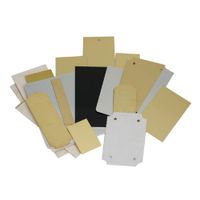
You can use all kinds of materials with Glowforge - things like wood or leather, fabric, cardboard, acrylic, and even chocolate. In fact, you can print on hundreds of materials - a river rock, secondhand lumber, your iPhone. It's up to you, but to make things easy, you can use our line of Proofgrade materials. They're finished and come encoded with automatic settings for perfect printing every time.
Step 3: Watch the Magic Happen
Hit print and watch your Glowforge go. Because the printing interface is in a browser, it works on a PC, it works on a Mac, and we have apps for iPad and iPhone - so you can create with just your fingertip. See your finished product in minutes.
What if you could sketch a design, then turn it into something real you could actually use? What if you could print things you wanted, needed, or just dreamed up on your desk, instead of relying on factories half a world away?
Meet Glowforge. It uses a beam of light the width of a human hair to cut, engrave, and shape designs from a variety of materials.
There's a lot you can do with that kind of power: it's having the perfect gift when you need one. A way to furnish your space. A personal boutique. A sandbox for your inventions. A launchpad for your business. And that's just the start.
Three steps to a finished product.
Step 1: Make Your Design
Whether you craft for fun or you're an experienced designer, it's easy to bring your ideas to life. Use dozens of different design software packages - everything from high-end CAD software to PowerPoint. It takes PDF, SVG, JPEG and other common file formats. Designing can also be as simple as drawing with a pen - Glowforge has onboard cameras that will scan your drawing and transform it into a digital file you can print, once or a hundred times.
Step 2: Pick Your Materials
You can use all kinds of materials with Glowforge - things like wood or leather, fabric, cardboard, acrylic, and even chocolate. In fact, you can print on hundreds of materials - a river rock, secondhand lumber, your iPhone. It's up to you, but to make things easy, you can use our line of Proofgrade materials. They're finished and come encoded with automatic settings for perfect printing every time.
Step 3: Watch the Magic Happen
Hit print and watch your Glowforge go. Because the printing interface is in a browser, it works on a PC, it works on a Mac, and we have apps for iPad and iPhone - so you can create with just your fingertip. See your finished product in minutes.
Glowforge Plus 3D Laser Printer - The Fast, Easy, and Powerful Tool for Wood, Leather, Craft, Paper, Fabric, and DIY. The Ultimate Hobby Laser Cutting & Engraving Machine
Current Price
$3 995
Average
$3 995
Min Price
$3 995
Max Price
$3 995
Price dynamics
0%
Description
Make magical things at the push of a button.
What if you could sketch a design, then turn it into something real you could actually use? What if you could print things you wanted, needed, or just dreamed up on your desk, instead of relying on factories half a world away?
Meet Glowforge. It uses a beam of light the width of a human hair to cut, engrave, and shape designs from a variety of materials.
There's a lot you can do with that kind of power: it's having the perfect gift when you need one. A way to furnish your space. A personal boutique. A sandbox for your inventions. A launchpad for your business. And that's just the start.
Three steps to a finished product.
Step 1: Make Your Design
Whether you craft for fun or you're an experienced designer, it's easy to bring your ideas to life. Use dozens of different design software packages - everything from high-end CAD software to PowerPoint. It takes PDF, SVG, JPEG and other common file formats. Designing can also be as simple as drawing with a pen - Glowforge has onboard cameras that will scan your drawing and transform it into a digital file you can print, once or a hundred times.
Step 2: Pick Your Materials
You can use all kinds of materials with Glowforge - things like wood or leather, fabric, cardboard, acrylic, and even chocolate. In fact, you can print on hundreds of materials - a river rock, secondhand lumber, your iPhone. It's up to you, but to make things easy, you can use our line of Proofgrade materials. They're finished and come encoded with automatic settings for perfect printing every time.
Step 3: Watch the Magic Happen
Hit print and watch your Glowforge go. Because the printing interface is in a browser, it works on a PC, it works on a Mac, and we have apps for iPad and iPhone - so you can create with just your fingertip. See your finished product in minutes.
What if you could sketch a design, then turn it into something real you could actually use? What if you could print things you wanted, needed, or just dreamed up on your desk, instead of relying on factories half a world away?
Meet Glowforge. It uses a beam of light the width of a human hair to cut, engrave, and shape designs from a variety of materials.
There's a lot you can do with that kind of power: it's having the perfect gift when you need one. A way to furnish your space. A personal boutique. A sandbox for your inventions. A launchpad for your business. And that's just the start.
Three steps to a finished product.
Step 1: Make Your Design
Whether you craft for fun or you're an experienced designer, it's easy to bring your ideas to life. Use dozens of different design software packages - everything from high-end CAD software to PowerPoint. It takes PDF, SVG, JPEG and other common file formats. Designing can also be as simple as drawing with a pen - Glowforge has onboard cameras that will scan your drawing and transform it into a digital file you can print, once or a hundred times.
Step 2: Pick Your Materials
You can use all kinds of materials with Glowforge - things like wood or leather, fabric, cardboard, acrylic, and even chocolate. In fact, you can print on hundreds of materials - a river rock, secondhand lumber, your iPhone. It's up to you, but to make things easy, you can use our line of Proofgrade materials. They're finished and come encoded with automatic settings for perfect printing every time.
Step 3: Watch the Magic Happen
Hit print and watch your Glowforge go. Because the printing interface is in a browser, it works on a PC, it works on a Mac, and we have apps for iPad and iPhone - so you can create with just your fingertip. See your finished product in minutes.
Price will be lower
in next 2 weeks
in next 2 weeks
According to the data, price will be lower in next two weeks, so not waste your money and track better price!
Similar products