- HomeElectronicsComputers & AccessoriesComputer Accessories & PeripheralsCables & InterconnectsThunderbolt Cables
Description
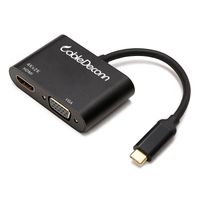
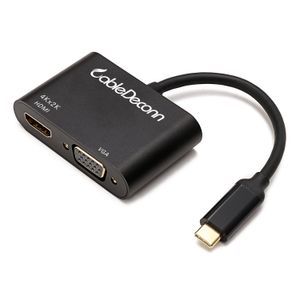
The CableDeconn USB C to HDMI/VGA 2 in 1Adapter Cable provides you with more options, you can choose available HDMI,VGA to connect your computer to an external monitor.
Specification:
Input Computer Connector: USB3.1 Type-C Male
HDMI Output Display Connector: Support video resolutions 4K Ultra HD UHD 4Kx2K@30Hz (3840*2160), including 720p, 1080P (1920 x 1080 @ 60 Hz) and 1600x1200
VGA Output: Support video resolutions 1920 x 1080 @ 60 Hz
PLEASE NOTE:This This adapter It can only convert signal from USB-C to HDMI/VGA .This is not a bi-Directional Adapter.
It can support to connect HDMI/VGA External Displays to work at the same time.Output two identical screens, not a different screen!Can only copy the screen, can not expand the screen,
A separate HDMI//VGA cable is required, not included.
USB Type C Compatible Devices (Partial List)
-New 2017 Macbook Pro
- MacBook Pro (13-Inch, Late 2016, Two Thunderbolt 3 Ports)
- 2015/2016 MacBook 12"
- ChromeBook Pixel 2015
- Dell XPS 12 (9250), Dell XPS 13 (9350/9550) XPS15
- HP Spectre 13, HP Elite x3, HP EliteBook Folio G1
-Smartphone Samsung Galaxy S8
-Lenovo Miix 510
-Huawei Mate10
Notes:
1. The adapter is not compatible with devices which do not support the protocol of DP Alt Mode.
2. This adapter is only designed for computer Support DP Alt Mode, not for tablets and smartphones(Except for Samsung Galaxy S8 and Lenovo Miix 510).
3. If you would like to get 4K UHD Video,Please only connect HDMI Port Individually to External Monitor,Meanwhile,it requires you to have 4K Source,4K Cable and 4K Screens.
4.For certain monitors such as Philips 288P6(4K@30Hz), Dell P2715Q (4K@30Hz) may turn on and off every minute as connected with a long HDMI/VGA cable, for stable output,
we highly recommend using a short HDMI/VGA cable within 5.9ft to connect your display.
Specification:
Input Computer Connector: USB3.1 Type-C Male
HDMI Output Display Connector: Support video resolutions 4K Ultra HD UHD 4Kx2K@30Hz (3840*2160), including 720p, 1080P (1920 x 1080 @ 60 Hz) and 1600x1200
VGA Output: Support video resolutions 1920 x 1080 @ 60 Hz
PLEASE NOTE:This This adapter It can only convert signal from USB-C to HDMI/VGA .This is not a bi-Directional Adapter.
It can support to connect HDMI/VGA External Displays to work at the same time.Output two identical screens, not a different screen!Can only copy the screen, can not expand the screen,
A separate HDMI//VGA cable is required, not included.
USB Type C Compatible Devices (Partial List)
-New 2017 Macbook Pro
- MacBook Pro (13-Inch, Late 2016, Two Thunderbolt 3 Ports)
- 2015/2016 MacBook 12"
- ChromeBook Pixel 2015
- Dell XPS 12 (9250), Dell XPS 13 (9350/9550) XPS15
- HP Spectre 13, HP Elite x3, HP EliteBook Folio G1
-Smartphone Samsung Galaxy S8
-Lenovo Miix 510
-Huawei Mate10
Notes:
1. The adapter is not compatible with devices which do not support the protocol of DP Alt Mode.
2. This adapter is only designed for computer Support DP Alt Mode, not for tablets and smartphones(Except for Samsung Galaxy S8 and Lenovo Miix 510).
3. If you would like to get 4K UHD Video,Please only connect HDMI Port Individually to External Monitor,Meanwhile,it requires you to have 4K Source,4K Cable and 4K Screens.
4.For certain monitors such as Philips 288P6(4K@30Hz), Dell P2715Q (4K@30Hz) may turn on and off every minute as connected with a long HDMI/VGA cable, for stable output,
we highly recommend using a short HDMI/VGA cable within 5.9ft to connect your display.
USB-C Multiport Adapter,CableDeconn USB-C Type C 3.1 (Thunderbolt 3 Compatible) to HDMI VGA Cable Adapter Converter for New MacBook (Deep Black)
Price is below average
Current Price
$12.99
Average
$19.86
Min Price
$10.59
Max Price
$29.99
Price dynamics
35%
Description
The CableDeconn USB C to HDMI/VGA 2 in 1Adapter Cable provides you with more options, you can choose available HDMI,VGA to connect your computer to an external monitor.
Specification:
Input Computer Connector: USB3.1 Type-C Male
HDMI Output Display Connector: Support video resolutions 4K Ultra HD UHD 4Kx2K@30Hz (3840*2160), including 720p, 1080P (1920 x 1080 @ 60 Hz) and 1600x1200
VGA Output: Support video resolutions 1920 x 1080 @ 60 Hz
PLEASE NOTE:This This adapter It can only convert signal from USB-C to HDMI/VGA .This is not a bi-Directional Adapter.
It can support to connect HDMI/VGA External Displays to work at the same time.Output two identical screens, not a different screen!Can only copy the screen, can not expand the screen,
A separate HDMI//VGA cable is required, not included.
USB Type C Compatible Devices (Partial List)
-New 2017 Macbook Pro
- MacBook Pro (13-Inch, Late 2016, Two Thunderbolt 3 Ports)
- 2015/2016 MacBook 12"
- ChromeBook Pixel 2015
- Dell XPS 12 (9250), Dell XPS 13 (9350/9550) XPS15
- HP Spectre 13, HP Elite x3, HP EliteBook Folio G1
-Smartphone Samsung Galaxy S8
-Lenovo Miix 510
-Huawei Mate10
Notes:
1. The adapter is not compatible with devices which do not support the protocol of DP Alt Mode.
2. This adapter is only designed for computer Support DP Alt Mode, not for tablets and smartphones(Except for Samsung Galaxy S8 and Lenovo Miix 510).
3. If you would like to get 4K UHD Video,Please only connect HDMI Port Individually to External Monitor,Meanwhile,it requires you to have 4K Source,4K Cable and 4K Screens.
4.For certain monitors such as Philips 288P6(4K@30Hz), Dell P2715Q (4K@30Hz) may turn on and off every minute as connected with a long HDMI/VGA cable, for stable output,
we highly recommend using a short HDMI/VGA cable within 5.9ft to connect your display.
Specification:
Input Computer Connector: USB3.1 Type-C Male
HDMI Output Display Connector: Support video resolutions 4K Ultra HD UHD 4Kx2K@30Hz (3840*2160), including 720p, 1080P (1920 x 1080 @ 60 Hz) and 1600x1200
VGA Output: Support video resolutions 1920 x 1080 @ 60 Hz
PLEASE NOTE:This This adapter It can only convert signal from USB-C to HDMI/VGA .This is not a bi-Directional Adapter.
It can support to connect HDMI/VGA External Displays to work at the same time.Output two identical screens, not a different screen!Can only copy the screen, can not expand the screen,
A separate HDMI//VGA cable is required, not included.
USB Type C Compatible Devices (Partial List)
-New 2017 Macbook Pro
- MacBook Pro (13-Inch, Late 2016, Two Thunderbolt 3 Ports)
- 2015/2016 MacBook 12"
- ChromeBook Pixel 2015
- Dell XPS 12 (9250), Dell XPS 13 (9350/9550) XPS15
- HP Spectre 13, HP Elite x3, HP EliteBook Folio G1
-Smartphone Samsung Galaxy S8
-Lenovo Miix 510
-Huawei Mate10
Notes:
1. The adapter is not compatible with devices which do not support the protocol of DP Alt Mode.
2. This adapter is only designed for computer Support DP Alt Mode, not for tablets and smartphones(Except for Samsung Galaxy S8 and Lenovo Miix 510).
3. If you would like to get 4K UHD Video,Please only connect HDMI Port Individually to External Monitor,Meanwhile,it requires you to have 4K Source,4K Cable and 4K Screens.
4.For certain monitors such as Philips 288P6(4K@30Hz), Dell P2715Q (4K@30Hz) may turn on and off every minute as connected with a long HDMI/VGA cable, for stable output,
we highly recommend using a short HDMI/VGA cable within 5.9ft to connect your display.
Price will be lower
in next 2 weeks
in next 2 weeks
According to the data, price will be lower in next two weeks, so not waste your money and track better price!
Product review & video
[Music] usb has a long and needlessly complicated past just try googling a chart of all the different usb generations ports their specs and compatibility if you've got the time and you'll see what we're talking about it's a mess thankfully we don't need to know this history lesson to use and appreciate the usb connection today it had its hits it had its misses and now with the help of usb type-c it's slowly becoming more streamlined than ever but here's the thing many technologies utilize this connector now one such technology is thunderbolt 3. and quite frankly it can be difficult to distinguish usb c from thunderbolt 3 at a glance that's why in today's video we will be talking about this topic so without any further ado let's begin by introducing the two terms we'll start with usb type-c as it does hold seniority over thunderbolt 3. as you can guess usb type-c is one in a long line of


Similar products