- HomeElectronicsComputers & AccessoriesComputer Accessories & PeripheralsCables & InterconnectsThunderbolt Cables
Description
Compatible With(Incomplete List):
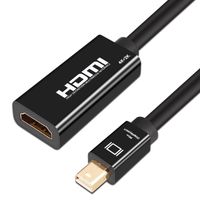
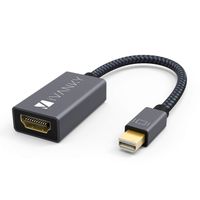
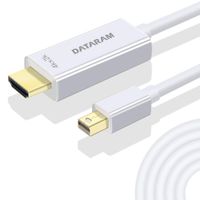
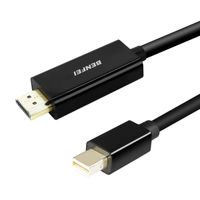
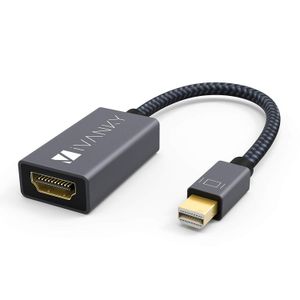
iVanky Mini DisplayPort to HDMI Adapter compatibility with all devices having a Mini DisplayPort ( Thunderbolt )
MacBook Air, MacBook Pro, MacBook Pro with Retina Display, iMac, Mac Mini, Mac Pro
Microsoft Surface Pro / Pro 2 / Pro 3 / Pro 4, Surface 3(NOT Surface/Surface 2), Surface Book
Lenovo ThinkPad X1, X1 Carbon, Helix, X230, L430, L530, T430s, T430, T530, W530
Satellite Pro S500, Tecra M11, A11, and S11
HP Envy 14, 17
Dell XPS 13,14,15,17
Note: NOT compatible with Thunderbolt 3.
As for audio, go into System Preferences --> Sound --> Output there should be an option to change the audio output from your laptop to the TV or other devices.
High-Definition Video and Audio:
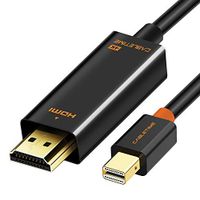
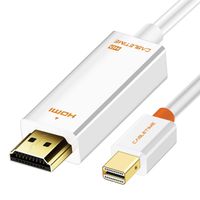
This cable utilizes the latest Mini DisplayPort specifications to achieve the highest transmission rate, capable of HD resolutions.
Up to 1080p@60Hz, HDCP support, 36-bit Deep Color, 3D, and uncompressed/compressed audio formats are some of the newer HDMI features supported on this cable.
As well as transmitting HD audio signals for an all-in-one A/V solution.
Outstanding & Unique Design:
Slimline design and lightweight aluminum casing provide greater portability and convenience.
Compared with the TPE material, nylon fiber has the feature of anti-aging, anti-twisting, moisture protection and abrasive resistance.
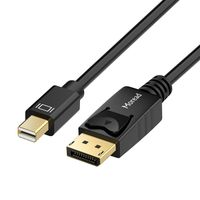
The Mini DisplayPort connector is made of pure copper and gold plated, resist corrosion, provide durability, and improve the signal transmission.
The iVanky Advantage:
Unconditional Lifetime Warranty with no questions asked.
All costs covered during your Lifetime Replacement process.
Fast and easy-to-reach Customer Service to solve your problems within 24 hours. If you come across any problem, contact us to get friendly and efficient support from iVanky.
iVanky Mini DisplayPort to HDMI Adapter compatibility with all devices having a Mini DisplayPort ( Thunderbolt )
MacBook Air, MacBook Pro, MacBook Pro with Retina Display, iMac, Mac Mini, Mac Pro
Microsoft Surface Pro / Pro 2 / Pro 3 / Pro 4, Surface 3(NOT Surface/Surface 2), Surface Book
Lenovo ThinkPad X1, X1 Carbon, Helix, X230, L430, L530, T430s, T430, T530, W530
Satellite Pro S500, Tecra M11, A11, and S11
HP Envy 14, 17
Dell XPS 13,14,15,17
Note: NOT compatible with Thunderbolt 3.
As for audio, go into System Preferences --> Sound --> Output there should be an option to change the audio output from your laptop to the TV or other devices.
High-Definition Video and Audio:
This cable utilizes the latest Mini DisplayPort specifications to achieve the highest transmission rate, capable of HD resolutions.
Up to 1080p@60Hz, HDCP support, 36-bit Deep Color, 3D, and uncompressed/compressed audio formats are some of the newer HDMI features supported on this cable.
As well as transmitting HD audio signals for an all-in-one A/V solution.
Outstanding & Unique Design:
Slimline design and lightweight aluminum casing provide greater portability and convenience.
Compared with the TPE material, nylon fiber has the feature of anti-aging, anti-twisting, moisture protection and abrasive resistance.
The Mini DisplayPort connector is made of pure copper and gold plated, resist corrosion, provide durability, and improve the signal transmission.
The iVanky Advantage:
Unconditional Lifetime Warranty with no questions asked.
All costs covered during your Lifetime Replacement process.
Fast and easy-to-reach Customer Service to solve your problems within 24 hours. If you come across any problem, contact us to get friendly and efficient support from iVanky.
Mini Displayport to HDMI Adapter for Projector in School, Work, Conference, iVanky 10 Pack Thunderbolt to HDMI Adapter for MacBook Air/Pro, Microsoft Surface Pro/Laptop, Dock, Monitor, and More - Grey
Current Price
$89.99
Average
$89.99
Min Price
$89.99
Max Price
$89.99
Price dynamics
0%
Description
Compatible With(Incomplete List):
iVanky Mini DisplayPort to HDMI Adapter compatibility with all devices having a Mini DisplayPort ( Thunderbolt )
MacBook Air, MacBook Pro, MacBook Pro with Retina Display, iMac, Mac Mini, Mac Pro
Microsoft Surface Pro / Pro 2 / Pro 3 / Pro 4, Surface 3(NOT Surface/Surface 2), Surface Book
Lenovo ThinkPad X1, X1 Carbon, Helix, X230, L430, L530, T430s, T430, T530, W530
Satellite Pro S500, Tecra M11, A11, and S11
HP Envy 14, 17
Dell XPS 13,14,15,17
Note: NOT compatible with Thunderbolt 3.
As for audio, go into System Preferences --> Sound --> Output there should be an option to change the audio output from your laptop to the TV or other devices.
High-Definition Video and Audio:
This cable utilizes the latest Mini DisplayPort specifications to achieve the highest transmission rate, capable of HD resolutions.
Up to 1080p@60Hz, HDCP support, 36-bit Deep Color, 3D, and uncompressed/compressed audio formats are some of the newer HDMI features supported on this cable.
As well as transmitting HD audio signals for an all-in-one A/V solution.
Outstanding & Unique Design:
Slimline design and lightweight aluminum casing provide greater portability and convenience.
Compared with the TPE material, nylon fiber has the feature of anti-aging, anti-twisting, moisture protection and abrasive resistance.
The Mini DisplayPort connector is made of pure copper and gold plated, resist corrosion, provide durability, and improve the signal transmission.
The iVanky Advantage:
Unconditional Lifetime Warranty with no questions asked.
All costs covered during your Lifetime Replacement process.
Fast and easy-to-reach Customer Service to solve your problems within 24 hours. If you come across any problem, contact us to get friendly and efficient support from iVanky.
iVanky Mini DisplayPort to HDMI Adapter compatibility with all devices having a Mini DisplayPort ( Thunderbolt )
MacBook Air, MacBook Pro, MacBook Pro with Retina Display, iMac, Mac Mini, Mac Pro
Microsoft Surface Pro / Pro 2 / Pro 3 / Pro 4, Surface 3(NOT Surface/Surface 2), Surface Book
Lenovo ThinkPad X1, X1 Carbon, Helix, X230, L430, L530, T430s, T430, T530, W530
Satellite Pro S500, Tecra M11, A11, and S11
HP Envy 14, 17
Dell XPS 13,14,15,17
Note: NOT compatible with Thunderbolt 3.
As for audio, go into System Preferences --> Sound --> Output there should be an option to change the audio output from your laptop to the TV or other devices.
High-Definition Video and Audio:
This cable utilizes the latest Mini DisplayPort specifications to achieve the highest transmission rate, capable of HD resolutions.
Up to 1080p@60Hz, HDCP support, 36-bit Deep Color, 3D, and uncompressed/compressed audio formats are some of the newer HDMI features supported on this cable.
As well as transmitting HD audio signals for an all-in-one A/V solution.
Outstanding & Unique Design:
Slimline design and lightweight aluminum casing provide greater portability and convenience.
Compared with the TPE material, nylon fiber has the feature of anti-aging, anti-twisting, moisture protection and abrasive resistance.
The Mini DisplayPort connector is made of pure copper and gold plated, resist corrosion, provide durability, and improve the signal transmission.
The iVanky Advantage:
Unconditional Lifetime Warranty with no questions asked.
All costs covered during your Lifetime Replacement process.
Fast and easy-to-reach Customer Service to solve your problems within 24 hours. If you come across any problem, contact us to get friendly and efficient support from iVanky.
Price will be lower
in next 2 weeks
in next 2 weeks
According to the data, price will be lower in next two weeks, so not waste your money and track better price!
Product review & video
[Music] hey guys as promised here's a quick setup video so as you guys know this part will go to your HDMI cable so you guys just plug that in and obviously that's the HDMI cable was connected to your monitor this part ok just get a close-up this will go right here so this is the back of my iMac on your macbook you guys should see the same thing when you guys can plug it into either one of these ports so just plug it into one of these ports and then from your Mac I just go into system preferences and don't have your monitor turned on by the way when you're making these connections just have it off for now and then once it's connected you guys can go to System Preferences alright let me just so you can see you guys can actually see this thing and then on this place you guys will see your monitor so at this time it's good to turn on your monitor so I have my monitor right here I'm gonna t


Similar products