- HomeElectronicsComputers & AccessoriesComputer Accessories & PeripheralsCables & InterconnectsThunderbolt Cables
Description
Please check the pictures and description carefully before bidding.
Condition:new
Compatible for Thunderbolt Display 27" A1407
- Thunderbolt Display Mid 2011: MC914LL/A
Identifying Numbers:
- For Apple Part #: 922-9941
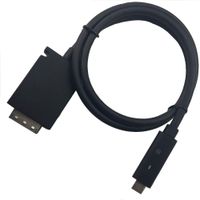
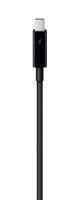
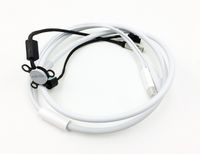
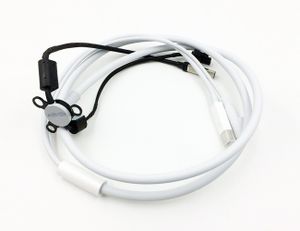
Package included:1* All-in-one cable (Thunderbolt, MagSafe, mini DisplayPort, and 2 pin PCIe commector)
Extremely Important:Please ensure that your original part number matches this exactly and install it very professionally, if not, do not try.
Tips:pls remember remove the protective cover when install.
Note: You will receive a 100% compatible Thunderbolt Cinema Display Cable .The exact brand,part number and package of the Thunderbolt Cinema Display Cable you will receive is determined by market availability.
If you are unsure what your current specification is, please feel free to contact us and we will gladly help.
Condition:new
Compatible for Thunderbolt Display 27" A1407
- Thunderbolt Display Mid 2011: MC914LL/A
Identifying Numbers:
- For Apple Part #: 922-9941
Package included:1* All-in-one cable (Thunderbolt, MagSafe, mini DisplayPort, and 2 pin PCIe commector)
Extremely Important:Please ensure that your original part number matches this exactly and install it very professionally, if not, do not try.
Tips:pls remember remove the protective cover when install.
Note: You will receive a 100% compatible Thunderbolt Cinema Display Cable .The exact brand,part number and package of the Thunderbolt Cinema Display Cable you will receive is determined by market availability.
If you are unsure what your current specification is, please feel free to contact us and we will gladly help.
Willhom 922-9941 All-in-One Cable Replacement for Thunderbolt Display 27" A1407 Mid 2011 (MC914LL/A)
Price is below average
Current Price
$16.99
Average
$23.71
Min Price
$13.01
Max Price
$39
Price dynamics
28%
Description
Please check the pictures and description carefully before bidding.
Condition:new
Compatible for Thunderbolt Display 27" A1407
- Thunderbolt Display Mid 2011: MC914LL/A
Identifying Numbers:
- For Apple Part #: 922-9941
Package included:1* All-in-one cable (Thunderbolt, MagSafe, mini DisplayPort, and 2 pin PCIe commector)
Extremely Important:Please ensure that your original part number matches this exactly and install it very professionally, if not, do not try.
Tips:pls remember remove the protective cover when install.
Note: You will receive a 100% compatible Thunderbolt Cinema Display Cable .The exact brand,part number and package of the Thunderbolt Cinema Display Cable you will receive is determined by market availability.
If you are unsure what your current specification is, please feel free to contact us and we will gladly help.
Condition:new
Compatible for Thunderbolt Display 27" A1407
- Thunderbolt Display Mid 2011: MC914LL/A
Identifying Numbers:
- For Apple Part #: 922-9941
Package included:1* All-in-one cable (Thunderbolt, MagSafe, mini DisplayPort, and 2 pin PCIe commector)
Extremely Important:Please ensure that your original part number matches this exactly and install it very professionally, if not, do not try.
Tips:pls remember remove the protective cover when install.
Note: You will receive a 100% compatible Thunderbolt Cinema Display Cable .The exact brand,part number and package of the Thunderbolt Cinema Display Cable you will receive is determined by market availability.
If you are unsure what your current specification is, please feel free to contact us and we will gladly help.
Price will be lower
in next 2 weeks
in next 2 weeks
According to the data, price will be lower in next two weeks, so not waste your money and track better price!
Product review & video
did your apple thunderbolt display start flashing and turn black only to never turn back on again well in this video i'll show you step by step exactly how to fix that so you can get back to working on this beauty in no time all right guys i want to start the video by showing you guys what my display was doing uh flashing and eventually going black never to come back on again and here are the items we'll need to complete this repair links in the description we'll first start by laying down the monitor on its back on top of those two towels to create a sturdy surface then we'll get the suction cups and we'll start pulling on the corners gently once we have a couple of suction cups on the corners we can start pulling the silica display back just enough to get your fingers underneath run your fingers through the top of the monitor and pull back gently this display is held in by magnets her


Similar products