Description
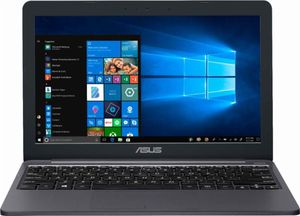
Asus Vivobook laptop:
power through a full day's work with this 11.6-Inch Asus Laptop. The Intel Celeron N4000 Processor runs demanding programs effortlessly, while the 2GB of RAM let you work through your task List efficiently. The 32GB eMMC storage provides plenty of space for file archives. This Asus Laptop has a 10-hour battery life to take you through the entire workday.√Processor
intel Celeron dual Core N4000 processor (1.1GHz, Turbo up to 2.6 GHz, 4M cache)
√operating system
windows 10 home
√chipset
integrated Intel cpu
√memory
2 GB LPDDR4 2400MHz SD RAM onboard memory, up to 4 GB sdram
√display
11.6" (16: 9) HD (1366x768) 60Hz glossy panel 45% ntsc
support Asus splendid technology
√graphic
integrated Intel UHD Graphics 605
√storage
32gb emmc
√keyboard
chiclet keyboard
√webcam
vga web camera
√networking
wi-fi
integrated 802.11 ac
√bluetooth
built-in Bluetooth V4.1√Interface
1 x combo Audio jack
2 x Type A USB3.0 (USB3.1 gen1)
1 x Type C USB3.0 (USB3.1 gen1)
1 x hdmi
1 x AC adapter plug
1 x Micro SD card
√audio
built-in Stereo 2 W speakers and digital array microphone
support Windows 10 cortana
√battery
2 cells 38 Whr polymer battery
√power adapter
plug Type:ø4
√output:
19 V DC, 1.75 a, 33 w
√input:
100 -240 V AC, 50/60 Hz universal
√dimensions
11.3 x 7.6 x 0.7 inches
√weight
2.2 pounds
os: Win10 s mode
you'll need to switch out of S mode. Switching out of S mode is one-way. If you make the switch, you won't be able to go back to Windows 10 in S mode. There's no charge to switch out of S mode.
• On your PC running Windows 10 in S mode, open Settings > Update & Security > Activation.
• In the Switch to Windows 10 Home or Switch to Windows 10 Pro section, select Go to the Store. (If you also see an "Upgrade your edition of Windows" section, be careful not to click the "Go to the Store" link that appears there.)
power through a full day's work with this 11.6-Inch Asus Laptop. The Intel Celeron N4000 Processor runs demanding programs effortlessly, while the 2GB of RAM let you work through your task List efficiently. The 32GB eMMC storage provides plenty of space for file archives. This Asus Laptop has a 10-hour battery life to take you through the entire workday.√Processor
intel Celeron dual Core N4000 processor (1.1GHz, Turbo up to 2.6 GHz, 4M cache)
√operating system
windows 10 home
√chipset
integrated Intel cpu
√memory
2 GB LPDDR4 2400MHz SD RAM onboard memory, up to 4 GB sdram
√display
11.6" (16: 9) HD (1366x768) 60Hz glossy panel 45% ntsc
support Asus splendid technology
√graphic
integrated Intel UHD Graphics 605
√storage
32gb emmc
√keyboard
chiclet keyboard
√webcam
vga web camera
√networking
wi-fi
integrated 802.11 ac
√bluetooth
built-in Bluetooth V4.1√Interface
1 x combo Audio jack
2 x Type A USB3.0 (USB3.1 gen1)
1 x Type C USB3.0 (USB3.1 gen1)
1 x hdmi
1 x AC adapter plug
1 x Micro SD card
√audio
built-in Stereo 2 W speakers and digital array microphone
support Windows 10 cortana
√battery
2 cells 38 Whr polymer battery
√power adapter
plug Type:ø4
√output:
19 V DC, 1.75 a, 33 w
√input:
100 -240 V AC, 50/60 Hz universal
√dimensions
11.3 x 7.6 x 0.7 inches
√weight
2.2 pounds
os: Win10 s mode
you'll need to switch out of S mode. Switching out of S mode is one-way. If you make the switch, you won't be able to go back to Windows 10 in S mode. There's no charge to switch out of S mode.
• On your PC running Windows 10 in S mode, open Settings > Update & Security > Activation.
• In the Switch to Windows 10 Home or Switch to Windows 10 Pro section, select Go to the Store. (If you also see an "Upgrade your edition of Windows" section, be careful not to click the "Go to the Store" link that appears there.)
2019 Asus Vivobook 11.6" Thin and Lightweight Laptop Computer, Intel Celeron N4000 up to 2.6GHz, 2GB DDR4 RAM, 32GB eMMC, 802.11AC WiFi, Bluetooth 4.1, USB-C 3.1, HDMI, Star Gray, Windows 10 in S Mode
Price is below average
Current Price
$159.99
Average
$278.19
Min Price
$149
Max Price
$1 999
Price dynamics
42%
Description
Asus Vivobook laptop:
power through a full day's work with this 11.6-Inch Asus Laptop. The Intel Celeron N4000 Processor runs demanding programs effortlessly, while the 2GB of RAM let you work through your task List efficiently. The 32GB eMMC storage provides plenty of space for file archives. This Asus Laptop has a 10-hour battery life to take you through the entire workday.√Processor
intel Celeron dual Core N4000 processor (1.1GHz, Turbo up to 2.6 GHz, 4M cache)
√operating system
windows 10 home
√chipset
integrated Intel cpu
√memory
2 GB LPDDR4 2400MHz SD RAM onboard memory, up to 4 GB sdram
√display
11.6" (16: 9) HD (1366x768) 60Hz glossy panel 45% ntsc
support Asus splendid technology
√graphic
integrated Intel UHD Graphics 605
√storage
32gb emmc
√keyboard
chiclet keyboard
√webcam
vga web camera
√networking
wi-fi
integrated 802.11 ac
√bluetooth
built-in Bluetooth V4.1√Interface
1 x combo Audio jack
2 x Type A USB3.0 (USB3.1 gen1)
1 x Type C USB3.0 (USB3.1 gen1)
1 x hdmi
1 x AC adapter plug
1 x Micro SD card
√audio
built-in Stereo 2 W speakers and digital array microphone
support Windows 10 cortana
√battery
2 cells 38 Whr polymer battery
√power adapter
plug Type:ø4
√output:
19 V DC, 1.75 a, 33 w
√input:
100 -240 V AC, 50/60 Hz universal
√dimensions
11.3 x 7.6 x 0.7 inches
√weight
2.2 pounds
os: Win10 s mode
you'll need to switch out of S mode. Switching out of S mode is one-way. If you make the switch, you won't be able to go back to Windows 10 in S mode. There's no charge to switch out of S mode.
• On your PC running Windows 10 in S mode, open Settings > Update & Security > Activation.
• In the Switch to Windows 10 Home or Switch to Windows 10 Pro section, select Go to the Store. (If you also see an "Upgrade your edition of Windows" section, be careful not to click the "Go to the Store" link that appears there.)
power through a full day's work with this 11.6-Inch Asus Laptop. The Intel Celeron N4000 Processor runs demanding programs effortlessly, while the 2GB of RAM let you work through your task List efficiently. The 32GB eMMC storage provides plenty of space for file archives. This Asus Laptop has a 10-hour battery life to take you through the entire workday.√Processor
intel Celeron dual Core N4000 processor (1.1GHz, Turbo up to 2.6 GHz, 4M cache)
√operating system
windows 10 home
√chipset
integrated Intel cpu
√memory
2 GB LPDDR4 2400MHz SD RAM onboard memory, up to 4 GB sdram
√display
11.6" (16: 9) HD (1366x768) 60Hz glossy panel 45% ntsc
support Asus splendid technology
√graphic
integrated Intel UHD Graphics 605
√storage
32gb emmc
√keyboard
chiclet keyboard
√webcam
vga web camera
√networking
wi-fi
integrated 802.11 ac
√bluetooth
built-in Bluetooth V4.1√Interface
1 x combo Audio jack
2 x Type A USB3.0 (USB3.1 gen1)
1 x Type C USB3.0 (USB3.1 gen1)
1 x hdmi
1 x AC adapter plug
1 x Micro SD card
√audio
built-in Stereo 2 W speakers and digital array microphone
support Windows 10 cortana
√battery
2 cells 38 Whr polymer battery
√power adapter
plug Type:ø4
√output:
19 V DC, 1.75 a, 33 w
√input:
100 -240 V AC, 50/60 Hz universal
√dimensions
11.3 x 7.6 x 0.7 inches
√weight
2.2 pounds
os: Win10 s mode
you'll need to switch out of S mode. Switching out of S mode is one-way. If you make the switch, you won't be able to go back to Windows 10 in S mode. There's no charge to switch out of S mode.
• On your PC running Windows 10 in S mode, open Settings > Update & Security > Activation.
• In the Switch to Windows 10 Home or Switch to Windows 10 Pro section, select Go to the Store. (If you also see an "Upgrade your edition of Windows" section, be careful not to click the "Go to the Store" link that appears there.)
Price will be lower
in next 2 weeks
in next 2 weeks
According to the data, price will be lower in next two weeks, so not waste your money and track better price!
Similar products