Description
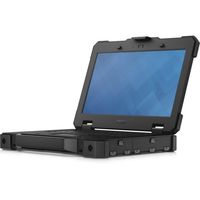
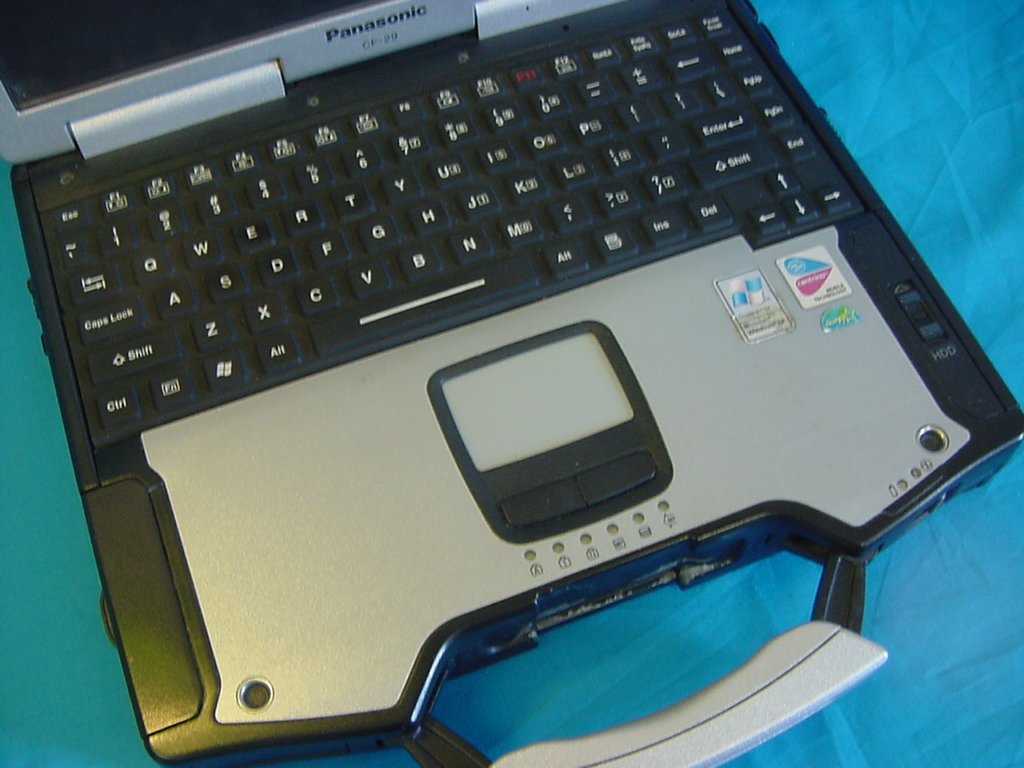
Out in the field or down in the dirt, the durable Panasonic Toughbook CF-29 is built to take a beating. This brawny workhorse is encased in magnesium alloy, with durability designed into every seal, hinge and connector. Plus, as the industry's fastest fully rugged mobile PC, it's built for lightening-quick processing and wireless connectivity. Communicate in real time from remote areas, access databases online and run sophisticated software applications even in the harshest environments. The Toughbook is vibration and drop-shock resistant.
WINDOWS 7
OFFICE 2010
PENTIUM (R)M CORE SOLO PROCESSOR
1.GB OF MEMORY
80GB OF HARD DRIVE
Features
Product Description: Panasonic Toughbook 29 MODEL
Built-in Devices: Speaker, wireless LAN antenna, Bluetooth antenna Embedded Security: Trusted Platform Module (TPM 1.2) Security Chip
Display: TOUCHSCREEN 13.3" TFT 1024 x 768 ( XGA ), 24-bit (16.7 million colors)
Graphics Controller: Intel GMA X3100
Memory Allocation Technology: Dynamic Video Memory Technology 4.0
Audio Output: Sound card
Telecom: Fax / modem, 56 Kbps
Wireless Broadband (WWAN): Cellular wireless ready
Networking: Network adapter, Ethernet, Fast Ethernet, Gigabit Ethernet, IEEE 802.11b, IEEE 802.11a, IEEE 802.11g, Bluetooth 2.0 EDR
Wireless NIC: Intel Wireless WiFi Link 4965AG
Input Device:WATER RESISTANCE Keyboard
Power: AC 120/230 V ( 50/60 Hz )
Battery: Lithium ion
Run Time (Up To): 7 hour(s)
Operating System: Microsoft Windows 7
Micrsoft Windows XP PRO COA (Certificate of Authenticity) included
Environmental Standards: , EPEAT Silve
IF YOU ARE INTERESTED, CALL BOB AT 757-402-9894 or 757 927 3568
Panasonic CF-29 13.3in ToughBook (Renewed)
Current Price
$279.48
Average
$279.48
Min Price
$279.48
Max Price
$279.48
Description
Out in the field or down in the dirt, the durable Panasonic Toughbook CF-29 is built to take a beating. This brawny workhorse is encased in magnesium alloy, with durability designed into every seal, hinge and connector. Plus, as the industry's fastest fully rugged mobile PC, it's built for lightening-quick processing and wireless connectivity. Communicate in real time from remote areas, access databases online and run sophisticated software applications even in the harshest environments. The Toughbook is vibration and drop-shock resistant.
WINDOWS 7
OFFICE 2010
PENTIUM (R)M CORE SOLO PROCESSOR
1.GB OF MEMORY
80GB OF HARD DRIVE
Features
Product Description: Panasonic Toughbook 29 MODEL
Built-in Devices: Speaker, wireless LAN antenna, Bluetooth antenna Embedded Security: Trusted Platform Module (TPM 1.2) Security Chip
Display: TOUCHSCREEN 13.3" TFT 1024 x 768 ( XGA ), 24-bit (16.7 million colors)
Graphics Controller: Intel GMA X3100
Memory Allocation Technology: Dynamic Video Memory Technology 4.0
Audio Output: Sound card
Telecom: Fax / modem, 56 Kbps
Wireless Broadband (WWAN): Cellular wireless ready
Networking: Network adapter, Ethernet, Fast Ethernet, Gigabit Ethernet, IEEE 802.11b, IEEE 802.11a, IEEE 802.11g, Bluetooth 2.0 EDR
Wireless NIC: Intel Wireless WiFi Link 4965AG
Input Device:WATER RESISTANCE Keyboard
Power: AC 120/230 V ( 50/60 Hz )
Battery: Lithium ion
Run Time (Up To): 7 hour(s)
Operating System: Microsoft Windows 7
Micrsoft Windows XP PRO COA (Certificate of Authenticity) included
Environmental Standards: , EPEAT Silve
IF YOU ARE INTERESTED, CALL BOB AT 757-402-9894 or 757 927 3568
Price will be lower
in next 2 weeks
in next 2 weeks
According to the data, price will be lower in next two weeks, so not waste your money and track better price!
Product review & video
hello this is Nick with Nick's computer fix comm and here's a short video on a laptop plugged in not charging within Windows 10 and easy battery fix are you getting a plugged in not charging message from your laptop battery within Windows 10 if you are here's a free battery fix and easy battery calibration try these easy steps and see if they will work for you step 1 shut down Windows 10 and power off your laptop step 2 disconnect the AC plug from your laptop step 3 remove your laptop battery if it's detachable results are better when the battery can be removed however it's okay if it's not removable step 4 connect your AC plug to your laptop step 5 turn your laptop on and boot to Windows 10 step 6 uninstall all Microsoft ACPI compliant control method battery listings within device manager having more than one listing is okay here's how you go about doing it at the Start menu right clic


Similar products